How to Successfully Implement WhatsApp Automation in Your Small Business (2026 Guide)
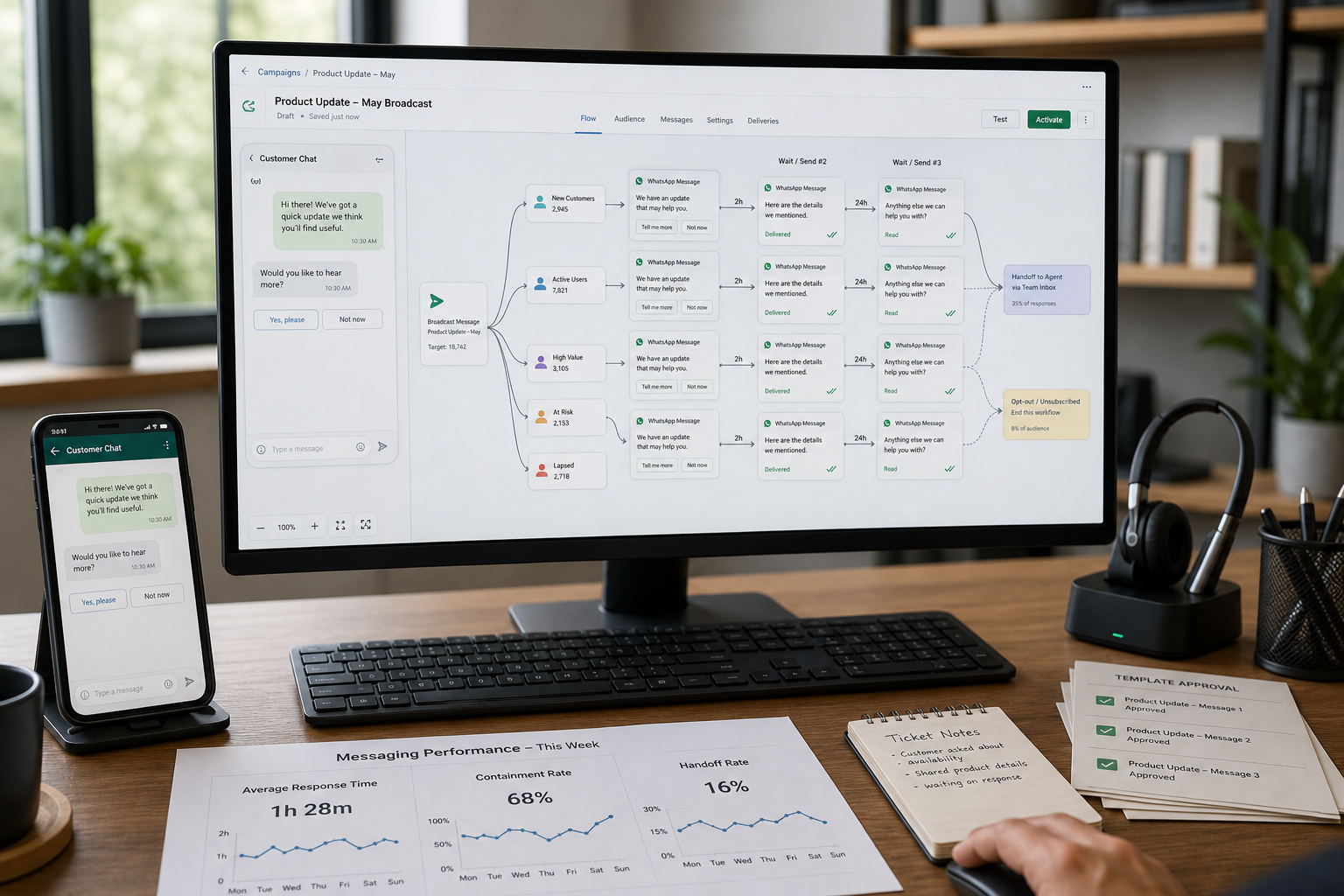
If your team is answering the same WhatsApp questions all day—pricing, availability, order status, appointment times—you don’t have a “messaging problem.” You have a workflow problem that’s draining time and leaking leads. WhatsApp Automation can fix that, but only if you implement it around real business outcomes (not shiny chatbot features).
This guide walks you through a business-first implementation approach: what to automate, when you need the WhatsApp Business API, which WhatsApp automation tools fit different small-business workflows, and how to launch compliantly with clear KPIs.
Quick Answer (40–60 words): WhatsApp automation is the use of approved tools and workflows to automatically handle common customer messages—like FAQs, lead qualification, reminders, and order updates—while routing exceptions to a human. Most small businesses should start with one high-volume workflow (support or bookings), then choose the simplest tool that supports shared inbox, templates, opt-in, and basic integrations.
What WhatsApp Automation Is (and What It Isn’t)
WhatsApp automation means using approved business messaging capabilities—such as saved replies, automation rules, chatbot flows, templates, routing, and integrations—to reduce manual effort and speed up responses on WhatsApp.
It’s important to separate three ideas that often get mixed together:
- WhatsApp Business Automation: the workflows (auto-replies, routing, reminders, broadcasts, handoffs) that reduce manual work.
- WhatsApp Business API (also called WhatsApp Business Platform): the scalable setup that enables multi-agent handling and integrations. Many automation platforms are built on top of it.
- WhatsApp AI / WhatsApp chatbot: AI-assisted responses or conversational flows. Useful for structured, repetitive questions and triage—not a replacement for your entire support or sales team.
What it isn’t: WhatsApp automation is not “spam blasting,” not scraping numbers, and not sending marketing messages without consent. Compliance and opt-in aren’t optional—they determine whether your automation survives long-term.
Start With the Business Problem (Business-First AI Framework™)
Most failed implementations start the same way: a business chooses a tool first, then tries to force the business to work the tool’s way. The Business-First AI Framework™ flips that order:
- Business Problem: What’s breaking today? Slow replies, repetitive questions, lead leakage, missed bookings, support overload, inconsistent follow-up.
- Workflow Improvement: Where does the work actually happen? What steps repeat? Where do customers get stuck?
- Choose the Right Solution: App vs API, inbox vs chatbot vs broadcast tool, integration needs, team size.
- Implement with Human Oversight: Escalation rules, approval steps, quality checks.
- Measure Business Outcomes: Response time, booking rate, qualified leads, resolution time, revenue from reactivation.
- Standardize and Scale: Add the next workflow only after the first one performs.
Business-First AI Insight: In many small businesses, the fastest ROI from WhatsApp automation comes from support and operations (FAQ triage, order updates, reminders) rather than marketing. Marketing automation can work well—but only after you’ve built a compliant opt-in engine and a reliable workflow for handling replies.
When to Use the WhatsApp Business App vs WhatsApp Business API
This decision determines your complexity, cost structure, and how far you can scale. Many small businesses stay on the WhatsApp Business App longer than they should, while others jump to the API too early.
Use the WhatsApp Business App when
- You have one person (or a very small team) handling messages.
- You need basic automation like greeting messages, away messages, and quick replies.
- You don’t need deep integrations (CRM, helpdesk, e-commerce events, calendar scheduling).
- Your “automation” goal is mainly consistency and speed—not complex workflows.
Use the WhatsApp Business API when
- You need a shared inbox for multiple agents and clear ownership of conversations.
- You need structured automation (routing, tagging, lead qualification flows, reminders).
- You need integrations (CRM logging, helpdesk tickets, Shopify order events, calendar booking).
- You need template-based outbound messaging (notifications, reminders, proactive follow-ups) at scale.
Key trade-off: simplicity vs scalability
The app is simpler but hits limits quickly. The API is scalable but introduces operational requirements: template approvals, opt-in management, and usually a platform or partner setup. Your best choice depends on how often WhatsApp creates work for your team—and how expensive that work has become.
What You Can Automate on WhatsApp (High-ROI Use Cases)
WhatsApp automation works best when the questions and actions are predictable. Start where volume is high and the “next step” is clear.
1) Customer support triage (fastest time-to-value for many SMBs)
Automate: first response, FAQ answers, issue classification, routing to the right person, and basic status updates.
Why it matters: slow replies increase drop-off and create backlogs. Triage reduces agent load by filtering repetitive questions.
Don’t overdo it: avoid forcing customers into endless menus. Always offer a clear “talk to a human” path.
2) Lead qualification and sales follow-up
Automate: capturing intent, collecting key details, scoring basic fit (budget, location, timeline), and routing to sales.
Why it matters: many leads message once and disappear. A fast, structured first interaction improves capture.
Trade-off: aggressive automation can reduce trust. Keep qualification short, then hand off to a human for real selling.
3) Appointment booking and reminders
Automate: slot selection, confirmations, reminders, rescheduling instructions.
Why it matters: reminders reduce no-shows and admin time. Booking workflows are measurable and easy to improve.
4) Order updates and delivery notifications (especially e-commerce)
Automate: order confirmation, shipping updates, delivery confirmation, and escalation for exceptions.
Why it matters: it cuts down “where is my order?” questions and improves customer experience.
5) Broadcast campaigns and reactivation
Automate: segmentation, approved template sending, reply handling workflow, and follow-up sequences.
Why it matters: reactivation can recover abandoned opportunities, especially for repeat-purchase businesses.
Risk: broadcast automation fails fast if opt-in is weak or replies aren’t handled quickly.
The 4 Types of WhatsApp Automation (Choose the Category Before the Tool)
Most “tool comparisons” blur categories. A better approach: identify which automation category matches your workflow.
| Automation Category | Best For | Typical Setup Effort | Common Outcome |
|---|---|---|---|
| Shared Inbox + Routing | Support and sales teams handling many chats | Low to medium | Faster responses, clearer ownership |
| Chatbot / Flow Builder | FAQ handling, lead qualification, triage | Medium | Less repetitive work, better capture |
| Broadcast + Campaign Automation | Promotions, reactivation, lifecycle nudges | Medium | More consistent outreach and follow-up |
| API Integrations (CRM, e-comm, calendar) | Operations automation and end-to-end workflows | Medium to high | Fewer manual steps, better data quality |
How to Choose the Right WhatsApp Automation Tool (Small-Business Decision Framework)
Tool choice should be the result of a workflow decision. Use these selection factors to avoid paying for complexity you won’t use—or choosing something too light that you’ll outgrow in 60 days.
Step 1: Identify your dominant workflow
- Support-led: high volume FAQs, issue routing, SLA pressure
- Sales-led: inbound leads, qualification, follow-up discipline
- Commerce-led: cart recovery, order updates, catalog-driven messaging
- Marketing-led: segmentation, campaigns, reactivation
- Operations-led: reminders, document collection, status notifications
Step 2: Choose your implementation path
Here’s a practical decision tree you can use in internal planning:
- Is one person managing WhatsApp and you only need basic auto-replies?
- Yes → Start with WhatsApp Business App.
- No → Go to step 2.
- Do you need multiple agents, shared inbox ownership, or routing?
- Yes → Use a WhatsApp Business API platform (BSP-based tool).
- No → Go to step 3.
- Do you need integrations (CRM/helpdesk/e-commerce/calendar) and automated triggers?
- Yes → Choose an API-enabled platform or developer-first API stack if you have technical resources.
- No → Choose a no-code WhatsApp automation tool focused on your workflow (support vs campaigns vs commerce).
Step 3: Score tools on business reality (not feature lists)
For most small businesses, these criteria matter more than advanced AI claims:
- Time to value: Can you launch your first workflow in days (not weeks)?
- Shared inbox quality: Assignment, tags, internal notes, handoff clarity.
- Automation builder: Can non-technical staff maintain flows?
- Template + opt-in management: Practical tools for compliant outbound messaging.
- Integrations: CRM/helpdesk/e-commerce/calendar connectivity that matches your stack.
- Analytics: Enough reporting to measure response speed, conversion, and resolution.
- Operational fit: Does it match how your team actually works day-to-day?
WhatsApp Automation Tools (2026): Which Ones Fit Which Small Business?
Below is a business-focused comparison of commonly referenced tools in 2026 WhatsApp automation guides. Pricing and packaging change frequently by region and plan, so treat any numbers you’ve seen elsewhere as directional and verify on official pages before you commit. Also remember: total cost often includes a platform subscription plus Meta conversation charges (volume matters).
| Tool | Best For | Ease of Use | Time to Value | Business Size Fit | Notes |
|---|---|---|---|---|---|
| WATI | Support + operational messaging with shared inbox | High | Fast | SMB | Strong inbox workflows; can be more than a tiny business needs if use case is simple. |
| AiSensy | Broadcasts + campaign automation | High | Fast | Micro to SMB | Often positioned as budget-friendly entry; less ideal if deep support workflow is your primary need. |
| Interakt | E-commerce messaging (Shopify-focused workflows) | High | Fast to medium | SMB e-commerce | Strong commerce fit (cart recovery, order updates); narrower if you need broad omnichannel ops. |
| Respond.io | Multi-channel inbox operations (sales + support) | Medium | Medium | SMB to mid-market | Good unified inbox; typically higher cost than entry-level WhatsApp-only tools. |
| SleekFlow | Omnichannel messaging + automation | Medium | Medium | Growing teams | Useful when WhatsApp is one of several channels; may be expensive/overkill for WhatsApp-only operations. |
| Gallabox | AI-oriented WhatsApp workflows | Medium | Medium | SMB experimenting with AI | AI-led features may be unnecessary if you haven’t standardized workflows first. |
| Twilio | Custom WhatsApp automation for developer teams | Low (non-technical) | Slow to medium | SMB with dev resources | Maximum flexibility; heavier build/maintenance burden. |
| ActiveCampaign (with WhatsApp via partner/BSP) | Lifecycle marketing across channels | Medium | Medium | Marketing-led SMB | Good when WhatsApp is part of a broader automation stack; WhatsApp may not be the primary strength. |
Expert Verdict (practical recommendation)
If you’re a typical small business with inbound WhatsApp conversations, start with a WhatsApp-centric platform that combines a shared inbox and simple automation. That usually delivers the fastest operational payoff because it reduces response delays and repetitive work immediately. Campaign-heavy businesses can justify a broadcast-first tool earlier, and developer-first stacks are best only when you truly need custom logic and can maintain it.
Recommended Tools by Business Type (What Usually Fits Best)
Different businesses feel the pain in different places. Here are pragmatic “best fit” patterns based on workflow type.
If you’re a solo business owner
- Start: WhatsApp Business App + saved replies + basic labels.
- Upgrade trigger: you miss messages, can’t keep response time low, or need integrations and templates.
If you’re a service business (clinic, salon, accountant, legal office)
- Start: booking + reminder workflow, plus FAQ triage and handoff to a person.
- Tool pattern: shared inbox + automation builder; add calendar integration when ready.
If you run e-commerce (Shopify / D2C)
- Start: order updates + “where is my order” automation + cart recovery (only after opt-in is solid).
- Tool pattern: commerce-focused WhatsApp automation (often Shopify-friendly) to reduce support tickets and recover carts.
If you’re a marketing-led team (promos, reactivation, segmentation)
- Start: opt-in capture + template approval process + segmented broadcasts + reply handling workflow.
- Tool pattern: campaign-centric platform with segmentation and automation sequences.
If you’re scaling a multi-agent sales + support team
- Start: shared inbox, routing rules, tags, QA, and analytics.
- Tool pattern: omnichannel inbox if you operate across WhatsApp + other channels; otherwise WhatsApp-focused inbox is usually simpler.
Step-by-Step WhatsApp Automation Implementation Checklist (2026)
This is the rollout sequence that reduces rework and compliance problems. The goal isn’t to build a “perfect” system. It’s to launch one workflow that measurably improves a KPI.
Phase 1: Define the workflow (before tools)
- Pick one workflow owner: who is accountable for the rollout and results?
- Choose one use case: support triage, lead qualification, booking, order updates, or broadcasts.
- Map the conversation: entry point → questions → decision points → handoff → logging → follow-up.
- Define escalation rules: when does a human take over, and who gets it?
- Set one KPI: first response time, booking rate, qualified lead rate, resolution time, or reactivation revenue.
Phase 2: Choose your setup path (App vs API)
- App path: configure profile, catalog (if relevant), quick replies, greeting/away messages, labels.
- API path: pick a WhatsApp Business API platform (often via a BSP), then plan templates, opt-in, and integrations.
Phase 3: Build your automation assets
- FAQ library: 15–30 high-frequency questions with approved answers.
- Message templates: utility notifications (reminders, confirmations) and marketing templates (only with opt-in).
- Bot/flow design: keep it short; optimize for routing, not “human-like conversation.”
- Handoff language: clear message that a human will respond, and set expectations.
Phase 4: Integrations and data flow (only what you need)
- CRM logging: store lead source, conversation status, and outcome.
- Helpdesk linkage: create a ticket when an issue hits certain tags/keywords.
- E-commerce triggers: order placed/shipped/delivered events for notifications.
- Calendar triggers: booking confirmed/canceled reminders.
Phase 5: QA and launch
- Test like a customer: new lead, returning customer, wrong input, angry customer, “human please.”
- Measure baseline: current response time and conversion/booking rate before automation.
- Soft launch: start with a subset of traffic or business hours.
- Review weekly: update FAQs, adjust routing, refine templates.
Consultant Insight: The hidden cost in WhatsApp automation isn’t the tool subscription—it’s unclear ownership. If nobody owns templates, opt-in language, routing rules, and KPI review, the system slowly degrades until your team stops trusting it.
Pricing, Compliance, and ROI (What Small Businesses Must Model)
WhatsApp automation ROI is real—but only if you model cost and value in a way that matches your business operations.
Pricing reality: it’s usually “subscription + conversation charges”
Most WhatsApp automation stacks include:
- Platform subscription: varies by tool, plan, team size, and features.
- Meta conversation charges: based on messaging conversations (varies by category and region). The exact structure changes over time, so verify in official Meta documentation and your provider’s pricing pages.
- Implementation cost: staff time (or external help) for workflow mapping, templates, testing, and training.
- Ongoing maintenance: updating FAQs, monitoring handoffs, refining flows.
Why this matters: a low monthly subscription can still become expensive if your message volume spikes, or if your workflows cause unnecessary conversations. Optimization is part of cost control.
Compliance: opt-in and templates aren’t “admin work”—they are your operating system
To automate reliably, you need a consent and messaging plan that aligns with WhatsApp policies and local privacy rules. At a minimum, small businesses should implement:
- Opt-in capture: clear permission before sending proactive messages (especially marketing).
- Template approval process: for outbound notifications and campaigns.
- Message purpose discipline: keep utility messages strictly informational; keep marketing messages clearly promotional (and only to opted-in users).
- Escalation and human oversight: avoid automations that trap customers without support.
Mini ROI calculator (quick estimation)
Use this simple model to decide whether you should implement now or later. You don’t need perfect accuracy—just a realistic range.
- Monthly inbound messages: ____
- % repetitive / automatable: ____%
- Average minutes to handle a repetitive chat manually: ____
- Estimated automation containment rate (handled without a human): ____%
Estimated hours saved per month ≈ (Monthly messages × % repetitive × containment rate × minutes per chat) ÷ 60
Then compare:
- Value of time saved: hours saved × your loaded hourly cost (or opportunity value)
- Plus revenue upside: improved lead capture, bookings, cart recovery (be conservative)
- Minus costs: subscription + conversation charges + implementation time
Practical rule: ROI is often visible within 30–90 days if you already have meaningful WhatsApp volume and you implement one workflow with a clear KPI.
A Simple KPI Dashboard for WhatsApp Automation
If you don’t measure outcomes, you’ll end up debating opinions (“the bot feels annoying” vs “it saves time”). A small KPI dashboard keeps decisions objective.
| KPI | What It Tells You | Why It Matters |
|---|---|---|
| First response time | How quickly customers get an initial reply | Strong predictor of lead capture and satisfaction |
| Automation containment rate | % conversations resolved without a human | Measures time saved (and bot quality) |
| Handoff rate | % conversations needing an agent | High can mean bot is too limited or issues are complex |
| Qualified lead rate | % inbound leads that meet your criteria | Shows if qualification is working (and not too strict) |
| Booking rate | % conversations that result in an appointment | Direct measure of operational impact for service businesses |
| Resolution time | Time from first message to problem solved | Support efficiency and customer experience indicator |
30–60–90 Day Implementation Plan (Small Business Friendly)
This phased approach prevents tool sprawl and reduces the chance you’ll build five half-working automations.
Start Today (0–7 days): launch one measurable workflow
- Pick one use case (support triage or booking reminders are common winners).
- Write your top 15 FAQs and draft short answers.
- Define handoff rules and business hours expectations.
- Set one KPI baseline (current response time or booking rate).
Improve Next (8–30 days): add structure and reporting
- Implement shared inbox operations (assignment, tags, internal notes).
- Add template approvals for key utility notifications (confirmations, reminders).
- Connect one integration that reduces manual admin (CRM logging or calendar triggers).
- Review KPI trend weekly and fix the top 3 failure points.
Scale Later (31–90 days): expand only after proving value
- Add the second workflow (e.g., lead qualification after support triage stabilizes).
- Introduce campaign automation only after opt-in and reply handling are reliable.
- Consider AI assistance for classification and drafting replies once your playbooks are stable.
- Standardize templates, QA checks, and ownership so performance doesn’t depend on one person.
Common Mistakes to Avoid (and the Better Approach)
Mistake 1: Choosing a tool before defining the workflow
Why it happens: tools are easy to buy; workflow design takes thinking.
Consequence: you pay for features you don’t use and still don’t fix response delays.
Better approach: map one conversation journey first, then pick the lightest tool that supports it.
Mistake 2: Automating marketing before building opt-in and reply handling
Why it happens: promotions feel like “growth,” so teams start there.
Consequence: complaints, compliance risk, and overwhelmed staff handling replies.
Better approach: build consent capture, templates, segmentation, and a reply workflow before scaling broadcasts.
Mistake 3: No escalation rules (customers get trapped)
Why it happens: teams optimize for containment rate and forget exceptions.
Consequence: frustrated customers and lost high-value conversations.
Better approach: always offer a clear path to a human and track reasons for handoff.
Mistake 4: Assuming “WhatsApp AI” will replace human support
Why it happens: AI demos look impressive in perfect scenarios.
Consequence: inconsistent answers, policy/compliance risk, and brand damage.
Better approach: use AI for structured tasks: classification, routing, and drafting—while keeping humans in control for exceptions.
Mistake 5: Not measuring outcomes
Why it happens: teams focus on building flows, not operating them.
Consequence: you can’t prove ROI, and you can’t prioritize improvements.
Better approach: track 3–5 KPIs from day one and review them on a set cadence.
FAQs
What is WhatsApp automation?
WhatsApp automation is using approved tools and workflows to automatically handle common messages—like FAQs, lead capture, reminders, order updates, and routing—while handing complex or sensitive cases to a human. It’s typically implemented through the WhatsApp Business App (basic) or WhatsApp Business API/platform (scalable).
Do I need the WhatsApp Business API for WhatsApp Business Automation?
Not always. If you’re a solo operator using WhatsApp for a manageable number of chats, the WhatsApp Business App may be enough. You typically need the WhatsApp Business API when you require multi-agent shared inboxes, integrations (CRM, e-commerce, calendar), scalable templates, and structured automation.
Is WhatsApp automation legal?
It can be, when implemented through approved access paths and operated with proper customer consent (opt-in), template rules, and compliance with WhatsApp policies and local privacy requirements. Avoid shortcuts like unsolicited outreach or scraping numbers—those create policy and reputational risk.
What’s the best WhatsApp automation tool for a small business?
The “best” tool depends on your dominant workflow. Many small businesses do well with WhatsApp-centric platforms that combine shared inbox + basic automation for support and sales. Campaign-heavy businesses often need stronger broadcast and segmentation features, while e-commerce businesses benefit from commerce-specific integrations.
How much does WhatsApp automation cost?
Costs typically include a platform subscription (which varies by tool and plan) plus Meta conversation charges based on message volume and category. Because pricing changes by region and provider, the practical approach is to estimate monthly conversations and compare total cost against time saved and conversion improvements.
What can I automate with a WhatsApp chatbot?
A WhatsApp chatbot is best for structured tasks: answering FAQs, collecting details, qualifying leads, routing requests, and triggering reminders or status updates. It’s less suitable for complex troubleshooting, emotionally sensitive issues, or negotiations—those should escalate to a human.
How long does it take to implement WhatsApp automation?
A basic workflow can often be launched in 1–3 days using a no-code platform, especially for FAQ triage or simple reminders. More complete implementations that involve template approvals, integrations, QA, and team training often take 1–3 weeks depending on complexity and readiness.
What should I measure to know if WhatsApp automation is working?
Start with business outcomes: first response time, automation containment rate, lead qualification rate, booking rate, resolution time, and message-driven revenue (for reactivation or commerce). Pick the KPIs tied to your first workflow, then expand measurement as you scale.
Conclusion: The Winning Strategy Is “One Workflow, One KPI, One Owner”
The best WhatsApp automation implementations don’t start with an AI chatbot. They start by removing friction from one high-volume customer workflow—then proving it with a metric. Once you can reliably respond fast, route correctly, and measure outcomes, you can safely scale into deeper automation, integrations, and selective WhatsApp AI support.
Next steps:
- Pick your highest-volume WhatsApp workflow (support triage, booking, order updates, lead qualification, or broadcasts).
- Define escalation rules and one KPI that matters to the business.
- Choose the simplest tool path that supports your workflow (App vs API + platform).
- Launch in a week, review weekly, and scale only after you can prove improvement.
If you want a faster, lower-risk rollout, consider starting with a structured workflow map and a compliance-ready opt-in + template plan before you invest heavily in tools.