How Retail Stores Can Use AI to Increase Sales and Improve Customer Experience
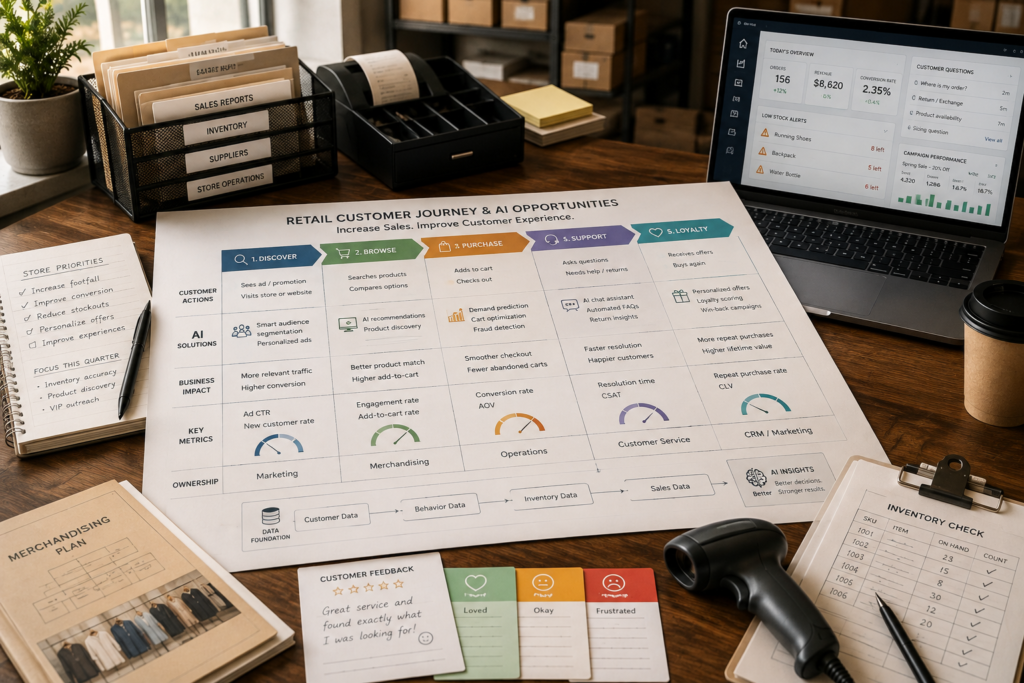
Most retail stores don’t lose sales because their products are bad. They lose sales because of friction: the right item isn’t available, staff can’t answer questions fast enough, offers feel irrelevant, and customer support takes too long after purchase. AI for Retail can reduce those friction points—if you start with the workflow problem, not the tool.
This guide breaks down practical retail AI use cases that increase sales and improve customer experience AI outcomes, plus a simple prioritization matrix, implementation steps, and KPIs you can actually track.
Quick Answer (40–60 words): AI for Retail helps stores increase sales and improve customer experience by automating high-volume service requests, improving inventory and demand decisions, and personalizing product discovery and promotions. The best results come from choosing one high-friction workflow first (service, inventory, or marketing), piloting it with clear KPIs, then scaling only after it proves value.
What “AI for Retail” Actually Means (in plain English)
In retail, “AI” usually shows up in three practical forms:
- Conversational AI: systems that understand customer questions and respond in chat, SMS, email, or voice (for example: order status, returns, FAQs, abandoned-cart outreach).
- Predictive analytics: models that forecast what will happen next (for example: demand forecasting, stockout risk, likely return risk, promotion response).
- Automation + agents: workflows that connect systems and take actions with guardrails (for example: create a support ticket, send a follow-up message, generate a staff answer from a knowledge base, route cases, produce summaries).
The key point: AI isn’t one feature you “turn on.” It’s a capability you apply to a specific retail workflow—like replenishment, support triage, or personalized promotions—so that customers experience less friction and your team spends less time on repetitive work.
The Business Problems AI Solves in Retail (and why they matter)
Retail owners and managers typically feel AI’s value in four recurring pain areas. These are worth naming clearly because they also determine what you should implement first.
1) Inventory imbalance: stockouts, overstock, waste, and shrink
Why it matters: Stockouts quietly destroy conversion and loyalty. Overstock quietly destroys cash flow and margin (especially in seasonal categories or perishables). Shrink and waste add another layer of margin pressure.
Where AI helps: Forecast demand, detect stock-gap risk sooner, recommend replenishment quantities, and surface exceptions that humans should review.
2) Slow or inconsistent customer service across channels
Why it matters: Customers don’t separate “store” from “website” from “support.” They just experience your brand. Slow responses and channel handoffs reduce trust, increase returns, and lower repeat purchase behavior.
Where AI helps: Answer FAQs 24/7, summarize conversations, route complex issues to humans, and keep context consistent across chat/SMS/email/help desk.
3) Personalization gaps (generic offers and generic shopping journeys)
Why it matters: Many retailers send the same message to everyone. That typically underperforms because timing and relevance drive conversion.
Where AI helps: Suggest products, tailor promotions, and improve discovery—when you have enough clean data and consent to do it responsibly.
4) Frontline workload and labor constraints
Why it matters: When staff are overwhelmed, shelves aren’t maintained, shoppers don’t get help, and managers lose time to manual reporting and exception handling.
Where AI helps: Provide associate “copilots” that answer policy/product questions quickly, generate checklists, summarize issues, and reduce time spent hunting through manuals and systems.
Business-First AI Insight: If your store has a messy workflow, AI won’t magically fix it—it will often scale the mess. The fastest wins typically come from picking one high-friction workflow (support triage, abandoned cart, replenishment exceptions), tightening the steps and ownership, then adding AI to remove repetitive work and shorten cycle time.
AI Use Cases That Increase Sales (practical, store-friendly ideas)
Sales improvement from AI usually comes from two levers: higher conversion (more shoppers buy) and higher average order value (shoppers buy more per order). The use cases below are the most common routes to those outcomes.
Use case A: Abandoned-cart recovery (conversational follow-up)
Business problem: Shoppers leave after browsing or adding items to cart. Sometimes it’s price, uncertainty about fit, shipping cost, delivery time, or return policy.
What AI does: Detect abandonment, send a contextual message, answer questions, and escalate to a human if needed. This is a classic AI sales automation workflow because it blends marketing + support.
Where it fits best: Retailers with meaningful online traffic or omnichannel shopping behavior.
Trade-offs: Too many automated messages feel spammy. You need tight frequency rules and clear escalation paths.
Implementation note: Start with one channel (e.g., web chat or SMS) and a small set of intent categories (shipping, returns, product questions) before expanding.
Use case B: Product discovery and guided selling (recommendations)
Business problem: Customers can’t find the right product quickly, especially in categories with many variants (size, compatibility, style, ingredients).
What AI does: Provide personalized recommendations or “next best product” suggestions based on behavior, purchase history, and context.
When it should be used: When your catalog is large enough that navigation/search is a bottleneck, or when staff regularly field “which one should I buy?” questions.
When it should not: If your product data is inconsistent (missing attributes, messy variants). Bad recommendations can hurt trust.
Practical alternative: Sometimes improving filters, site search, and merchandising rules delivers faster value than advanced personalization.
Use case C: Personalized promotions (intent-based offers)
Business problem: Blanket discounts erode margin and train customers to wait for sales.
What AI does: Segment customers by behavior, predict who is likely to respond, and time promotions more intelligently.
Trade-offs: This requires stronger governance (consent, transparency, and rules) and more data integration than basic support automation.
Implementation consideration: Keep humans in charge of promo strategy. Use AI to improve targeting and timing—not to randomly generate discounts.
Use case D: Price and markdown optimization (margin-aware sales growth)
Business problem: Pricing and markdowns are often reactive. Done poorly, you lose margin or miss sell-through targets.
What AI does: Recommend pricing/markdown actions using demand signals and inventory position.
Reality check: This is high impact but also higher risk. You need clear guardrails, exception review, and careful measurement to avoid unintended brand damage.
Use case E: Associate copilot for faster on-floor selling
Business problem: Associates lose time searching for answers: product compatibility, warranty, returns, policy exceptions, and “what should I recommend?”
What AI does: An internal assistant that answers from your approved knowledge base, suggests next best actions, and reduces time to help customers.
Why it increases sales: Faster answers reduce walkouts and improve confidence at the point of decision.
AI Use Cases That Improve Customer Experience (without over-automating)
Customer experience improvements usually show up as faster responses, fewer handoffs, more consistent answers, and smoother post-purchase support. The goal isn’t to hide humans—it’s to ensure customers get help quickly and accurately.
Use case A: Customer support triage and FAQ automation
What it looks like: AI classifies the customer’s issue (order status, returns, product issue), answers simple questions, and routes complex cases to staff—often with a summary attached.
Why it matters: This can reduce backlog and improve first response time without forcing customers into dead-end chatbot loops.
Where it fits best: Service-heavy retailers or any store with frequent “where is my order?” and “what’s your return policy?” contacts.
Use case B: Post-purchase automation (order, delivery, returns)
What it looks like: Proactive notifications, self-service status checks, return eligibility guidance, and easy escalation to a human.
Why it matters: Many negative experiences happen after the purchase. Reducing uncertainty reduces support load and increases repeat purchase confidence.
Use case C: Omnichannel context (consistent answers across store + online)
What it is: Not just “a chatbot.” True omnichannel CX means your team and systems share the same customer context: purchase history, prior support interactions, loyalty status, and current order state.
Common mistake: Implementing a bot in one channel without fixing the workflow ownership and data handoff between marketing, store ops, and support.
Use case D: Shelf and store operations support (including computer vision)
What it is: Vision-based or analytics-based detection of shelf gaps, misplaced items, or operational issues (often paired with task workflows for staff).
When it’s worth it: When your biggest customer experience issues are actually availability and store execution—not messaging or online service.
SMB reality: This can be more complex than support automation because it touches hardware, store processes, and ongoing monitoring.
A Use-Case Prioritization Matrix (impact vs effort vs data dependency)
If you’re deciding where to start, use a simple prioritization lens. The goal is to pick one workflow with (1) clear pain, (2) measurable KPI, and (3) manageable implementation risk.
| Use Case | Primary Outcome | Implementation Effort | Data Dependency | Time to Value (Typical) | Best Starting Point For |
|---|---|---|---|---|---|
| Support triage + FAQ automation | Faster response, lower service load | Low–Medium | Low–Medium | Weeks | Service-heavy stores, lean teams |
| Abandoned-cart recovery | Higher conversion | Medium | Medium | Weeks | Ecommerce/omnichannel retailers |
| Associate knowledge assistant | Better in-store CX, faster selling | Medium | Medium | Weeks to months | Stores with frequent product/policy questions |
| Personalized promotions | Higher repeat purchase, better promo ROI | Medium–High | High | Months | Retailers with loyalty/CRM maturity |
| Demand forecasting + replenishment recommendations | Fewer stockouts/overstock | High | High | Months | Inventory-heavy categories, multi-store ops |
| Price/markdown optimization | Margin + sell-through | High | High | Months | Retailers with disciplined pricing governance |
Consultant insight: Many retailers think personalization is the “obvious” first AI project. In practice, support automation and inventory accuracy often produce cleaner, faster wins because the workflow is easier to define and measure. Personalization becomes more valuable after your data and journey design are stable.
Best AI Tools for Retail Stores (business-focused comparison)
The right tool depends on your starting workflow and your current systems (POS, ecommerce, CRM, help desk, inventory). Below is a practical comparison based on the provided research sources. Pricing changes frequently and is often not listed publicly, so verify on official vendor pages.
| Tool | Best For | Ease of Use (SMB) | Time to Value | Business Size Fit | Notes / Trade-offs |
|---|---|---|---|---|---|
| Microsoft Copilot / Copilot Studio / Azure AI Foundry | Associate copilots, internal workflow automation, AI agents | Medium–High (best in Microsoft stack) | Weeks to months | SMB → Enterprise | Strong for productivity and cross-system workflows; best fit if you already run Microsoft 365 and related tools. |
| Zendesk AI | Customer support automation and triage | High | Weeks | SMB → Mid-market | Great for post-purchase support; less focused on merchandising/planning. |
| Salesforce Retail AI | CRM-driven personalization, marketing + commerce + service | Medium | Months | Mid-market → Enterprise (some SMB) | Best value if you already use Salesforce; relies on strong customer data practices. |
| Google Cloud for Retail | Custom retail AI, data platform work, advanced personalization/analytics | Low (requires technical setup) | Months+ | Mid-market → Enterprise | Powerful capabilities, but expects higher data maturity and technical resources. |
| Oracle Retail AI | Merchandising, inventory, planning, forecasting | Medium | Months+ | Growing → Enterprise | Broad retail suite; implementation is typically heavier and more process-driven. |
| IBM AI for Retail | Broad retail AI framework across CX + forecasting + supply chain | Medium | Months+ | Mid-market → Enterprise | Strong strategic coverage; exact rollout effort depends on scope and integrations. |
| Parloa | Enterprise conversational CX with staged rollout and measurement | Medium | Months | Mid-market → Enterprise | Best for service-heavy retailers; may be more than a small store needs. |
| Quiq | Conversational CX + abandoned-cart recovery | High | Weeks to months | SMB → Mid-market | Good for sales + service workflows over messaging; integration effort varies by stack. |
Expert Verdict: what most small retailers should start with
If you’re a typical small-to-midsize retailer, start with customer support triage and post-purchase automation (often via a help desk platform with AI) or abandoned-cart recovery (if you have ecommerce volume). These projects usually have clearer workflows, faster measurable impact, and lower data dependency than forecasting or advanced personalization.
Move to demand forecasting, price optimization, and deeper personalization after you’ve proven you can run one AI-supported workflow end-to-end with solid KPIs and human oversight.
How to Implement AI in Retail Step by Step (Business-First AI Framework™)
This rollout approach is designed for real retail constraints: limited time, limited staff, and systems that don’t always talk to each other.
Step 1: Pick one bottleneck you can name in one sentence
- “We’re spending too many hours answering order status and return questions.”
- “We lose sales because popular items go out of stock unexpectedly.”
- “Online carts are abandoned and we don’t follow up effectively.”
Why this matters: If you can’t define the problem clearly, you won’t be able to measure whether AI helped—or whether you just added another tool.
Step 2: Map the current workflow (the boring part that creates the ROI)
Write down the real steps, including handoffs and delays:
- Customer contacts you (channel + reason)
- Team member reads the request and searches for context
- They respond or escalate
- They update systems (or forget)
- Customer gets resolution (or follows up again)
Implementation tip: Identify where time is lost: “searching,” “copy/pasting,” “waiting,” or “re-asking for info.” Those are prime automation targets.
Step 3: Choose the AI category that matches the workflow
- High-volume questions → conversational AI + triage
- Repetitive internal questions → associate copilot / knowledge assistant
- Uncertain inventory decisions → predictive analytics + exception-based review
- Promo targeting issues → CRM-driven personalization and segmentation
Step 4: Define “human oversight” rules upfront
Retail AI works best with clear boundaries. Examples:
- AI can answer FAQs only from an approved knowledge base.
- AI can recommend replenishment, but a manager approves exceptions and large orders.
- AI can draft customer responses, but humans approve anything involving refunds, legal language, or sensitive complaints.
Why this matters: Oversight is how you prevent brand damage, policy mistakes, and inconsistent customer experiences—especially early on.
Step 5: Run a pilot with 2–3 KPIs (not 12)
Pick KPIs tied to the workflow:
- Support automation: first response time, resolution time, % deflected/automated, CSAT
- Abandoned cart: recovery rate, conversion rate, assisted conversion
- Inventory: stockout rate, overstock rate, inventory turnover
Step 6: Integrate only what you must (avoid “integration paralysis”)
Integration is where many projects stall. For a first implementation, aim for “minimum viable integration”:
- Support AI needs: order lookup + policy articles + ticketing
- Cart recovery needs: cart events + product links + messaging channel + escalation
- Associate assistant needs: knowledge base + approved documents + simple logging
Step 7: Standardize, then scale to the next workflow
Once the pilot is stable, document:
- who owns the workflow
- what the AI is allowed to do
- how issues are escalated
- how performance is measured weekly
Then move to the next highest-impact use case. This sequencing matters because it builds your internal “AI operating muscle” without overwhelming staff.
A Simple Retail AI ROI Calculator (mini formulas you can use)
You don’t need perfect forecasting to decide if a pilot is worthwhile. Use simple math to estimate whether the effort is justified.
1) Support automation savings (time and cost)
Estimated monthly hours saved:
(Monthly support contacts) × (Minutes saved per contact) ÷ 60
Estimated monthly value:
(Monthly hours saved) × (Loaded hourly cost)
Why it’s useful: Support workflows are measurable quickly, which is why they often have faster time-to-value.
2) Abandoned-cart recovery upside (revenue)
Estimated recovered revenue:
(Abandoned carts per month) × (Recovery rate lift) × (Average order value)
Note: Track assisted conversions separately from baseline conversions so you don’t over-credit AI.
3) Stockout reduction upside (revenue protection)
Estimated protected revenue:
(Monthly sales of affected SKUs) × (Stockout reduction %) × (Gross margin %)
Why gross margin matters: Inventory improvements often show up as both revenue protection and margin protection.
KPIs to Measure AI Success in Retail (what to track by workflow)
Don’t measure AI by “how smart it is.” Measure it by outcomes your store already cares about.
| Workflow | Primary KPIs | Secondary KPIs | What to watch for |
|---|---|---|---|
| Customer support automation | First response time, resolution time, CSAT | Ticket volume, escalation rate | Automation that frustrates customers; inaccurate policy answers |
| Abandoned-cart recovery | Recovery rate, conversion rate, assisted revenue | Opt-out rate, complaint rate | Over-messaging and brand fatigue |
| Personalized promotions | Promo conversion, repeat purchase rate | AOV, unsubscribe rate | Privacy concerns, irrelevant targeting |
| Inventory forecasting/replenishment | Stockout rate, overstock rate, inventory turnover | Waste/spoilage, shrink signals | Bad inputs causing wrong recommendations; lack of exception review |
| Associate copilot | Time-to-answer, task cycle time | Training time, customer satisfaction | Hallucinated answers if knowledge base isn’t controlled |
Common Mistakes to Avoid (what derails retail AI projects)
Mistake 1: Starting with a tool instead of a workflow
Why it happens: Vendors demo features; teams buy features.
Consequence: You end up with AI that doesn’t match day-to-day operations.
Better approach: Choose the workflow, define KPIs, then pick the simplest tool that can deliver the result.
Mistake 2: Automating too many use cases at once
Why it happens: AI feels like a “platform,” so teams try to boil the ocean.
Consequence: Staff confusion, inconsistent customer experiences, and unclear ROI.
Better approach: One high-friction workflow, one pilot, measurable outcomes, then expand.
Mistake 3: Treating personalization as the first step
Why it happens: Personalization sounds like the most direct route to sales.
Consequence: Poor data quality leads to irrelevant offers and trust loss.
Better approach: Fix service speed and inventory accuracy first if those are larger friction points.
Mistake 4: Ignoring data readiness and governance
Why it happens: “We have a POS and ecommerce, so we have data.”
Consequence: Fragmented data creates fragmented experiences and wrong AI outputs.
Better approach: Identify what data the workflow needs (orders, inventory, policies, customer history) and verify it’s consistent and accessible.
Mistake 5: Over-automating customer experience
Why it happens: Cost pressure pushes teams to maximize deflection.
Consequence: Customers feel trapped in automation loops.
Better approach: Automate the simple stuff, escalate fast for complex cases, and measure customer satisfaction—not just deflection.
Launch Readiness Checklist (quick self-audit)
- Workflow clarity: We can describe the workflow start-to-finish and who owns it.
- Knowledge control: Customer-facing answers come from approved policies/content.
- Escalation path: Customers can reach a human when needed.
- Data access: The AI can access the minimum required data (orders, policies, inventory) reliably.
- KPIs: We selected 2–3 KPIs and have a baseline before launch.
- Training: Staff know how to handle escalations and correct AI mistakes.
- Governance: We have rules for privacy, consent, and messaging frequency.
Start Today / Improve Next / Scale Later (implementation priorities)
Start Today (low effort)
- Pick one workflow bottleneck and write the “one-sentence problem statement.”
- Pull a baseline: last 30 days of ticket volume, response time, or stockout incidents (whichever matches your workflow).
- Clean up your top 20 FAQs/policies so they’re consistent and easy to use.
Improve Next (next 30 days)
- Pilot support triage or abandoned-cart recovery with clear escalation rules.
- Implement weekly KPI review (15 minutes) so improvement is continuous, not ad hoc.
- Create a “do not automate” list (refund exceptions, legal issues, sensitive complaints) to protect the brand.
Scale Later (after the first workflow proves value)
- Expand to associate copilots and internal knowledge workflows.
- Connect more systems for omnichannel context (POS, ecommerce, CRM, support) once workflow ownership is stable.
- Explore forecasting and inventory optimization when data quality and exception review processes are mature.
FAQ: AI for Retail
How is AI used in retail?
Retailers use AI for customer service automation, product recommendations, personalized promotions, demand forecasting, inventory optimization, and store operations support. The most practical implementations target one workflow (like support triage or replenishment exceptions) and measure outcomes such as conversion rate, response time, or stockouts.
How does AI increase retail sales?
AI increases sales by reducing friction in product discovery and purchase decisions (recommendations and guided selling), recovering lost purchases (abandoned-cart workflows), and improving availability (fewer stockouts). The fastest gains usually come from improving response speed and relevance at key moments in the customer journey.
Can AI improve in-store customer experience?
Yes. AI can support associates with faster answers to product and policy questions, help prioritize tasks (like shelf gaps), and reduce checkout or support delays by handling routine inquiries. In-store CX improvements are strongest when the assistant uses approved store knowledge and has a clear escalation path.
Is AI worth it for small retail stores?
Often, yes—especially for service automation and workflow assistance where the effort and data requirements are manageable. Small stores should avoid trying to implement complex forecasting or advanced personalization first unless their data is clean and their operations are ready to act on recommendations.
Which retail AI use case has the fastest ROI?
Support automation (triage + FAQs) and abandoned-cart recovery are commonly the fastest to validate because they’re measurable quickly and don’t require deep data science work. Forecasting and personalization can deliver large value but typically require more data integration and operational readiness.
Does AI replace retail staff?
In most practical retail deployments, AI augments staff rather than replaces them—handling repetitive questions, drafting responses, and surfacing context so associates can focus on selling and complex service. The best outcomes come from pairing automation with human oversight and clear responsibility.
What data does AI for Retail need?
It depends on the workflow. Support automation needs policies and order data. Abandoned-cart recovery needs cart events and product data. Forecasting needs sales history and inventory data (often plus external signals like weather or trends). The biggest issue isn’t “having data”—it’s whether it’s consistent, accessible, and trusted.
What’s the biggest risk of retail AI?
The biggest risks are poor data quality, fragmented workflows, and over-automating customer experience. These can produce wrong answers, inconsistent service, and brand damage. You reduce risk by using approved knowledge sources, defining escalation paths, and measuring customer satisfaction alongside efficiency metrics.
Conclusion: the retailers who win with AI treat it like workflow design
The retailers who get real value from AI for Retail don’t chase the most advanced technology first. They start with a specific bottleneck, improve the workflow, then use AI to reduce repetitive work and speed up decisions—with humans supervising the high-impact moments.
Your best next step is simple: pick one workflow where time or revenue is leaking (support, inventory, or cart recovery), define 2–3 KPIs, and run a pilot you can evaluate within weeks—not quarters. Once that workflow is stable, scaling becomes a business decision, not a leap of faith.
Next step (helpful CTA): If you want a structured way to identify your highest-ROI starting point, consider doing a short “Retail AI Opportunity Audit” internally: list your top three friction points, estimate hours/revenue impact using the mini ROI formulas above, and choose the one workflow you can pilot with clear ownership and measurable outcomes.