AI for Healthcare Clinics: 15 Automation Ideas That Save Time
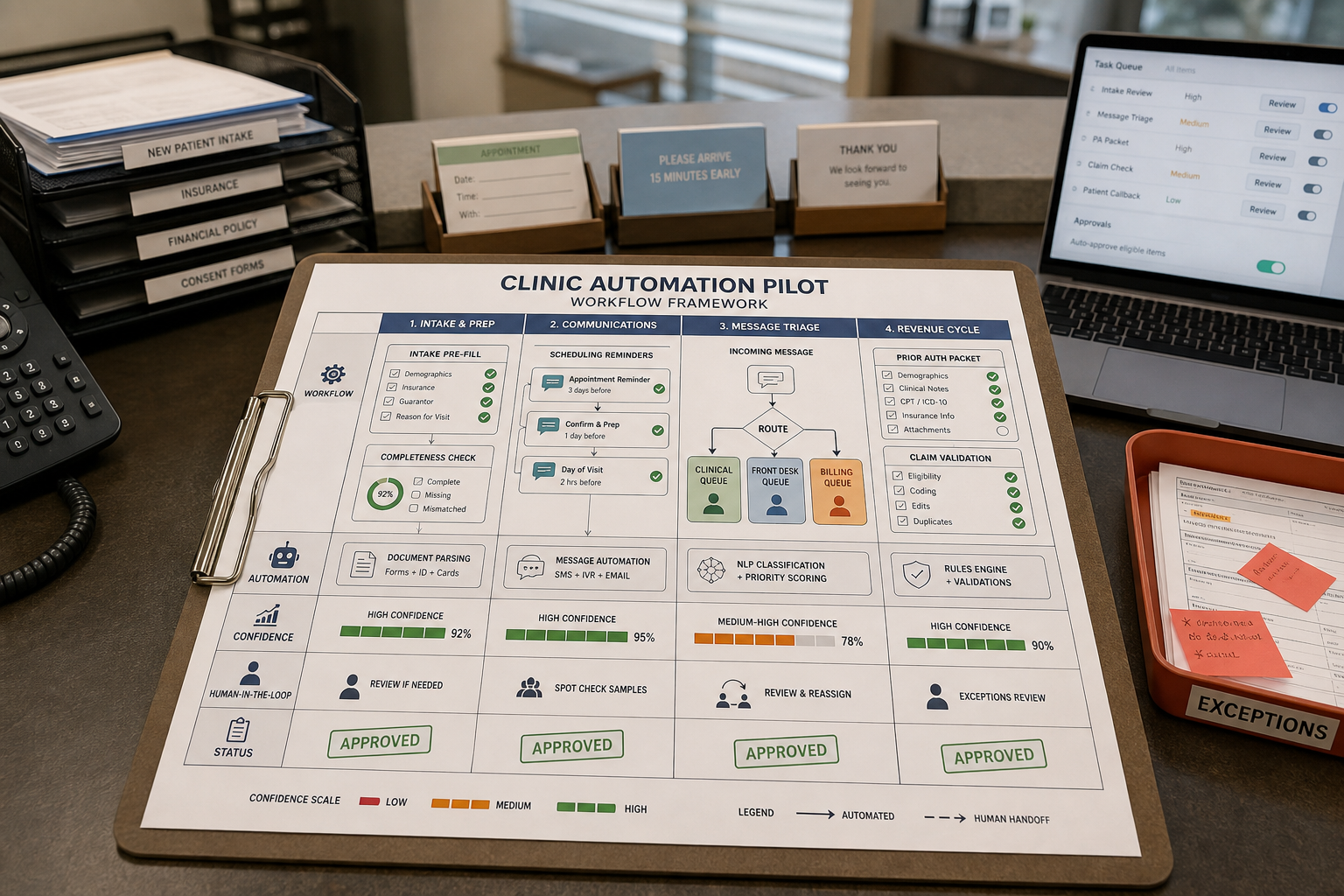
If your front desk is drowning in calls, your nurses are fielding routine portal messages, and your clinicians are charting after hours, you don’t have an “AI problem.” You have a workflow bottleneck problem. The best AI for Healthcare use cases in small clinics are usually administrative and operational automations—drafting, routing, summarizing, reminding, and pre-filling—so your team handles exceptions instead of repetitive work.
Quick Answer (practical): The safest, highest-ROI healthcare AI wins for most clinics start with patient workflow automation in intake, scheduling, reminders, message triage, and follow-up. Look for automations that are repetitive, measurable, and easy to review. Avoid “hands-off” automation in anything that changes clinical decisions or patient safety without clear human oversight.
What AI Can (and Can’t) Safely Automate in a Healthcare Clinic
Most clinics should think of healthcare AI as clinic automation for operational throughput, not autonomous medicine. That distinction matters because it changes what you pilot, who owns it, and how you manage risk.
Low-risk, high-value automation patterns (great first pilots)
- Drafting: creating a first version of messages, letters, instructions, or forms for staff to review.
- Classification + routing: sorting patient requests into the right queue (billing, scheduling, clinical, prescriptions) based on rules and confidence thresholds.
- Summarization: turning long threads (portal messages, phone notes, referrals) into a short, structured summary.
- Pre-fill + validation: extracting data from forms/documents and flagging missing fields before staff touch it.
- Reminders + follow-up triggers: sending time-based or event-based outreach and tracking completion.
Higher-risk areas (use carefully, with strict oversight)
- Clinical decision support that influences diagnosis or treatment.
- Medication advice or symptom triage that could delay urgent care.
- Autonomous actions that update charts, place orders, or close clinical tasks without human review.
Consultant Insight: The clinic automations that “stick” are the ones your team can audit. If you can’t easily answer “What did the AI do, why did it do it, and who approved it?”—you’re likely automating the wrong way.
The Real Problem: Where Clinics Lose Time (and Why Automation Helps)
Small and mid-sized medical practices tend to have the same operational friction points:
- Manual intake and registration creates delays, missing data, and repeated follow-up.
- Scheduling and reminders consume front-desk hours and contribute to no-shows.
- Patient message triage overwhelms staff with routing decisions and repetitive responses.
- Prior authorization and billing workflows create rework when information is incomplete or inconsistent.
- Documentation burden reduces clinician time and contributes to burnout.
- Follow-up and recall outreach becomes inconsistent when handled manually.
AI helps when it reduces “re-entry work” (typing the same data twice), shortens queue time (faster routing), and improves completeness (fewer missing fields). In other words: it improves throughput without needing to increase headcount.
A Business-First AI Insight (Before You Touch Any Tool)
Business-First AI Insight: Clinics often buy tools to “do AI,” when what they actually need is a single, measurable workflow improvement. If you can’t name the queue you’re improving (e.g., “new patient intake,” “refill requests,” “prior auth packets”), you can’t measure success—and you’ll struggle with staff adoption.
Use the Business-First AI Framework™ as your decision filter:
- Business Problem (which queue is breaking?)
- Workflow Improvement (what step should be shorter, more complete, or less manual?)
- Choose the Right Solution (automation platform, assistant, or integration)
- Implement with Human Oversight (review + escalation rules)
- Measure Business Outcomes (cycle time, no-shows, edits, denials)
- Standardize and Scale (one queue at a time)
A Simple “What Should We Automate First?” Decision Framework
Most clinics don’t fail because AI “doesn’t work.” They fail because they start with the wrong workflow (too complex, too risky, or impossible to measure).
Use this quick scoring approach. For each workflow you’re considering, score 1–5:
- Volume: How often does it happen each week?
- Repetition: Is it mostly the same steps every time?
- Reviewability: Can a human quickly approve or correct it?
- Risk: What happens if it’s wrong?
- Integration need: Does it require deep EHR connectivity on day one?
Start with workflows that are high volume + highly repetitive + easy to review + low risk, even if they seem “less exciting.” That’s where healthcare AI usually produces the fastest operational win.
Risk vs. ROI matrix (clinic reality check)
| Category | Examples | Typical ROI Speed | Risk Level | Best Pilot Approach |
|---|---|---|---|---|
| Front desk automation | Intake pre-fill, reminders, cancellation fills | Fast | Low | Draft + validate + staff approval |
| Patient communication automation | Message triage, FAQ drafting, status updates | Fast to moderate | Low to medium | Routing rules + escalation + templates |
| Clinical documentation support | Dictation, note drafting, summarization | Moderate | Medium | Clinician review required; start with one provider |
| Revenue-cycle automation | Prior auth prep, claims scrubbing, coding assist | Moderate to slower | Medium to high | Parallel run + billing team QA |
| Clinical decision workflows | Diagnosis/treatment suggestions | Uncertain | High | Avoid as first project; governance required |
15 Automation Ideas for Healthcare Clinics (Grouped by Real Clinic Operations)
Below are 15 practical clinic automation ideas focused on operational support. For each, the goal is the same: reduce manual handling, speed up the queue, and keep humans in control.
Front Desk: Intake, Registration, Scheduling
1) Patient intake pre-fill (forms → structured fields)
What it does: Patients complete digital intake. AI extracts key fields, flags missing info, and prepares a “ready to file” packet for staff review.
Why it matters: Intake is a bottleneck because missing fields create phone-tag and rework.
Implementation notes: Define required fields per visit type, create an exception queue (“missing insurance card,” “signature missing”), and keep a human approval step before anything posts into the EHR.
2) Smart registration completeness checks
What it does: Automatically checks that demographics, consent, insurance, referral, and key screening questions are complete before the appointment.
Why it matters: The earlier you catch missing data, the less you disrupt clinic flow on appointment day.
Trade-off: Too many automated nags can frustrate patients. Limit to the minimum required steps and provide a simple way to ask for help.
3) Appointment reminder automation (SMS/email/voice)
What it does: Sends confirmations and reminders, collects “confirm/cancel/reschedule” responses, and logs the outcome.
Why it matters: Reminder work is repetitive, and missed appointments damage both access and revenue.
Implementation notes: Build rules by appointment type and patient preference. Route cancellations into a “fill this slot” workflow (idea #5).
4) Two-way rescheduling workflows (with staff guardrails)
What it does: Lets patients request reschedules via message links; AI proposes options based on your scheduling rules.
Why it matters: Rescheduling is time-consuming because it requires back-and-forth.
Don’t use it when: Your scheduling is highly complex (multi-provider dependencies, special equipment, long pre-visit requirements) and you don’t have clear rules yet. Fix the rules first.
5) Cancellation gap-filling (waitlist outreach)
What it does: When a slot opens, automatically texts a prioritized waitlist segment and books the first confirmed response (with staff verification if needed).
Why it matters: This turns cancellations into a manageable, trackable process instead of a scramble.
Implementation notes: Start with low-risk appointment types and a simple “offer window” (e.g., first response within X minutes).
Patient Communication: Message Triage, Request Routing, Status Updates
6) Patient message triage (classify + route to the right queue)
What it does: Categorizes incoming calls/voicemails/portal messages (billing, scheduling, clinical question, refill, prior auth) and routes them.
Why it matters: Your team loses time when every message requires a human to decide “who owns this?”
Implementation notes: Use confidence thresholds. Low-confidence messages go to a human triage queue. High-confidence ones get routed with a short summary.
7) Draft replies for routine questions (human-approved)
What it does: Produces draft responses to common questions (prep instructions, hours, directions, what to bring, billing documentation), using your clinic-approved templates.
Why it matters: Drafting consumes time and introduces inconsistency.
Trade-off: You must maintain templates and review drafts. The benefit is consistent tone and fewer omissions.
8) Patient-friendly visit instruction generation
What it does: Creates clear, plain-English instructions after certain visit types (labs, imaging, follow-up scheduling), ready for staff review and sending.
Why it matters: Patients forget verbal instructions, and staff spend time re-explaining.
Compliance consideration: Keep instructions tightly templated and clinician-approved. Avoid improvisational medical advice.
9) Referral intake summarization (fax/email/documents → one-page summary)
What it does: Summarizes referral packets into an intake-ready snapshot (reason for referral, key history, required docs present/missing).
Why it matters: Referral handling is often “document heavy” and slows scheduling.
Implementation notes: Pair summarization with a missing-doc checklist and a standard request message (idea #10).
Back Office: Documents, Prior Authorization, Billing Support
10) Automated document request drafting (missing info chase)
What it does: Drafts requests for missing records, images, authorizations, or insurance documentation, then routes them for staff review.
Why it matters: Chasing missing information is high effort and low value—but unavoidable. Drafting makes it faster and more consistent.
Trade-off: You still need a human to confirm what’s missing. AI accelerates the communication step.
11) Prior authorization packet preparation (pre-check + pre-fill)
What it does: Collects required fields, pre-fills forms, and flags missing elements before submission.
Why it matters: Prior auth delays often come from incomplete packets and repeated submissions.
Don’t use it when: You can’t define payer-specific rules or you lack a QA step. Start with one payer or one service line first.
12) Claims scrubbing support (pre-submission validation)
What it does: Checks claims for completeness and consistency, flags likely denial reasons, and sends a worklist to billing.
Why it matters: Denials create “hidden labor” through rework.
Implementation notes: Run in parallel first: compare AI flags vs. actual denials to calibrate rules and avoid noise.
13) Coding assistance and documentation-to-code support (billing team-owned)
What it does: Helps suggest codes or highlight documentation gaps that commonly cause issues, then requires human coders to finalize.
Why it matters: Coding is complex; the value is often in catching omissions early, not replacing coders.
Risk control: Always keep final coding decisions with qualified staff and audit changes.
Clinical Support: Documentation and Task Routing (with human control)
14) Ambient documentation / dictation-assisted note drafting
What it does: Converts clinician-patient conversation or dictation into structured note drafts (e.g., SOAP format), which clinicians review and sign.
Why it matters: Documentation load is a major driver of after-hours work.
Trade-off: Benefits can be meaningful, but the implementation is sensitive: privacy, workflow fit, clinician trust, and edit burden matter more than “model quality.”
Accuracy note: Some vendors claim large documentation-time reductions. Treat these as vendor claims unless independently validated for your specialty and workflow.
15) Task routing and queue aging alerts (work assignment by role + priority)
What it does: Assigns tasks based on message type, urgency, and role (front desk vs. MA vs. billing), and alerts when work items age past thresholds.
Why it matters: Many clinics don’t lack effort—they lack visibility. Queue aging shows whether patients are waiting too long and where handoffs break.
Implementation notes: Define service-level targets (e.g., portal message response within X hours) and a clear escalation path.
“Safe to Automate” vs. “Keep Human-Controlled” (A Practical Guardrail Table)
| Workflow Element | Automate | Keep Human-Controlled | Why |
|---|---|---|---|
| Scheduling reminders | Send reminders, capture confirmations, log outcomes | Final override rules for complex appointments | Low risk, high volume; exceptions need judgment |
| Intake | Extract/pre-fill, validate completeness, flag missing items | Final verification before EHR update | Pre-fill reduces work; posting errors can propagate |
| Message triage | Classify, summarize, route with confidence thresholds | Urgency assessment when uncertain; clinical advice | Routing is safe with guardrails; clinical risk requires review |
| Documentation | Draft notes from dictation/ambient capture | Clinician review and signature | Clinicians are accountable for accuracy |
| Billing support | Pre-check completeness, flag inconsistencies, prep worklists | Final coding, submission decisions, appeal strategy | Automation helps QA; final decisions require expertise |
Best AI Tools for Clinic Automation (How to Think About Fit)
There isn’t one universally “best” platform. Most clinics end up with one core workflow automation platform plus a few specialized tools (for example, documentation support or messaging). When evaluating options, focus less on feature checklists and more on operational fit:
- EHR and scheduling integration: Can it connect to where your work actually happens?
- Security and privacy: Data handling, audit logs, access controls, and vendor policies.
- Customization: Can you adapt templates, routing rules, and escalation?
- Human-in-the-loop controls: Review queues, approvals, and confidence thresholds.
- Time to value: How quickly can you pilot one workflow without disrupting staff?
Pricing note: Many vendors don’t publish pricing publicly, and it can vary by clinic size, modules, and integration scope. Verify current pricing and capabilities on official vendor sites.
Clinic automation tool comparison (business-focused)
| Tool | Best For | Ease of Implementation | Time to Value | Best Clinic Size | Notes / Trade-offs |
|---|---|---|---|---|---|
| Microsoft Health Solutions | Broader healthcare workflows in Microsoft ecosystem | Medium to hard | Moderate | Mid-size to larger clinics | Strong ecosystem credibility; may be heavier than a small clinic needs |
| Heidi Health | Documentation support and healthcare workflow automation | Medium | Moderate | Small to mid-size practices | Healthcare-focused; confirm integrations and governance features for your EHR |
| FREED | Clinician note drafting / charting support | Medium | Moderate | Small practices | Best when clinician adoption is strong; requires review discipline |
| Sully.ai | Operational automation across intake, coding, billing, scheduling | Medium | Moderate | Clinics prioritizing ROI in ops + revenue cycle | Good for operational categories; validate real-world fit with a pilot |
| ClinicX | Combined intake + dictation + operational support | Medium | Moderate | Small to mid-size clinics | All-in-one appeal; confirm depth in each module versus specialist tools |
| Curogram | Front-desk automation: chat/SMS, scheduling, back-office workflows | Medium | Faster for front-office use cases | Small to mid-size clinics | Strong for admin workflows; define boundaries for patient-facing messaging |
| Aidoc | Workflow automation positioning; reminders and workflows | Medium | Moderate | Clinics and health organizations | Confirm which modules match clinic needs; avoid overbuying |
| Knack (workflow automation approach) | Connected workflows across systems (EHR, billing, scheduling) | Medium | Moderate | Clinics building custom workflows | More “platform approach” than single clinic product in many setups; clarify scope |
Expert Verdict (most small clinics)
Expert Verdict: If you’re a small clinic trying to reduce front-desk load quickly, prioritize a platform that can improve intake + reminders + message triage with clear human review controls and minimal integration complexity. Add documentation or revenue-cycle automation only after you’ve proven you can measure queue improvements and maintain staff adoption.
How to Implement Clinic Automation Without Disrupting Staff
A phased rollout beats a big-bang deployment, especially in healthcare operations where trust and safety matter.
Phase 1: Map one queue (not the whole clinic)
- Pick a single workflow (e.g., “new patient intake”).
- Document steps, handoffs, and “where it gets stuck.”
- Define what good looks like (cycle time, completeness rate, fewer callbacks).
Phase 2: Add AI as a co-pilot (draft/routing/summarize)
- Start with drafts and classification, not autonomous actions.
- Create exception rules and escalation paths.
- Require staff approval for any patient-facing message templates at first.
Phase 3: Pilot with silent validation, then limited live use
- Silent validation: run AI in the background and compare outputs with staff work.
- Go live for one provider or one front-desk team shift.
- Collect feedback weekly and adjust templates/routing.
Phase 4: Standardize and scale
- Only scale when metrics improve and staff edit burden drops.
- Add the next queue (e.g., “portal message triage”).
- Keep a simple change log: what rules/templates changed and why.
Business Tip: “Staff edits” is a hidden KPI. If AI drafts save time, edits should shrink over time. If edits stay high, you may be shifting work—not reducing it.
How to Measure ROI (Without Guesswork)
Clinics often struggle to justify automation because benefits feel “real” but aren’t measured. Keep it simple and operational.
Start with a basic time-savings formula
ROI Time-Savings Estimate: Volume per week × minutes per task × staff hourly cost
This doesn’t capture everything (patient experience, reduced burnout, fewer denials), but it’s a practical baseline for prioritization.
Clinic KPI scorecard (measure what actually changes)
| Workflow Area | Primary KPI | Secondary KPI | Why It Matters |
|---|---|---|---|
| Intake | Intake completion rate | Time from booking to “ready” chart | Completeness reduces day-of delays and callbacks |
| Scheduling | No-show rate | Fill rate after cancellations | Directly impacts utilization and patient access |
| Messages | Average response time | Queue aging / backlog size | Shows whether patients are waiting too long |
| Documentation | After-hours charting time | Edit rate per note | Measures burnout drivers and note quality effort |
| Billing | Denial rate | Rework volume per week | Denials create hidden costs and delayed cash flow |
| Follow-up | Follow-up completion rate | Days to next appointment scheduled | Improves continuity and retention |
Compliance, Privacy, and Human Review: Operational Guardrails
Healthcare workflows carry real privacy and safety responsibilities. The practical approach for most clinics is to design AI so it’s auditable and supervised.
Minimum guardrails most clinics should insist on
- Human review for anything patient-facing at the start (messages, instructions, letters).
- Escalation rules for urgency keywords, uncertainty, or missing critical info.
- Auditability: ability to review what was generated and who approved it.
- Access control: staff see only what they need for their role.
- Data handling clarity: understand where data is stored/processed and what the vendor retains.
Important: Requirements vary by jurisdiction, specialty, and your existing systems. Always validate your compliance obligations with qualified legal/compliance guidance and vendor documentation before going live.
Common Mistakes Clinics Make (and a Better Approach)
Mistake 1: Automating “everything” instead of one queue
Why it happens: Vendors demo many features; clinics feel pressure to modernize quickly.
Consequence: Staff confusion, unclear ownership, and no measurable win.
Better approach: Pick one workflow with a baseline metric and pilot until it’s stable.
Mistake 2: Treating AI as a replacement for staff
Why it happens: Cost pressure and staffing shortages.
Consequence: Adoption resistance and higher risk when exceptions occur.
Better approach: Use AI to reduce repetitive work so staff can handle complex cases and patient empathy.
Mistake 3: Skipping escalation rules
Why it happens: Teams focus on “happy path” automation.
Consequence: High-risk items get mishandled or delayed.
Better approach: Design “when AI should stop” before you design “what AI should do.”
Mistake 4: Not measuring edit burden
Why it happens: Teams measure output volume, not effort.
Consequence: You might create more work through corrections.
Better approach: Track edits per task and time-to-approve. Automation should reduce both.
Mistake 5: Over-weighting model quality and under-weighting workflow fit
Why it happens: AI marketing emphasizes intelligence, not operational design.
Consequence: Great AI output in a poor workflow still fails.
Better approach: Prioritize integration, routing, templates, and approval flows—then improve content quality iteratively.
Implementation Priority: Start Today → Improve Next → Scale Later
Start Today (low effort)
- Pick one workflow queue to improve (intake, reminders, triage, follow-up).
- Baseline two metrics (e.g., response time and backlog size).
- List your top 20 repeatable patient questions to template.
Improve Next (next 30 days)
- Pilot one automation (drafting or routing) with human approval.
- Introduce a basic queue aging dashboard (even if manual at first).
- Create escalation rules for urgent/uncertain items.
Scale Later (after measurable success)
- Expand to the next queue (often portal triage or cancellation fill).
- Consider documentation support with one clinician champion and strong review discipline.
- Move into prior auth or claims automation after you’ve proven governance and measurement.
FAQ: AI for Healthcare Clinics
What can AI automate in a healthcare clinic?
AI can automate routine administrative and operational tasks such as intake pre-fill, appointment reminders, scheduling support, message triage and routing, drafting routine replies, follow-up outreach, documentation drafting, and billing workflows like prior authorization prep and claims checks—typically with human review and escalation rules.
What should clinics automate first?
Start with low-risk, high-volume workflows: intake completeness, reminders, cancellation fill, and message triage. These are repetitive, measurable, and easier to supervise than clinical decision workflows.
Can AI replace front-desk staff in a clinic?
In most small practices, AI is best treated as staff support, not replacement. It can reduce repetitive work (drafts, routing, reminders), but humans still handle exceptions, empathy-heavy conversations, and accountability-sensitive tasks.
Is AI safe for patient-facing workflows like chat or SMS?
It can be safe when limited to controlled use cases (reminders, confirmations, status updates, templated FAQs) with human review during rollout, strong escalation rules, and clear boundaries that prevent the system from giving clinical advice.
How does AI reduce no-shows?
Primarily through consistent reminders, easier confirmations and rescheduling, and faster gap-filling when cancellations occur. The operational win usually comes from closing the loop (confirm/cancel captured and acted on), not just sending messages.
Can AI help with medical billing and claims?
Yes—especially for pre-submission completeness checks, claims scrubbing support, and highlighting likely denial issues. Clinics should run billing AI in parallel first and keep final decisions with qualified billing/coding staff.
What integrations matter most for clinic automation?
For most clinics: EHR (where chart data lives), scheduling (calendar/appointments), patient messaging (SMS/portal), and billing/claims systems. Integration depth often determines time-to-value more than “AI features.”
How do we measure ROI from clinic automation?
Track time saved and throughput metrics: intake completion rate, no-show rate, response time, queue aging, staff edit burden, denial rate, and follow-up completion. A simple baseline formula is volume per week × minutes per task × staff hourly cost.
Do we need a pilot before rolling out healthcare AI?
Yes. A narrow pilot with silent validation (compare AI outputs to staff work before going live) reduces risk, builds trust, and prevents workflow disruption. Scale only after metrics improve and staff effort decreases.
Conclusion: The Best AI for Healthcare Is the AI That Fixes a Queue
Most clinics don’t need “more AI.” They need fewer operational bottlenecks. When you treat healthcare AI as patient workflow automation—drafting, routing, summarizing, reminding, and validating—you can reclaim staff time, improve patient flow, and reduce rework without stepping into high-risk clinical autonomy.
Your best next step is simple: choose one queue (intake, reminders, message triage, follow-up, or prior auth prep), define success metrics, and pilot a human-reviewed automation. If the queue gets faster and the edit burden drops, you’ve found a scalable pattern. If it doesn’t, the lesson is just as valuable: redesign the workflow before you buy more tools.
Next step: If you want help choosing the right first workflow and setting measurable KPIs, consider requesting a clinic workflow audit or a focused intake-and-scheduling automation assessment—so you can make progress without disrupting your team.