How WhatsApp AI for Dental Appointment Reminders Can Reduce No-Shows: An Illustrative Dental Clinic Case Study (India)
12.1 — Case Study Classification & Headline
This case study is written for small and medium-sized dental clinics in India that want to reduce missed appointments and cut repetitive front-desk follow-up work.
| Case study detail | What this article covers |
|---|---|
| Case study classification | Illustrative reconstruction (reconstructed from common dental reminder best practices and vendor-described WhatsApp automation capabilities; not a verified single-clinic implementation) |
| Evidence basis | Operational guidance from dental industry sources (e.g., CareCredit, Henry Schein, Spear Education, Septodont), general research on no-show prediction (NIH/PMC), and vendor/market claims about WhatsApp automation in India (e.g., India-focused dental software and automation providers). Exact clinic results, stack details, and pricing are not verified in the supplied research. |
| Industry | Healthcare (dental) |
| Business type | Small / medium dental clinic (India) |
| Specific workflow | Appointment reminder, confirmation, rescheduling, and waitlist refill |
| Primary keyword | WhatsApp AI for dental appointment reminders |
| Automation risk | Moderate (patient communication + scheduling changes can create operational and reputational risk if messages are wrong or the system reschedules incorrectly) |
| Implementation difficulty | Beginner to intermediate (depends mainly on booking-data quality and whether the clinic uses a schedulable system with reliable exports / API access) |
Scope & Assumptions
This is an illustrative reconstruction based on common dental clinic workflows and widely recommended reminder practices. The tools, costs, and potential outcomes are examples for planning purposes and do not represent verified results from a specific dental clinic in India. Where the research does not establish an exact baseline, tech stack, pricing, or measured outcomes, this article labels those items as assumptions, estimates, or unknown.
12.2 — Business Context & Workflow
Context. Many small dental clinics in India run a high-throughput daily schedule where one empty chair slot is hard to recover. Appointments are often booked days or weeks in advance, and the clinic’s front desk becomes the coordination hub for:
- Capturing patient details (name, phone number, preferred language)
- Scheduling the appointment and provider
- Sending the address and pre-visit instructions
- Confirming attendance
- Handling reschedules and cancellations
- Refilling cancelled slots (if a waitlist exists)
Why WhatsApp is operationally relevant in India. The supplied research frames WhatsApp as a high-engagement channel in India for patient communications and highlights strong market availability of WhatsApp-first clinic automation. However, it does not provide verified comparative performance data (e.g., WhatsApp vs SMS) for a specific clinic. In this reconstruction, WhatsApp is treated as the primary channel because it reduces friction for quick “Confirm / Reschedule” interactions.
Workflow owner. In a typical small clinic, the appointment workflow is owned by the front desk / reception team, with oversight from the practice manager or clinic owner. The dentist’s role is usually limited to clinical decisions, while scheduling decisions and patient messaging are operational.
Systems involved (typical, not verified for one clinic).
- Appointment book (paper register, spreadsheet, or clinic/practice management software)
- WhatsApp (WhatsApp Business App or WhatsApp Business Platform/API via a provider)
- Optional: CRM/spreadsheet for tagging repeat no-shows and managing a waitlist
What “success” means for this workflow. The business outcome is not “using AI.” The desired outcome is fewer no-shows, more confirmations, faster rescheduling, and fewer staff hours spent on repetitive reminder calls.
12.3 — The Problem & Business Impact
The operational problem. Patients forget appointments, do not confirm, or cancel too late. That creates empty chair time and forces staff into manual follow-up (calls and messages) to confirm, reschedule, or fill the slot.
Why this workflow is a good automation candidate (and where it isn’t).
- Suitable for automation: reminders and confirmation prompts are repeatable, rules-based, and high-volume for many clinics.
- Not fully suitable for automation: edge cases (patient confusion, procedure-specific instructions, billing questions, clinical triage) often require human handling.
Business impacts (evidence-conscious). The supplied research supports these impacts as common and plausible, but does not quantify them for a specific Indian clinic:
- Efficiency: staff time spent calling patients or manually sending reminder messages
- Quality: inconsistent reminder timing and inconsistent wording (patients miss key details)
- Customer experience: patients want quick, low-friction confirmation/rescheduling rather than phone tag
- Financial impact: missed appointments can become unrecovered chair capacity; some clinics use deposits or stricter cancellation policies for higher-value procedures (recommended by multiple dental operations sources)
Decision gate (Business-First AI Framework™). Before selecting AI, the clinic should confirm two basic facts:
- Is the no-show/cancellation problem large enough to justify process change?
- Is the clinic’s appointment data reliable enough to send correct reminders (right patient, right date/time, right provider, right location)?
If the clinic cannot answer these, the first step is measurement and workflow discipline, not AI.
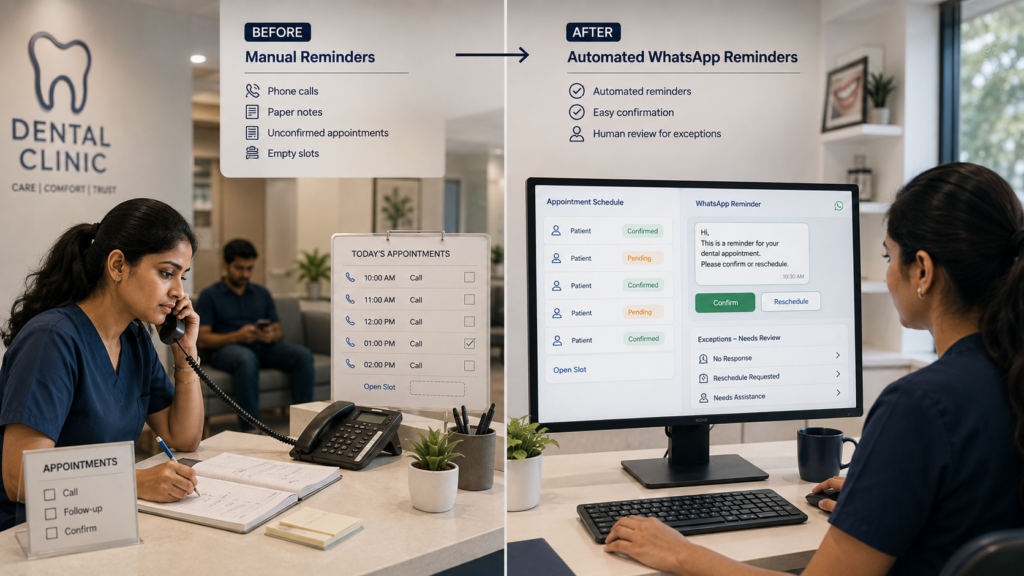
12.4 — Before: Manual Workflow
Typical manual workflow (reconstructed).
Booking (phone/walk-in/WhatsApp) → Staff writes appointment in register/software → Staff manually messages/calls confirmation → Day-before reminder (sometimes) → Same-day reminder (sometimes) → If no confirmation, staff calls → If patient cancels late, slot often stays empty
Common friction points.
- Single-touch reminders: many clinics send only one reminder (or rely on memory/calls), despite repeated guidance that multiple touches are more effective.
- No easy “one-tap” action: patient has to call back to confirm or reschedule.
- Weak waitlist process: cancellations do not reliably trigger outreach to fill the slot.
- No segmentation: repeat no-show patients are treated the same as reliable patients, even though tracking patterns is widely recommended.
Baseline measurement gap (important). The supplied research does not provide a verified baseline no-show rate, reminder volume, or staff time for a specific clinic. Before implementing automation, a clinic should measure at least:
- No-show rate (by provider, day/time, appointment type)
- Cancellation rate and average cancellation lead time
- Confirmation rate (how many patients confirm before arrival)
- Time spent weekly on reminder calls/messages
- Percentage of cancelled slots refilled from a waitlist (if any)
Without this baseline, any “improvement” is guesswork. With it, the clinic can evaluate whether WhatsApp appointment reminders (with or without AI) are actually producing value.
12.5 — AI Automation Design
Business-first design goal. Design a reminder-and-confirmation workflow that is consistent, measurable, and safe. Then add AI only where it reduces friction (for example, understanding patient replies and routing exceptions).
What should be automated even without AI (deterministic automation). The supplied research strongly supports automation patterns like multiple reminder touches, easy confirmation/rescheduling, waitlists, and tracking repeat no-shows. None of these inherently require AI.
Where AI fits (optional, proportionate). In this workflow, AI is most justified when messages become conversational:
- Intent detection: interpret replies like “Yes”, “Ok”, “Coming”, “Not possible”, “Can we do evening?”, “Doctor change?”
- Extraction: pull a proposed new time/date from a message (when clearly stated)
- Drafting: propose a polite, policy-compliant response in the patient’s preferred language
- Routing: escalate ambiguous or high-risk interactions to a human
Proposed design (illustrative).
| Design element | Proposed approach | Why it exists (business reason) |
|---|---|---|
| Trigger | Appointment created or updated in the schedule | Start reminders from a reliable appointment record |
| Reminder cadence | Immediate booking confirmation, then 24 hours before, then 2–3 hours before | Multiple touches are repeatedly recommended in the supplied research |
| Patient action | Buttons/quick replies: Confirm, Reschedule, Cancel | Reduce friction and inbound phone calls |
| AI task (optional) | Classify free-text replies into intents; draft responses; extract simple reschedule requests | Handle natural language replies without staff reading every thread |
| Business rules | Do not reschedule across providers without approval; do not override blocked slots; apply clinic cancellation policy; enforce lead-time rules | Prevent wrong bookings and protect chair utilization |
| System actions | Update confirmation status; create a staff task when unconfirmed; send waitlist broadcast if cancelled | Make confirmations visible and cancellations recoverable |
| Human approval | Required for ambiguous replies, procedure changes, provider changes, or repeated no-show patients | Keep humans responsible for high-impact scheduling decisions |
| Fallback | If WhatsApp message fails, send SMS (where appropriate) or create a call task; if AI confidence is low, escalate to staff | Reliability and safety over “full automation” |
| Monitoring & auditability | Log outbound message timestamps, delivery status (where available), patient reply intent, confirmation status changes, and human overrides | Needed to prove whether the workflow created value and to troubleshoot failures |
Solution-selection gate. If the clinic only needs scheduled reminders with “Confirm/Cancel” buttons, AI may be unnecessary. The clinic should first implement deterministic reminders + tracking and add AI later if free-text replies create enough workload to justify it.
12.6 — After: Automated Workflow
Proposed automated workflow (WhatsApp-first, with human oversight).
Appointment booked/updated → Automatic WhatsApp confirmation message → 24-hour reminder with Confirm/Reschedule/Cancel → 2–3 hour reminder → Patient confirms (status updated) OR patient requests change (AI intent detection or rule-based routing) → Human handles exceptions → If cancellation occurs, waitlist outreach to refill slot → Daily/weekly reporting
Before vs After (what changes operationally).
| Area | Before (manual) | After (proposed automation) |
|---|---|---|
| Reminder timing | Inconsistent; depends on staff bandwidth | Consistent cadence (immediate + 24h + 2–3h), configurable by appointment type |
| Patient confirmation | Often requires calls; confirmations not tracked consistently | Track confirmation status per appointment; quick replies reduce back-and-forth |
| Rescheduling | Staff-driven; delays common | Structured reschedule prompts; exceptions routed to staff |
| Cancelled slot recovery | Ad hoc; often stays empty | Waitlist-triggered outreach (first-come, staff-approved where needed) |
| Staff workload | High repetitive messaging + calls | More time spent on exceptions and patient care coordination rather than routine reminders |
What the AI Does Not Do (boundaries)
- It does not make clinical decisions. It cannot advise on symptoms, treatment choices, or urgency beyond an approved script. Anything clinical should escalate to a human.
- It does not override the schedule rules. Even if the model can “suggest” a time, the system should not book into blocked slots or change providers without policy checks and (where required) staff approval.
- It does not handle ambiguity without escalation. Messages like “maybe”, “later”, “not sure”, or multi-part questions should become a staff task.
- It does not access unnecessary sensitive data. The minimum necessary appointment details should be used for reminders (name, date/time, location). Avoid embedding sensitive clinical detail in messages.
- It does not silently hide errors. Delivery failures, integration failures, and repeated non-responses should trigger staff notifications or work queues.
12.7 — Human Control, Risks & Safeguards
Human control is not a slogan. In this workflow, the clinic should explicitly define who intervenes, what they review, and what actions require human approval.
Where humans remain responsible (proposed operating model)
- Front desk staff: handle escalations, confirm identity when needed, approve provider changes, resolve rescheduling conflicts, and follow up on unconfirmed appointments.
- Practice manager/owner: owns policies (cancellation rules, deposit rules for higher-value procedures), monitors KPIs, and approves workflow changes.
Risk & safeguard table (specific to this workflow)
| Risk | What can go wrong | Safeguard (prevention / detection / containment) |
|---|---|---|
| Incorrect reminder details | Wrong date/time/provider/location sent to patient | Use schedule as the system-of-record; validate required fields; send a test message preview for new templates; log message payloads for audit |
| Wrong reschedule action | Automation moves an appointment incorrectly, double-books a slot, or changes provider without approval | Rules-based validation (no booking into blocked slots); restrict automation to “request reschedule” unless staff approves the final booking; require human approval for provider change |
| AI misclassification | AI reads “I can’t” as confirmation, or misses a cancellation intent | Confidence thresholds + escalation; treat negative sentiment or uncertain phrasing as “needs human”; maintain a human override workflow |
| Privacy & consent issues | Patient objects to messages; sensitive info exposed on shared phones | Capture opt-in/consent for WhatsApp reminders; minimize PHI in message text; include an opt-out instruction; avoid clinical details in reminders |
| Delivery failures | WhatsApp message not delivered; patient never sees reminder | Delivery monitoring (where available); fallback to SMS/call task; daily queue for “unconfirmed + no delivery” |
| Operational overload | Automation generates too many exception tasks | Start small (one appointment type or one dentist); tune templates and thresholds; review exception reasons weekly for process fixes |
Accountability. The clinic should name a process owner for reminders (often the practice manager). That person is responsible for approving message templates, escalation rules, and KPI definitions.
12.8 — Technology, Implementation & Cost
Important limitation. The supplied research does not establish a single verified technology stack used by one named clinic in India for WhatsApp AI reminders, and it does not provide reliable pricing for the vendors mentioned. Therefore, the stack and costs below are presented as a proposed implementation blueprint and a planning cost structure (not a verified bill of materials).
Proposed architecture (components and roles)
| Component | Role in the workflow | Evidence status |
|---|---|---|
| Appointment system (software / spreadsheet) | System-of-record for appointment time, provider, patient contact | Proposed (varies by clinic) |
| WhatsApp channel | Outbound reminders and inbound confirmation/reschedule replies | Supported as a common option in the supplied research; specific provider is unknown |
| Automation/orchestration | Schedules reminders, routes replies, creates staff tasks, logs events | Proposed (tools not verified for a specific clinic) |
| Optional AI layer | Intent classification, extraction, response drafting, language handling | Proposed (AI provider/model not established) |
| Waitlist tracker | List of patients who want earlier slots; used to refill cancellations | Supported as a recommended tactic; implementation details proposed |
| Human reviewer (front desk) | Handles exceptions, approves changes, calls high-risk/no-response patients | Required control |
Implementation difficulty: Easy vs Moderate vs Advanced
- Easy: clinic has clean appointment data and can export daily schedules; reminders are one-way plus “Confirm” tracking.
- Moderate: two-way conversation, reschedule requests, and waitlist fill logic are included; multiple providers and appointment types exist.
- Advanced: deep integration into practice management software with real-time booking changes, multi-location rules, or predictive no-show risk scoring.
Practical timeline (planning estimate from the supplied research framing). A basic workflow is often feasible in 1–3 weeks, but deeper integrations can take longer. This is a planning estimate, not a verified implementation timeline.
Cost structure (planning view; pricing not established)
The supplied research does not provide verified pricing for WhatsApp automation vendors or dental software integrations referenced. Instead of inventing numbers, this section provides a cost checklist you can use to request quotes and avoid underestimating total cost.
| Cost category | What to include | Why it matters |
|---|---|---|
| Software / messaging fees | WhatsApp Business Platform/API provider fees (if used), message conversation charges (if applicable), automation platform subscription | Recurring cost tied to message volume and provider terms |
| One-time implementation | Workflow setup, templates, integration to appointment source, testing, staff training | Often larger than the first month of software costs |
| Ongoing operations | Human exception handling time, template updates, periodic reporting review | Automation does not remove the need for oversight |
| Compliance & consent | Opt-in language, opt-out handling, data retention rules, minimum-necessary messaging | Reduces risk of patient complaints and privacy issues |
| Maintenance | Integration break-fix, WhatsApp template approvals (where applicable), number changes, staff onboarding | Prevents silent workflow decay |
12.9 — Results, Evidence & ROI
This section separates what is known from the supplied research (research findings and external claims) from what must be estimated (planning model) because this is an illustrative reconstruction.
Verified Result
None provided for a specific dental clinic in India in the supplied research. The available evidence does not establish a single clinic’s baseline, measurement period, technology stack, and measured no-show reduction.
Research Finding
Multiple dental-industry sources consistently recommend reminder workflows with multiple touches, easy confirmation/rescheduling, waitlists, and clear cancellation policies as practical tactics to reduce no-shows and late cancellations. Research literature (NIH/PMC) also indicates that no-shows can be analyzed and predicted rather than treated as random events.
External Report
Some vendor materials in the supplied research describe WhatsApp reminder automation and (in at least one case) claim large percentage reductions in no-shows. These claims are not presented here as expected outcomes for a specific clinic because the supplied research does not provide a controlled baseline or independently verified measurement context.
Planning model: estimating ROI for WhatsApp appointment reminders (illustrative)
Purpose. Give a clinic owner a transparent way to decide whether the workflow is worth implementing, using their own numbers.
Important. The model below uses illustrative assumptions. Replace them with your clinic’s measured baseline.
Illustrative Assumption
- Monthly appointments: 600
- Baseline no-show rate: 12%
- Average contribution margin per kept appointment (not revenue): ₹600
- Portion of no-shows that can be prevented by better confirmation + reminders + waitlist (scenario): 25% of no-shows
- Front-desk manual reminder time today: 2 minutes per appointment (blended across calls/messages)
- Portion of reminder work reduced by automation (scenario): 60%
- Front-desk fully loaded hourly cost (scenario): ₹300/hour
- Ongoing automation operating cost (software + messaging + maintenance) (scenario placeholder): Unknown (obtain quotes)
Step 1: quantify current no-show impact (illustrative calculation)
Estimated monthly no-shows = Monthly appointments × Baseline no-show rate
Estimated monthly no-shows = 600 × 0.12 = 72 no-shows/month
Estimated preventable no-shows (scenario) = No-shows × Preventable portion
Estimated preventable no-shows = 72 × 0.25 = 18 appointments/month
Estimated monthly contribution margin recovered = Preventable no-shows × Margin per kept appointment
Estimated monthly recovered margin = 18 × ₹600 = ₹10,800/month
Step 2: quantify staff-time savings (illustrative calculation)
Estimated monthly reminder time today = Monthly appointments × Minutes per appointment
Estimated monthly reminder time today = 600 × 2 minutes = 1,200 minutes = 20 hours/month
Estimated hours reduced (scenario) = Current reminder hours × Reduction portion
Estimated hours reduced = 20 × 0.60 = 12 hours/month
Estimated labour cost avoided = Hours reduced × Hourly cost
Estimated labour cost avoided = 12 × ₹300 = ₹3,600/month
Step 3: compare benefits vs costs (formula, not a fabricated quote)
Estimated monthly quantified benefit (scenario) = Recovered margin + Labour cost avoided
Estimated monthly quantified benefit = ₹10,800 + ₹3,600 = ₹14,400/month
Net benefit (monthly) = Quantified benefit − Ongoing automation operating cost
The ongoing cost is unknown in the supplied research and must come from vendor quotes and your anticipated message volume. Once you have that number, you can compute payback.
ROI sensitivity (what matters most)
- Your baseline no-show rate. If it’s already low, ROI may be limited.
- Your ability to refill cancelled slots. Waitlist effectiveness can matter as much as reminders.
- Margin per kept appointment. Use contribution margin, not top-line revenue, to avoid overstating value.
- Operational discipline. Automation can fail if appointment data is messy or staff do not work the exception queue.
How to prove value (Stage 5 of Business-First AI Framework™). Run a 30–60 day measurement period comparing:
- no-show rate vs the prior baseline period
- confirmation rate before appointment time
- percentage of cancellations refilled
- front-desk time spent on reminders and follow-up
Only then decide whether to expand to more appointment types, more languages, or deeper rescheduling automation.
12.10 — Lessons, Starting Version & KPIs
What we learned (from comparable implementations and the planning model)
- Workflow design beats “AI features.” Immediate confirmation, multiple reminders, and one-tap actions are the core levers repeatedly recommended in the supplied research.
- Waitlists are a profit lever. Reducing no-shows helps, but refilling cancellations can recover capacity even when patients legitimately cancel.
- AI is optional at first. Many clinics can capture most value with deterministic automation; add AI when free-text replies and language handling create enough workload to justify it.
- Measurement is non-negotiable. Without baseline tracking, clinics cannot defend the spend or know what to tune (timing, templates, escalation rules).
What should not be automated initially
- Clinical questions and triage. Route to a human; do not let an AI chatbot improvise clinical guidance.
- Irreversible schedule actions. Avoid auto-moving appointments across providers or high-value procedure slots without staff approval.
- Deposit enforcement decisions. Deposits can reduce no-shows for certain procedures, but policy and exceptions should remain human-controlled.
Recommended starting version (minimum viable workflow)
A safe, high-value starting version for a small dental clinic in India is:
- Automate message cadence: booking confirmation + 24-hour reminder + 2–3 hour reminder.
- Add confirmation tracking: capture Confirm / Reschedule / Cancel as a status on the appointment.
- Create an exception queue: appointments not confirmed by a cutoff time become a staff call task.
- Implement a simple waitlist: a list of patients willing to take earlier slots; use it when cancellations happen.
- Keep AI optional: start without AI; introduce AI intent detection later if staff spend significant time reading and interpreting free-text replies.
What should remain human-controlled (explicit boundaries)
- Approving provider changes and complex reschedules
- Handling repeated no-show patients (manual confirmation, deposits, or policy enforcement)
- Handling complaints, sensitive conversations, and special accommodations
- Approving message templates, language, and policy wording
Suggested KPIs (3–5) and how to measure them
| KPI | How to measure | Direction of improvement | Review cadence |
|---|---|---|---|
| No-show rate | No-shows ÷ total scheduled appointments (exclude rescheduled in advance if you track separately) | Down | Monthly |
| Confirmation rate (by cutoff) | % appointments confirmed at least X hours before appointment time | Up | Weekly then monthly |
| Cancellation-to-refill time | Average time from cancellation to slot refilled (or marked unfillable) | Down | Monthly |
| Human escalation rate | % conversations requiring staff handling (unconfirmed, ambiguous replies, reschedule requests) | Down (but not to zero) | Weekly during rollout |
| Cost per kept appointment (operations) | (Reminder ops costs + staff reminder time) ÷ kept appointments | Down | Monthly / quarterly |
30/60/90-day review (what to check)
- 30 days: delivery failures, data-quality issues, template clarity, exception queue volume
- 60 days: KPI trends vs baseline; waitlist refill performance; staff adoption
- 90 days: whether to add AI intent detection, expand to more appointment types, and formalize repeat no-show policies
When to expand (Stage 6: standardize and scale)
- Stable delivery and low integration failure rate
- Exception queue is manageable and clearly owned
- Measured improvement in confirmations and/or filled-chair outcomes versus baseline
- Staff feedback supports the new process (less phone chasing, clearer priorities)
Practical CTA (non-aggressive). If you want to implement WhatsApp appointment reminders safely, start with a no-show baseline and a simple workflow map. A short no-show reduction audit can often identify whether reminder cadence, waitlist design, or data quality will deliver the fastest wins before adding AI.