How an Accounting Firm Automated Invoice Processing with AI
Case Study Classification & Headline
Scope & Assumptions
This is an illustrative SMB implementation case study based on common accounting-firm invoice workflows and publicly reported invoice-automation examples. The workflow, controls, costs, and potential outcomes are planning examples and do not represent verified results from one specific accounting firm.
Case study metadata
- Evidence type: Illustrative SMB Implementation Case Study (evidence-based reconstruction)
- Industry: Accounting & Professional Services
- Business type: Accounting firm serving SMB clients
- Geography: India
- Primary workflow: Invoice capture → AI/OCR data extraction → validation & classification → approval → accounting-system entry
- Primary keyword: Invoice Automation Case Study
- Automation risk: Moderate (financial accuracy, controls, compliance)
- Implementation difficulty: Moderate (integrations + exception handling + change management)
Invoice processing is a classic “high-volume, rules-heavy” workflow inside accounting firms—especially firms that provide bookkeeping and accounts payable (AP) support for multiple SMB clients. The work is repetitive (keying invoice fields), time-sensitive (payment cycles), and sensitive (tax, vendor master data, duplicate payments, audit trails). That combination makes it a good candidate for workflow automation—but only if the firm designs clear controls and keeps accounting judgment under human ownership.
Business Context & Workflow
In this scenario, an Indian accounting firm handles invoice processing in two ways:
- Internal AP: The firm’s own vendor invoices (rent, software, contractors).
- Client work: Bookkeeping/AP outsourcing for SMB clients who email or upload invoices (PDF scans, digital PDFs, occasional photos).
Teams involved typically include:
- AP/Bookkeeping staff: First-line data entry and invoice preparation.
- Reviewer (senior accountant/CA manager): Validation of coding, tax treatment, and exceptions.
- Client approver (business owner/operations head): Approval for payment or posting policies (varies by client).
Systems commonly present in these environments include:
- Invoice intake: Shared inbox (email), client portal, or shared drive.
- System of record: Accounting/ERP platform used for bookkeeping and ledger posting.
- Supporting references: Vendor master data, purchase orders (POs) where used, and prior invoice history.
This workflow matters because it sits upstream of critical outcomes: vendor payments, monthly closes, GST/tax reporting accuracy, and audit readiness. If invoices pile up, downstream work (reconciliation, payment runs, client reporting) becomes a fire drill.
The Problem & Business Impact
The firm’s operational friction is straightforward: staff manually read invoices and re-type the same fields into the accounting system. Over time, volume growth and inconsistent invoice formats increase cost and risk.
What makes invoice processing worth changing
- Efficiency: Manual keying and chasing approvals consumes significant staff hours, especially during month-end.
- Quality: Data-entry errors lead to rework (wrong vendor, wrong GST components, incorrect totals), and can create reconciliation issues.
- Customer experience (clients/vendors): Slow processing can delay approvals and vendor payments, increasing escalations.
- Financial control risk: Weak handling of duplicates, mismatches, or missing approvals can increase overpayment and audit issues.
Invoice automation becomes a sensible candidate when the workflow has:
- Repeatable inputs: Common invoice layouts and recurring vendors.
- Stable rules: Clear approval thresholds, coding policies, and validation checks.
- Measurable outcomes: Cycle time, cost per invoice, exception rate, and first-pass accuracy.
It is not a good first automation project when invoice volumes are low, invoices are highly unstructured, or the firm has not agreed on baseline coding/approval rules. In those cases, workflow cleanup can deliver more value than adding AI.
Before: Manual Workflow
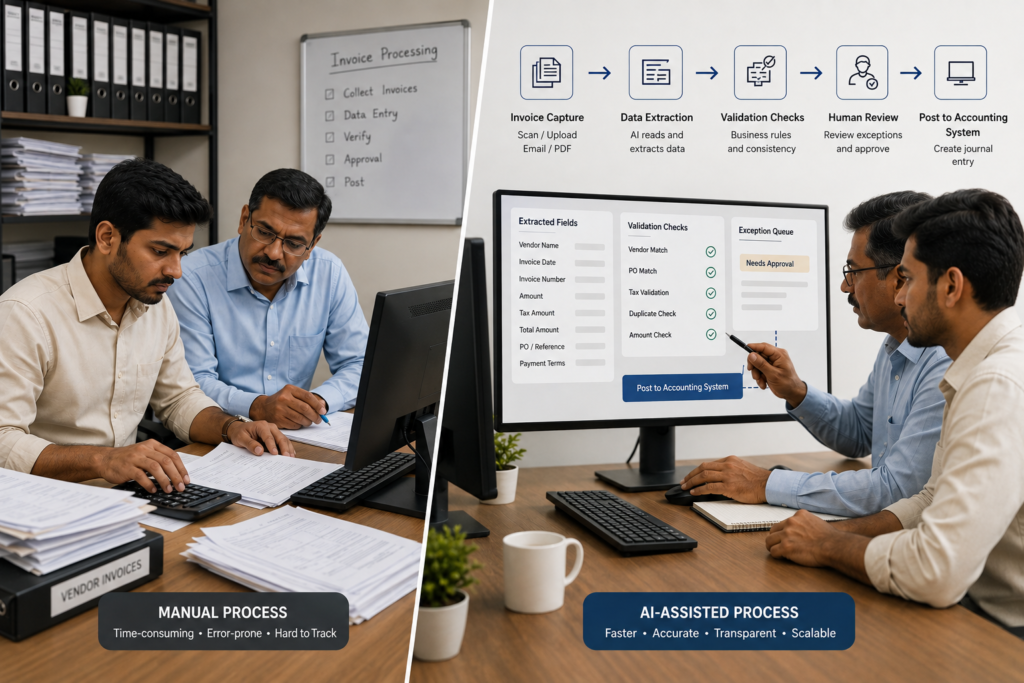
Invoice received (email/PDF/photo) → Staff downloads & renames file → Staff reads invoice → Staff types header fields → Staff types line items/taxes → Staff chooses vendor & GL codes → Staff checks totals → Staff emails client for approval (if required) → Staff posts entry → Staff files invoice & notes
Typical manual touchpoints
- Manual file handling (download, naming, foldering)
- Manual extraction (invoice number, date, vendor name, GSTIN, line items, tax amounts)
- Manual validation (math checks, duplicate checks, PO match where applicable)
- Manual routing (forwarding to approver, following up, tracking status)
- Manual posting (creating bills/journal entries and attaching documents)
Baseline measurement (what should be measured first)
Because this is an illustrative case, no verified baseline metrics are assumed. Before implementing automation, a firm would typically measure a two- to four-week sample:
- Invoices per week (by client, by channel)
- Average handling time per invoice (including follow-ups)
- First-pass accuracy (how many invoices require correction after posting/review)
- Exception rate (missing PO, mismatch, unclear tax, new vendor)
- Approval turnaround time
- Duplicate invoice incidents (if measurable)
If a firm cannot measure these, it can still pilot automation—but it should treat the first 30 days as a baseline-building phase rather than promising ROI.
AI Automation Design
The business goal is not “OCR the invoice.” The goal is to reduce manual typing and reduce rework by adding validation, routing, and auditability. In practical terms, the automation is a workflow that uses AI for document understanding and uses deterministic rules for controls.
What AI does (specific roles)
- Classification: Identify document type (tax invoice vs proforma vs credit note) and route accordingly.
- Extraction: Pull key fields (vendor, invoice number/date, GSTIN, taxable amounts, tax components, totals, line items).
- Drafting: Prepare a draft accounting entry (e.g., a draft bill with suggested GL codes) for human review where needed.
- Anomaly flagging (decision support): Highlight likely duplicates, unusual totals, or missing mandatory fields for escalation.
Workflow design (trigger to posting)
| Design element | Practical definition for this workflow |
|---|---|
| Trigger | New invoice arrives via shared inbox or portal upload. |
| AI task | Extract invoice fields and produce a structured “invoice record” plus a confidence score per field. |
| Business rules | Validate mandatory fields; check math; check vendor master match; apply approval thresholds (e.g., by amount/vendor/cost center); optional PO/GRN match rules where used. |
| Data access | Vendor list, historical invoices for duplicate detection, chart of accounts, and approval policy rules. Access should follow “minimum necessary” principles. |
| System actions | Create a draft bill/entry in the accounting system; attach original invoice; route to approver queue; update status tracking. |
| Human approval | Required for exceptions (low confidence, new vendor, mismatched totals, tax uncertainty) and for posting policies above risk thresholds. |
| Fallback | If extraction fails or confidence is low, route to manual entry with pre-filled partial data and a clear reason code (e.g., “missing GSTIN”). |
| Monitoring | Daily queue review, exception trends, field-level accuracy, processing time, and integration failure logs. |
| Auditability | Log: original document hash, extracted fields, human edits, approver identity, timestamps, and posting reference. |
Why AI (and where simpler automation is enough)
Rules-based automation can reliably handle:
- File naming and routing by client/email address
- Approval routing by amount thresholds
- Validation checks (totals, required fields, PO match rules)
AI is most justified when invoice formats vary and the firm needs flexible extraction across vendors without building templates for each one. The proportionate approach is to use AI for extraction and suggestions, and use deterministic rules plus human review to control financial risk.
After: Automated Workflow
Invoice received → Automatic intake & file capture → AI/OCR extraction to structured fields → Rules-based validation (math/mandatory fields/vendor match/duplicate check) → Route to “straight-through” queue or “exception” queue → Human review for exceptions → Approval (where required) → Post to accounting system + attach invoice → Log & report KPIs
Before vs After (what changes in practice)
| Step | Before (manual) | After (automated + controlled) |
|---|---|---|
| Invoice intake | Download, rename, file manually | Captured automatically from inbox/portal; standardized storage and naming |
| Data extraction | Staff types header/lines/tax | AI/OCR extracts fields; staff edits only when needed |
| Validation | Inconsistent checks; depends on staff | Standard rule checks; exceptions are flagged consistently |
| Approval routing | Email back-and-forth; hard to track | Approval queue with clear status and reminders |
| Posting | Manual entry into accounting system | Create draft entries; controlled posting after review/approval rules |
| Audit trail | Scattered emails and notes | Centralized logs of extraction, edits, approvals, and posting references |
What the AI does not do (boundaries)
- It does not approve payments. Approval remains a business control owned by the firm/client.
- It does not override accounting policy. GL coding and tax treatment rules are defined by humans; AI can only suggest.
- It does not silently post uncertain invoices. Low-confidence extractions, new vendors, and mismatches must escalate.
- It does not “fix” a broken workflow. If the firm has unclear approval rules or inconsistent vendor masters, automation will surface the mess faster—not resolve it.
- It does not eliminate the need for audit readiness. The workflow must log corrections, approvals, and exceptions for traceability.
Human Control, Risks & Safeguards
In invoice automation, the biggest operational mistake is treating the workflow as “hands-free.” The safer design is “straight-through where safe; human review where risky.”
Where humans remain responsible
- Accounting judgment: Final decision on GL coding and tax treatment for ambiguous cases.
- Vendor onboarding: Creating/approving new vendors and validating GSTIN details (where applicable).
- Exception resolution: Handling mismatches, missing PO/receipt, unclear line items, or suspicious duplicates.
- Approval accountability: Approving invoices per policy (amount thresholds, departments, cost centers).
- Controls governance: Defining and updating validation and routing rules.
Risk-to-safeguard mapping
| Risk | What can go wrong | Safeguard (prevention / detection / containment) |
|---|---|---|
| Incorrect extraction | Wrong totals, wrong GST components, wrong invoice number | Field-level confidence thresholds; mandatory-field checks; math validation; exception queue for low-confidence fields |
| Wrong vendor mapping | Posting to incorrect vendor; duplicate vendor records | Vendor master match rules; “new vendor” always escalates; restrict vendor creation permissions |
| Duplicate payments | Same invoice posted twice (invoice number variations, scanning duplicates) | Duplicate checks using vendor + invoice number + amount + date; flag near-duplicates for review |
| Approval bypass | Invoices posted without required approval | Hard rule: posting blocked until required approvals recorded; audit log of approver and timestamp |
| Integration failure | Invoices stuck between systems; missing attachments | Retry logic; failure alerts; daily reconciliation report (invoices captured vs posted) |
| Privacy & data exposure | Invoices contain sensitive vendor/customer information | Minimum necessary access; role-based permissions; secure storage; retention policy; vendor due diligence for processors |
| Process drift | Rules and vendor data get outdated; accuracy drops | Monthly exception review; update rules and vendor masters; track accuracy and override rate |
For India-specific needs, the workflow often benefits from explicit tax-aware validation (for example, validating mandatory identifiers and consistent tax totals). However, the exact GST validation approach depends on the firm’s accounting system and client requirements and should be configured deliberately rather than assumed to be “automatic.”
Technology, Implementation & Cost
This scenario does not assume one “verified” tool stack for a specific firm. Instead, it describes a practical reference architecture that small accounting firms can adapt.
Reference architecture (components and roles)
| Component | Role in the workflow |
|---|---|
| Invoice intake | Shared inbox / portal / drive that receives PDFs and images |
| AI/OCR extraction layer | Extract header and line-item fields; produce confidence scores |
| Workflow/orchestration | Route invoices; enforce validations; manage approval queues; escalate exceptions |
| Accounting system integration | Create draft bills/entries; attach invoice document; write back posting IDs |
| Audit log & reporting | Track who changed what, when; support audits and KPI reporting |
| Human review console | Exception handling, approvals, GL/tax review, and corrections |
Implementation difficulty: Moderate (why)
- Not hard: Basic extraction and routing can be piloted quickly.
- Harder: Exception taxonomy, approval rules, and accounting-system integration determine whether the solution is reliable.
- Operationally hard: Training staff to trust the workflow while still reviewing exceptions correctly.
Implementation timeline (planning range)
Illustrative Scenario
A small-to-mid complexity invoice workflow is often feasible as a pilot in roughly 2–8 weeks when the accounting system integration is straightforward and the firm starts with one invoice stream/client group.
Cost structure (what to budget for)
Actual pricing varies significantly by vendor, invoice volume, and integration scope. Rather than inventing exact prices, this case study uses cost categories a firm should budget for:
| Cost category | What it includes | Notes for small firms |
|---|---|---|
| Software | AI/OCR extraction + workflow + approvals | Often volume-based (per invoice) or tiered; clarify what counts as a “page” vs “invoice” |
| One-time implementation | Process mapping, rule setup, integration, testing | Commonly underestimated; include exception handling design and user training |
| Ongoing operations | Human exception review, monitoring, rule updates | Automation does not remove human work; it shifts it to review and exceptions |
| Maintenance | Template tuning (if used), vendor master cleanup, changes in invoice formats | Plan for periodic tuning, especially for new vendors |
| Security & compliance | Access control, retention, vendor due diligence, audit logging | Critical if the firm handles multiple client datasets |
Results, Evidence & ROI
This section separates what is externally reported by other implementations from what is estimated for this illustrative accounting-firm scenario.
Externally reported outcomes (examples from published implementations)
External Report
- An invoice automation program at AM/NS India has been publicly described as processing 300,000 invoices annually with over 90% accuracy using multiple automation bots.
- An Indian bank automation example using RPA and an “IQ Bot”-style document automation approach has been publicly described as reducing handling time from 10 minutes to 1 minute per invoice, with 2,940 hours saved annually (as reported in the case example).
- A Newgen-reported real-estate invoice processing example in India has described throughput on the order of nearly 400 invoices/day and cycle-time improvement from weeks to days (as reported in the case example).
- A Vic.ai-reported accounting/tax advisory case study has described performance figures such as 86% overall accuracy and a share of invoices requiring no human touch (as reported by the vendor).
These are results reported for other organizations and should not be treated as guaranteed outcomes for an accounting firm. They are useful as directional benchmarks for what is possible when workflows, controls, and data quality are well-managed.
Planning model: estimating potential value for an Indian accounting firm
Below is a transparent ROI model based on illustrative assumptions. You should replace the assumptions with your measured baseline.
Illustrative Assumptions
- Invoice volume: 2,000 invoices/month (across multiple SMB clients)
- Manual handling time (before): 8 minutes/invoice (entry + basic checks + filing)
- Automated handling time (after): 3 minutes/invoice average (mix of straight-through and exception reviews)
- Time saved: 5 minutes/invoice
- Fully loaded labour cost: ₹450/hour
- Automation operating cost: not specified (varies by vendor); model shows the break-even ceiling instead of guessing
Calculated estimate (time and labour value)
| Metric | Formula | Calculated estimate |
|---|---|---|
| Monthly hours saved | Invoices/month × minutes saved ÷ 60 | 2,000 × 5 ÷ 60 = 166.7 hours/month |
| Monthly labour value of time saved | Monthly hours saved × labour cost/hour | 166.7 × ₹450 = ₹75,000/month (approx.) |
| Annual labour value of time saved | Monthly labour value × 12 | ₹75,000 × 12 = ₹9,00,000/year (approx.) |
How to interpret this number: this is not automatically “cash saved.” It is time capacity that the firm can redeploy to higher-value services (review, advisory, faster close support) or to handle more invoice volume without hiring at the same rate.
Break-even test (a safer way to budget without guessing vendor pricing)
If the planning model estimates approximately ₹75,000/month in labour value, then:
- If total monthly automation cost (software + support + ongoing ops) is below ₹75,000/month, the workflow can plausibly be net-positive on time value alone.
- If total monthly automation cost is above ₹75,000/month, the business case must rely on additional value (fewer errors/rework, faster approvals, reduced duplicate payments, better client retention, or higher throughput).
What else to measure (beyond time savings)
Time savings are only one part of value. Invoice automation can also create measurable control improvements, but the firm must instrument them:
- First-pass accuracy: % invoices posted without correction after review
- Rework rate: # invoices requiring correction / # invoices posted
- Exception rate: % routed to human review; should trend down as vendors stabilize
- Approval turnaround time: median hours from “ready for approval” to “approved”
- Duplicate flags and prevented duplicates: count of duplicates detected before posting/payment
Limitations (what this case study does not establish)
- No verified “after” performance is available for a single identified accounting firm in this scenario.
- No single tool stack, pricing schedule, or integration complexity is claimed as universal.
- Tax validation requirements (including GST specifics) vary by client, accounting system, and policy.
CTA (helpful next step): If your firm is considering invoice automation, start with an invoice workflow assessment: map the current steps, quantify baseline time and error rates, define approval rules, and run a controlled pilot for one invoice stream before scaling.
Lessons, Starting Version & KPIs
What we learned from comparable implementations and the planning model
- Automation succeeds when exceptions are designed first. “Happy path” invoices are easy; the value is in predictable handling of mismatches, missing fields, and policy decisions.
- OCR alone is not invoice automation. The workflow needs routing, validation, approvals, and posting integration to create operational value.
- Humans must own controls. AI can extract and suggest; humans define policy and decide on ambiguous accounting treatment.
- Auditability is a feature, not a bonus. If you cannot explain what changed and who approved it, you may be moving faster while increasing risk.
What should not be automated initially
- New vendor creation without review (high fraud/control risk)
- High-value invoice posting without approval (control breach risk)
- Ambiguous tax/GL coding decisions (requires accounting judgment)
- Irreversible actions such as initiating payments (keep payment execution separate and controlled)
Recommended starting version (smallest sensible implementation)
A practical “Version 1” for an accounting firm typically focuses on one predictable invoice stream before expanding across clients:
- Scope: One client group or one entity; invoices received via one channel (e.g., shared inbox).
- Automation: Intake + extraction + validation + exception queue.
- Human control: All invoices create draft entries; posting requires review for exceptions and approval where policy requires.
- Data requirements: Clean vendor master list, chart of accounts, and defined approval thresholds.
- Success criteria: Reduced average handling time without increasing rework or control failures.
Suggested KPIs (3–5 to start)
| KPI | Why it matters | How to measure | Review cadence |
|---|---|---|---|
| Average handling time per invoice | Direct measure of time saved | Time tracking sample or workflow timestamps (received → posted) | Weekly (pilot), then monthly |
| Exception rate | Shows how often humans must intervene | % invoices routed to exception queue | Weekly (pilot), then monthly |
| First-pass accuracy | Ensures speed is not creating rework | % invoices posted without correction after review | Weekly (pilot), then monthly |
| Approval turnaround time | Highlights bottlenecks outside extraction | Median time in “awaiting approval” status | Monthly |
| Human override rate | Signals trust and model/rule quality | % invoices where extracted fields were edited materially | Monthly |
When to expand (standardize and scale)
- Exception rate is stable and trending down for recurring vendors
- Integrations are reliable (low failure/retry rates)
- First-pass accuracy meets internal targets without excessive overrides
- Approval workflow is consistently followed and auditable
- Measured value is positive using your baseline (time, rework, and control metrics)
30/60/90-day review checklist
- Day 30: Confirm baseline, top exception reasons, and integration reliability.
- Day 60: Tighten rules, update vendor masters, reduce recurring exceptions, train staff on consistent review.
- Day 90: Decide whether to expand to more clients/entities, add PO matching, or introduce more advanced coding assistance.
Practical next step for small firms: Start by mapping your invoice workflow end-to-end (including approvals and exceptions), measure a short baseline sample, then pilot a controlled automation that creates draft entries and escalates uncertainties—before you attempt “full autopilot.”