Before vs After AI: How Automation Transforms Small Businesses
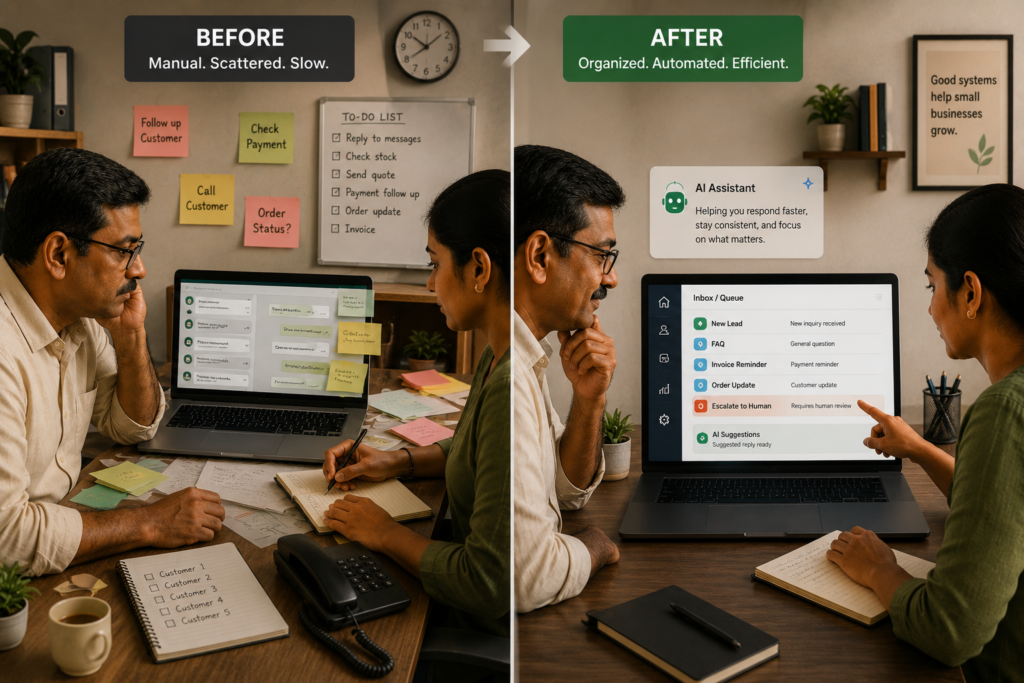
Case Study Classification & Scope
Important: This is an illustrative SMB transformation case study designed to show how AI automation can change common small-business workflows. It is not a documented implementation for a specific company and does not claim verified business results.
Any costs, time savings, percentages, or ROI figures in this article are hypothetical planning assumptions unless explicitly identified otherwise. Real results depend on workflow volume, process quality, implementation, adoption, data quality, and the tools used.
| Case Study Metadata | Details |
|---|---|
| Evidence type | Illustrative case study |
| Geography | India |
| Business type | Small business / SMB |
| Primary workflow theme | Before vs after manual workflows and AI-assisted automation |
| Primary keyword | AI Automation for Small Business |
| Automation risk | Moderate |
| Implementation difficulty | Easy–Moderate for one workflow; Moderate for multiple workflows |
| Primary objective | Reduce repetitive work while improving consistency, response speed, and visibility |
Many small businesses do not need complicated AI systems to benefit from AI automation. They need better workflows first.
What they often need first is something much more practical:
A better workflow.
The difference between a manually operated business and an AI-assisted business is not simply whether one has an AI tool and the other does not.
The real difference is how work moves through the organization.
In a traditional small business, customer messages, leads, invoices, follow-ups, appointments, and reports may be handled manually across WhatsApp, email, spreadsheets, notebooks, and separate business applications.
With a well-designed automation workflow, repetitive work can be captured, classified, routed, recorded, followed up, and summarized automatically—while humans remain responsible for decisions, exceptions, and high-risk actions.
This article shows what that transformation can look like.
Business Context: A Typical Indian Small Business
Consider a typical small business in India with a lean team and multiple customer communication channels.
The business could be a:
- Professional services firm
- Retail business
- Education provider
- Local service business
- Small B2B company
- Clinic or appointment-based business
- Marketing agency
- Accounting or professional services firm
The industry may differ, but many operational challenges are similar.
The business may rely heavily on:
- WhatsApp for customer communication
- Email for documents and formal communication
- Spreadsheets for tracking leads and customers
- Manual reminders for payments and appointments
- Employees copying information between applications
- Individual employees remembering when to follow up
- Manually prepared weekly reports
- Owners checking multiple systems to understand what is happening
The problem is not necessarily that employees are inefficient.
The problem is that the workflow itself depends too heavily on manual execution.
Typical repetitive workflows
Four areas are particularly suitable for examining an AI-assisted transformation:
- Sales — lead capture, qualification, and follow-up
- Customer support — FAQs, status requests, and escalation
- Administration — reminders and document collection
- Reporting — daily and weekly operational summaries
The objective is not to remove people from the process.
The objective is to allow the same people to spend less time on repetitive execution and more time on work that requires judgment, relationships, and business decisions.
The Problem: What Manual Work Really Costs
Manual workflows create several types of operational friction.
| Impact Area | Typical Manual Problem | What to Measure |
|---|---|---|
| Efficiency | Employees spend time copying data, replying to repetitive questions, sending reminders, and preparing reports | Minutes per task, hours/week |
| Quality | Different employees handle similar requests differently | Errors, rework, duplicate records |
| Customer experience | Customers wait for responses or repeat information | First response time, resolution time |
| Follow-up | Leads, payments, and requests are easy to forget | Missed follow-ups, overdue actions |
| Management visibility | Information is scattered across systems | Reporting time, data completeness |
| Business capacity | Employees spend time on repetitive work instead of higher-value activities | Productive hours available for growth |
These problems are especially common when the business grows faster than its internal processes.
A workflow that worked for 20 customer requests per week may become painful at 200.
The business may respond by hiring more people.
Sometimes that is the correct solution.
But before adding headcount, it is worth asking:
Which parts of the workflow actually require a human?
That question is the starting point for practical AI automation.
Before: The Manual Workflow
The “before” state is not necessarily chaotic.
It may simply have evolved organically as the business grew.
Sales — Before
A typical lead-handling process might look like this:
Lead sends WhatsApp message → Employee reads message → Employee asks questions → Employee manually records information → Employee responds → Employee remembers to follow up → Owner checks status later
The process depends heavily on individual employees remembering what to do.
If the employee is busy, the response may be delayed.
If the employee forgets to record the lead, information may disappear into a chat thread.
If the employee forgets to follow up, a potential opportunity may go cold.
Customer Support — Before
A typical support process might look like:
Customer asks question → Employee searches previous messages or documents → Employee prepares response → Customer asks another question → Employee searches again → Complex issue is escalated
Different employees may also provide slightly different answers.
This creates inconsistency and increases training requirements.
Administration — Before
A payment reminder workflow might look like:
Invoice issued → Employee checks due dates → Employee remembers to send reminder → Employee sends WhatsApp/email → Employee checks whether payment arrived → Employee follows up again
The workflow is simple.
But it is repetitive.
And repetitive workflows are exactly where automation can create value.
Reporting — Before
Weekly reporting may look like:
Data exists in WhatsApp + spreadsheet + CRM + accounting system → Employee collects information → Employee copies data → Employee prepares report → Owner reviews → Actions are identified
The report may already be outdated by the time it reaches management.
Why These Workflows Are Good Candidates for Automation
Not every business process should be automated.
The strongest candidates usually have three characteristics:
1. High repetition
The same type of task happens frequently.
Examples:
- Lead acknowledgment
- Appointment reminders
- Invoice reminders
- Frequently asked questions
- Data entry
- Status updates
2. Clear rules
The business knows what should normally happen.
For example:
- If an invoice is due, send reminder.
- If a lead requests service information, send the approved information.
- If a customer asks a standard FAQ, use the approved answer.
- If a request involves a dispute, escalate to a human.
3. Measurable outcomes
The business can measure whether the workflow improved.
Examples include:
- Response time
- Handling time
- Completion rate
- Missed follow-ups
- Error rate
- Human escalation rate
- Cost per transaction
If a process has no clear rules and every situation is completely different, improving the process may be more important than adding AI.
AI Automation Design
The important distinction is this:
AI automation is not the same as putting AI everywhere.
A good workflow combines three elements:
Rules + Automation + AI
Each has a different job.
Rules-based automation
Use conventional automation when the logic is predictable.
Examples:
- Send invoice reminder three days before due date.
- Create a CRM record when a form is submitted.
- Send appointment confirmation after booking.
- Generate a report every Monday.
- Route a request to a specific team.
There is no reason to use generative AI for these tasks.
AI-assisted automation
AI becomes useful when the input is unstructured or requires language understanding.
Examples:
- Understanding a customer’s WhatsApp message
- Classifying a lead
- Extracting information from a message
- Summarizing a conversation
- Drafting a response
- Categorizing a support request
This is where AI can reduce manual interpretation.
The AI-Assisted Workflow
A practical architecture can look like this:
Customer / Employee Input → Automation Trigger → AI Classification or Extraction → Business Rules → System Action → Human Approval Where Required → Logging
Each component has a defined responsibility.
| Component | Role |
|---|---|
| Trigger | Starts the workflow |
| AI | Understands, classifies, extracts, drafts, or summarizes |
| Business rules | Determines what is allowed |
| Automation platform | Connects systems and executes actions |
| System of record | Stores the resulting information |
| Human reviewer | Handles exceptions and high-risk decisions |
| Logging | Records what happened |
This separation is important.
AI should not become an uncontrolled decision-maker.
After: The Automated Workflow
Now consider how the same workflows can operate after automation.
Sales — After
Lead message → AI identifies new lead → AI extracts relevant details → Business rules validate information → Lead record created → AI drafts approved response → Auto-send or human approval → Follow-up scheduled → Exceptions routed to employee
The employee no longer needs to perform every repetitive step manually.
Instead, the employee focuses on:
- Qualified opportunities
- Missing information
- Unusual requests
- High-value prospects
- Exceptions
Customer Support — After
Customer question → AI identifies intent → Knowledge base provides approved information → AI drafts response → Low-risk response automatically sent → Complex/uncertain request escalated → Human resolves issue → Outcome logged
The critical improvement is not simply faster replies.
It is controlled consistency.
The business defines what information the AI is allowed to use and when the conversation must move to a person.
Administration — After
For invoice reminders:
Invoice due date → Automated trigger → Approved reminder template → Message sent → Payment status checked → Follow-up scheduled → Dispute or exception routed to human
This workflow may require little or no generative AI.
Rules-based automation is often sufficient.
That is an important lesson:
The best automation solution is not necessarily the one that uses the most AI.
Reporting — After
Scheduled trigger → Systems provide structured activity data → Automation consolidates information → AI summarizes trends and exceptions → Management receives report → Human makes decisions
Instead of spending hours assembling information, management can spend more time interpreting it.
Before vs After: What Actually Changes?
| Dimension | Before | After |
|---|---|---|
| Lead capture | Manual entry | Automated record creation |
| First response | Depends on employee availability | Automated acknowledgment or response |
| Customer questions | Manually researched | AI-assisted classification and response |
| Follow-ups | Employee memory | Scheduled workflow |
| Data entry | Copy/paste | Automated extraction and updates |
| Reporting | Manual compilation | Automated collection and AI-assisted summary |
| Exceptions | Often discovered late | Explicit escalation path |
| Management visibility | Scattered information | Centralized workflow records |
| Human role | Executes repetitive tasks | Handles judgment, exceptions, and decisions |
The transformation is therefore not:
Human → AI
It is:
Manual execution → Automated execution + Human judgment
That distinction matters.
What AI Should Not Do
Responsible AI automation requires clear boundaries.
AI should not automatically:
- Approve refunds
- Resolve payment disputes
- Make unauthorized pricing commitments
- Provide legal or contractual commitments
- Make irreversible business decisions
- Override business rules
- Access unnecessary sensitive information
- Invent information that is not available in the approved knowledge base
- Continue interacting with a customer when the workflow requires human intervention
The system should also have a clear fallback:
When uncertain, ask for clarification or escalate to a human.
A good automation system knows when not to act.
Human Control, Risks & Safeguards
Automation does not remove accountability.
The business still needs someone responsible for the workflow.
Where Humans Remain Responsible
Humans should remain responsible for:
- Business policies
- Pricing decisions
- Refunds and disputes
- Sensitive customer situations
- High-risk communications
- Exceptions
- Workflow ownership
- Knowledge-base accuracy
- Reviewing automation failures
- Improving the workflow over time
Risk-to-Safeguard Mapping
| Risk | What Could Go Wrong | Safeguard |
|---|---|---|
| Incorrect interpretation | AI misunderstands a customer request | Confidence thresholds and escalation |
| Incorrect response | AI sends an inaccurate or inappropriate message | Approved templates and knowledge sources |
| Privacy exposure | Unnecessary customer data is shared | Minimum-data access and permissions |
| Integration failure | Record or message is not created | Retries, alerts, and reconciliation |
| Unsupported AI answer | AI provides information not supported by business data | Restricted knowledge sources and fallback |
| Over-automation | Customer cannot reach a person | Clear human escalation path |
| Unclear accountability | Nobody owns the workflow | Named workflow owner |
| Silent failures | Automation fails without anyone noticing | Logging, alerts, and monitoring |
For Indian SMBs that rely heavily on WhatsApp, communication governance is particularly important.
Businesses should define:
- What messages can be automatically sent
- Which messages require approval
- Approved templates
- Escalation conditions
- Operating hours
- Data-access permissions
- Retention requirements
Technology Architecture
There is no single technology stack that every small business should use.
A typical architecture could include:
| Component | Purpose |
|---|---|
| WhatsApp / Email / Web Form | Customer and lead communication |
| Automation platform | Connects applications and executes workflows |
| AI model/API | Classification, extraction, drafting, summarization |
| CRM / Spreadsheet / Database | System of record |
| Knowledge base | Approved business information |
| Human review queue | Exceptions and approvals |
| Reporting layer | Monitoring and management visibility |
The technology should follow the workflow—not the other way around.
A business should not begin with:
“Which AI tool should I buy?”
A better starting question is:
“Which business workflow is consuming the most repetitive effort, and why?”
Implementation Difficulty
The complexity depends heavily on scope.
Easy: One Narrow Workflow
Examples:
- Invoice reminders
- Lead acknowledgment
- Appointment reminders
- Simple FAQ automation
These can often be implemented relatively quickly when the rules and data are clear.
Moderate: Multiple Connected Workflows
Complexity increases when the business connects:
- CRM
- Accounting software
- Spreadsheets
- AI APIs
- Knowledge bases
- Reporting systems
- Human approval queues
At this point, data consistency, permissions, error handling, monitoring, and governance become important.
Cost of AI Automation
There is no single “typical” cost for AI automation.
The total cost depends on:
- Number of workflows
- Message volume
- AI usage
- Number of integrations
- Automation platform
- CRM or business software
- Implementation approach
- Human review requirements
- Monitoring and maintenance
A business should think about five cost categories.
| Cost Category | What It Includes |
|---|---|
| Software | Automation platform, CRM, messaging, AI APIs |
| Implementation | Workflow design, integration, testing |
| Operations | Monitoring, human review, maintenance |
| Change management | Training and SOP updates |
| Governance | Access controls, logging, data policies |
The cheapest automation is not necessarily the best automation.
A workflow that fails silently can cost more than the software subscription itself.
Results & Evidence
This article does not present verified results from a specific company.
That distinction is important.
There are three different types of statements businesses often confuse:
1. Verified results
Measured before-and-after results from a documented implementation.
This article does not contain verified client results.
2. External claims
Results reported by another company or publisher.
These should not automatically be presented as expected results for your business.
3. Planning assumptions
Hypothetical numbers used to understand whether an automation project could make financial sense.
The ROI example below belongs to the third category.
Illustrative ROI Planning Model
A business can estimate potential value using its own baseline data.
Monthly Manual Cost
Monthly transactions × Manual minutes per transaction ÷ 60 × Loaded hourly cost
Monthly Time Benefit
Monthly manual cost − Post-automation human time cost
Net Monthly Value
Monthly benefit − Monthly recurring automation costs
Payback Period
One-time implementation cost ÷ Net monthly value
These formulas are only useful when the underlying assumptions are realistic.
Illustrative Scenario
The following numbers are hypothetical and are provided only to demonstrate the calculation.
| ROI Input | Illustrative Assumption | Purpose |
|---|---|---|
| Monthly transactions | 1,200 | Leads, support requests, reminders, and other repetitive tasks |
| Manual handling time | 6 minutes | Average manual handling time |
| Loaded employee cost | ₹350/hour | Salary plus applicable overhead |
| Manual time reduction | 40% | Hypothetical planning assumption |
| Monthly software/usage cost | ₹10,000 | Placeholder |
| One-time implementation | ₹60,000 | Placeholder |
Illustrative Calculation
Monthly manual hours
1,200 × 6 ÷ 60 = 120 hours
Estimated monthly labor cost of current workflow
120 × ₹350 = ₹42,000
Post-automation human hours
120 × (1 − 0.40) = 72 hours
Post-automation human cost
72 × ₹350 = ₹25,200
Estimated monthly labor capacity value
₹42,000 − ₹25,200 = ₹16,800
Net monthly value after recurring software costs
₹16,800 − ₹10,000 = ₹6,800
Illustrative payback period
₹60,000 ÷ ₹6,800 ≈ 8.8 months
Again, these are not predicted results.
They demonstrate how a business can evaluate an automation project using its own numbers.
The actual result could be substantially different.
What Should You Measure Before Automating?
One of the biggest mistakes businesses make is automating first and measuring later.
Instead, establish a baseline.
For at least one or two weeks, measure:
- Number of requests
- Manual handling time
- First response time
- Number of follow-ups
- Missed follow-ups
- Error and rework count
- Number of escalations
- Cost of the current process
- Employee time spent on repetitive work
Once the baseline exists, automation has something to improve.
Measuring Business Value Beyond Time Savings
Time savings are useful, but they are only one part of the business case for AI automation.
An automation initiative should be evaluated across efficiency, quality, customer experience, operational reliability, and financial impact.
| Benefit | How to Validate |
|---|---|
| Reduced repetitive work | Compare employee hours spent on the workflow before and after automation |
| Fewer errors and rework | Track corrections, duplicate records, failed transactions, and rework before vs. after |
| Fewer missed follow-ups | Compare missed or overdue follow-ups before and after automation |
| Faster customer response | Compare first-response and resolution-time timestamps |
| Better consistency | Audit automated responses and actions against approved policies and workflows |
| Improved management visibility | Compare reporting effort, data completeness, and availability of real-time operational information |
| More owner capacity | Track time previously spent on operational coordination |
| Improved customer experience | Track customer satisfaction, response quality, repeat requests, or complaints where reliable data is available |
| Financial impact | Measure changes in labor cost, conversion, recovered opportunities, revenue, or contribution margin against a defined baseline while accounting for relevant external factors |
Do not automatically convert time savings into financial savings
This distinction is important.
If automation frees 20 employee hours per month, that does not automatically mean the business saved the equivalent of 20 hours of salary.
The financial value depends on what the business does with that capacity.
For example, freed capacity may:
- Reduce overtime
- Avoid the need for additional hiring
- Allow employees to handle more customers
- Increase sales activity
- Improve customer service
- Reduce administrative workload
- Give the owner more time for business development
Therefore, the business should define how freed capacity will create measurable value before calculating ROI.
Treat revenue improvements as a separate evidence category
Revenue impact should be treated more cautiously than operational improvements.
For example, faster lead response may improve conversion. However, the business should not automatically claim that additional sales were caused by automation.
Instead, measure the relevant baseline and compare it with the post-automation period.
Useful measures include:
- Lead-to-customer conversion rate
- Number of leads captured
- Number of previously missed leads recovered
- Response time by lead
- Average order or deal value
- Contribution margin per additional customer
- Repeat purchase or retention rate
Where possible, compare similar periods and control for major changes such as seasonality, pricing, promotions, staffing, or marketing spend.
Business-first principle: Measure the operational improvement first. Attribute financial impact only when the evidence supports the connection.
What Should Not Be Automated First?
Small businesses should resist the temptation to automate everything at once.
Avoid starting with:
- Refund approvals
- Payment disputes
- Legal commitments
- Contractual decisions
- Complex customer complaints
- Sensitive personal-data workflows
- Irreversible transactions
- High-value pricing decisions
- Processes where business rules are still unclear
These workflows can eventually benefit from automation, but they generally require stronger controls.
The Best Starting Point for an SMB
The best first automation is usually not the most impressive one.
It is the one with the best combination of:
High volume + clear rules + measurable value + manageable risk
For example:
Option 1: Lead Intake
Lead → AI classification → Information extraction → CRM entry → Response → Follow-up → Human escalation
Option 2: Invoice Reminders
Invoice due date → Reminder → Payment status → Follow-up → Exception escalation
Option 3: Customer FAQ
Customer question → AI classification → Approved knowledge base → Response → Human escalation
The first implementation should ideally be narrow enough to measure.
Once it works reliably, expand.
A Practical 30 / 60 / 90-Day Automation Roadmap
| Timeframe | Focus | Deliverable |
|---|---|---|
| First 30 Days | Baseline + one workflow | Process mapping, measurement, automation design, approved templates |
| 60 Days | Expand automation | Additional reminders, routing, reporting, and integrations |
| 90 Days | Optimize and govern | Exception analysis, workflow tuning, monitoring, access controls |
The goal is not to automate the entire company in 90 days.
The goal is to establish a repeatable method for identifying, implementing, measuring, and improving automation opportunities.
Recommended KPIs
A small business does not need dozens of AI metrics.
Start with a small set of operational KPIs.
| KPI | Why It Matters | How to Measure |
|---|---|---|
| First Response Time | Measures responsiveness | First inbound vs first outbound timestamp |
| Human Escalation Rate | Shows where automation needs help | Escalated requests ÷ total requests |
| Completion Rate | Shows whether workflows reach the intended outcome | Completed workflows ÷ total workflows |
| Time per Transaction | Measures productivity | Manual handling time before vs after |
| Error/Rework Rate | Measures quality | Corrections ÷ total transactions |
| Missed Follow-up Rate | Measures workflow reliability | Missed follow-ups ÷ required follow-ups |
| Customer Satisfaction | Ensures efficiency doesn’t reduce service quality | Simple post-resolution feedback |
The objective is not to drive every KPI in one direction.
For example, a very low human escalation rate may not be good if the AI is simply making unsafe decisions.
The goal is controlled automation, not maximum automation.
Lessons from the Before vs After Model
Several practical lessons emerge from this transformation.
1. Fix the workflow before adding AI
AI cannot compensate for a broken process.
If nobody knows:
- Who owns a task
- What the business rule is
- Where data belongs
- When to escalate
- What response is approved
then adding AI may simply make the confusion happen faster.
2. Start with repetitive work
The best early automation opportunities are often boring.
Examples include:
- Reminders
- Data entry
- Lead acknowledgments
- FAQs
- Status updates
- Reporting
These workflows happen frequently and are easier to measure.
3. Use AI only where it adds value
If a rule can solve the problem reliably, use a rule.
If the problem requires understanding unstructured language, AI may be appropriate.
This keeps the solution simpler, cheaper, and easier to control.
4. Keep humans responsible for judgment
The strongest SMB automation model is not:
AI runs the business.
It is:
Automation handles repeatable execution. AI assists with unstructured work. Humans control judgment and risk.
5. Measure before claiming success
An automation project should have a baseline.
Without baseline data, it is difficult to prove:
- Time savings
- Cost savings
- Quality improvement
- Faster response
- Revenue impact
- Customer experience improvement
Measurement should therefore be part of the automation design itself.
Before vs After: The Bigger Transformation
The most important change is not technological.
It is operational.
Before
People remember → People search → People copy → People respond → People follow up → People report
After
System captures → AI interprets → Rules validate → Automation executes → Humans handle exceptions → System records → Management decides
That is the real transformation.
AI becomes part of the business operating workflow rather than another standalone software tool.
Final Takeaway
AI automation can transform a small business—but not because AI magically makes employees more productive.
The transformation happens when a business takes repetitive work that currently depends on memory, manual entry, and individual effort and turns it into a structured, measurable workflow.
The most effective model is:
Identify the workflow → Measure the baseline → Simplify the process → Automate predictable steps → Use AI where language or unstructured information requires it → Keep humans in control of exceptions → Measure the result → Improve and expand
For many Indian SMBs, the opportunity is not to build a futuristic AI business.
It is much more practical:
Respond to leads faster.
Stop missing follow-ups.
Reduce repetitive data entry.
Automate routine reminders.
Give employees better information.
Give owners better visibility.
And most importantly, free people to spend more time on work that actually requires people.
That is what a responsible Before vs After AI transformation looks like.
A Practical Next Step
If you are considering AI automation for your business, do not start by buying another AI tool.
Start with a simple workflow audit.
List your 10 most repetitive business tasks and record:
- How often each task occurs
- How many minutes each task takes
- Who performs it
- What systems are involved
- What rules govern the task
- Where errors occur
- What happens when something goes wrong
- Whether the result can be measured
Then select the workflow with the best combination of:
Volume + Repetition + Clear Rules + Business Impact + Manageable Risk
That workflow should become your first automation candidate.
This business-first approach is the foundation of the Business-First AI Assessment™: understand the business problem, assess the workflow, establish the baseline, identify the right automation opportunity, and only then select the technology.
The goal is not to automate everything. The goal is to automate the right things.