WhatsApp Marketing Automation: Best Practices for Small Businesses
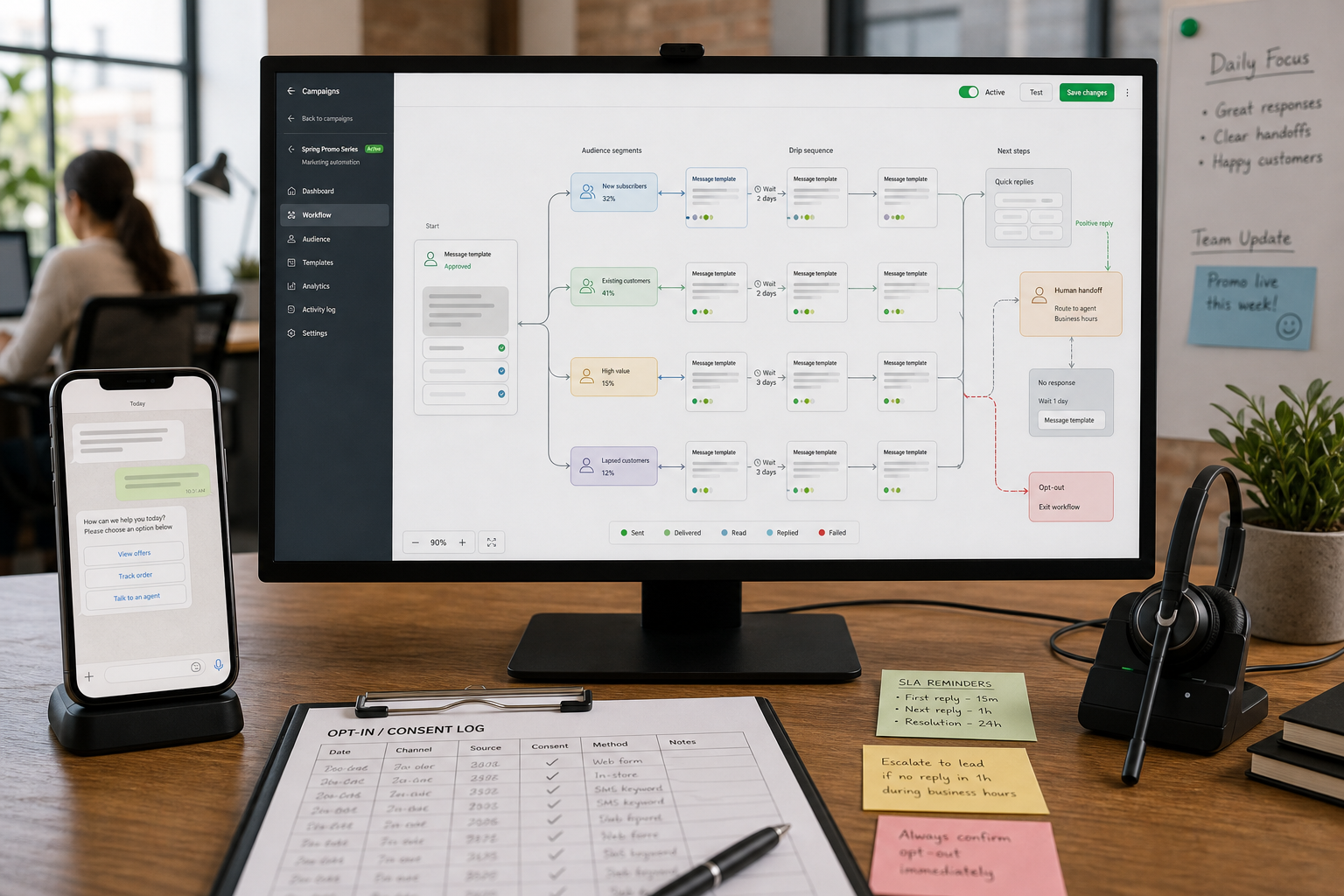
If you’re running a small business, WhatsApp can feel like a superpower—and a burden. Customers expect fast replies, your team can’t be online 24/7, and manual follow-ups quietly leak leads and revenue. WhatsApp Marketing Automation solves that by sending the right message at the right time (with consent), while keeping humans in the loop when it actually matters.
Quick Answer (40–60 words): WhatsApp marketing automation is the use of approved templates, triggers, and integrations (often via the WhatsApp Business Platform/API) to send timely messages based on customer actions—like inquiries, appointments, or abandoned carts. The best programs are permission-based, segmented, and measured. Automate repetitive tasks first and use human handoff for high-value or sensitive conversations.
What is WhatsApp marketing automation (in plain English)?
WhatsApp marketing automation means setting up workflows that automatically send WhatsApp messages when something happens—without a team member manually typing each message. “Something happens” could be a form submission, a booking, an order, a cart abandonment event, or a customer typing a keyword like “hours” or “pricing.”
In practice, automation usually includes:
- Triggered messages: sent after an action (e.g., “Thanks for your enquiry—here are next steps”).
- Template-based outbound messages: pre-approved message templates for outreach like reminders or promotions.
- Routing and handoff: escalation to a human when the conversation is complex or high-stakes.
- Integrations: syncing WhatsApp with a CRM, ecommerce platform, calendar, or help desk so conversations aren’t stuck in one inbox.
One important clarification: the WhatsApp Business Platform/API is typically what enables serious automation at scale. The WhatsApp Business app can help with basic quick replies and labeling, but it’s not the same as automated campaign and integration workflows.
Why WhatsApp automation works for small businesses (and when it doesn’t)
WhatsApp is a conversational channel. People open it to talk to someone, not to browse ads. That’s exactly why automation can be so effective—if you use it to reduce friction rather than push volume.
Where WhatsApp automation creates the most business value
- Faster lead response: instant follow-up after a form fill, DM, or click-to-WhatsApp ad.
- Fewer no-shows: appointment confirmations and reminders with an easy “reschedule” option.
- Support workload reduction: automate the top FAQs and route exceptions to humans.
- Abandoned cart recovery: a targeted nudge when the customer is already high-intent.
- Post-purchase reassurance: order updates and delivery information that reduce “Where is my order?” messages.
When WhatsApp automation is a poor fit
- You don’t have real opt-in: if your plan relies on scraped/purchased lists, stop. It’s a compliance and trust risk.
- Your offers are broad and unsegmented: WhatsApp punishes irrelevance faster than email.
- Your team can’t handle replies: successful WhatsApp campaigns often increase inbound responses. If nobody owns follow-up, customer experience suffers.
- You’re trying to “blast” your way to growth: WhatsApp works best as a relationship system, not an ad megaphone.
Business-First AI Insight: Don’t design WhatsApp automation around your internal departments (sales vs. support). Design it around customer intent stages: “I’m researching,” “I’m ready to buy,” and “I need help.” Intent-based flows reduce spam, increase relevance, and make automation feel helpful rather than robotic.
Start with the business problem (Business-First AI Framework™)
Small businesses often start by picking a tool first. That’s how you end up with messages going out… but no measurable outcome. Use this Business-First AI Framework™ sequence instead:
- Business problem: Where are you losing time or revenue? (Slow follow-up, no-shows, repetitive support, abandoned carts.)
- Workflow improvement: Map the current steps and remove unnecessary handoffs before automating.
- Choose the right solution: App vs. API + automation platform vs. CRM-led orchestration.
- Implement with human oversight: Define escalation rules and ownership for replies.
- Measure business outcomes: Response time, conversions, opt-outs, time saved.
- Standardize and scale: Expand to a second use case only after the first is stable.
Compliance and opt-in rules: the foundation of sustainable WhatsApp campaigns
Most WhatsApp marketing failures aren’t creative failures—they’re trust failures. Multiple vendor guides and best-practice sources consistently emphasize the same baseline rules: explicit opt-in, clear expectations, easy opt-out, and consent records.
What “good opt-in” looks like
- Explicit consent: the customer clearly agrees to receive WhatsApp messages from your business.
- Expectation setting: tell them what they’ll receive (offers, updates, reminders) and roughly how often.
- Proof and record-keeping: maintain a basic consent log (date, method, source, language/terms shown).
- Easy opt-out: “Reply STOP to opt out” (or your local equivalent) should work without friction.
A practical compliance checklist (launch readiness)
- Opt-in source is documented (website form, checkout checkbox, in-store QR, lead ad, etc.).
- Consent text is clear about message types and frequency.
- Opt-out instructions are included in relevant messages.
- Consent log is stored in a CRM, spreadsheet, or automation tool field.
- Templates are approved (where required) before outbound sends.
- Local sending hours are defined (avoid late-night blasts).
- Escalation rules exist (billing issues, complaints, medical/legal topics, high-value leads).
- Owner assigned for inbox monitoring and response SLAs.
Note: Specific policy details can vary by platform rules and region. Always verify current requirements via official Meta/WhatsApp Business documentation and your solution provider.
Best practices for WhatsApp campaigns that don’t feel spammy
The goal isn’t to send more messages. The goal is to send fewer messages that earn replies. These practices are the difference between “helpful” and “blocked.”
1) Segment aggressively (relevance beats volume)
Segmentation is your main anti-spam strategy. Common segmentation dimensions that small businesses can implement quickly:
- Customer status: lead, first-time buyer, repeat buyer, VIP, inactive/dormant.
- Interest: which service/product category they asked about.
- Lifecycle stage: researching vs. ready to buy vs. needs support.
- Location/language: especially if your business is multilingual or regional.
- Engagement level: recent replies/clicks vs. silent contacts.
If you can’t segment yet, don’t compensate by blasting. Fix the data first.
2) Keep copy short, specific, and single-purpose
WhatsApp messages should read like a helpful human wrote them:
- One main action per message: book, reply with a number, click one link, confirm yes/no.
- Value first: answer a question, reduce effort, clarify next steps.
- Minimal fluff: long intros and multi-offer messages reduce responses.
3) Use timing as a conversion lever
WhatsApp performs best in high-intent moments. Examples:
- Within minutes after an enquiry
- 24 hours and 2 hours before an appointment
- 1–3 hours after cart abandonment (depending on your buying cycle)
- Shortly after delivery for feedback or support
Also: send during reasonable local hours. “Correct message, wrong time” still feels intrusive.
4) Use rich media sparingly
Images, PDFs, and short videos can improve clarity (menus, catalog snippets, directions, prep instructions). But rich media can also distract, slow down customers, or feel promotional. A good rule: only add media when it reduces decision effort or support questions.
5) Build a content calendar so WhatsApp stays useful
If WhatsApp becomes a random stream of promotions, opt-outs rise. A lightweight calendar helps you stay consistent and selective:
- Utility messages: reminders, updates, FAQs
- Relationship messages: tips, restock alerts, helpful content
- Promotional messages: targeted offers with clear relevance
What to automate vs. what to keep human (decision tree)
Automation should handle predictable conversations. Humans should handle trust-sensitive and exception-heavy conversations.
Fast decision tree
- Is the customer asking a repetitive question with a stable answer?
- Yes → Automate (FAQ flow), add “Talk to a person” option.
- No → Go to step 2.
- Is the outcome high-value or high-risk? (big purchase, complaint, refund, health/legal sensitivity)
- Yes → Human-first, automation can assist with routing/context.
- No → Go to step 3.
- Can you define clear rules and required fields? (date, location, product, budget)
- Yes → Automate qualification/collection, then handoff if qualified.
- No → Human conversation (or redesign the workflow to collect better data).
What to automate first: the highest-ROI starting points
For most small businesses, the best first automations are the ones that remove repetitive work or protect revenue you’re already generating.
Priority #1: FAQ automation (support deflection)
- Best for: retail, restaurants, services, clinics
- Automate: hours, pricing ranges, locations, booking links, delivery windows, refund policy (where appropriate)
- Include: “Need help from a person? Reply HUMAN.”
Priority #2: Lead capture and follow-up (speed-to-lead)
- Best for: professional services, agencies, real estate, high-consideration purchases
- Automate: immediate acknowledgement + 2–4 qualifying questions + scheduling link
- Handoff: once qualified or when a customer asks a custom question
Priority #3: Appointment reminders (reduce no-shows)
- Best for: healthcare, salons, consulting, education
- Automate: confirm → remind → “reschedule” option
- Why it matters: fewer no-shows is often measurable within weeks
Priority #4: Abandoned cart recovery (recover intent)
- Best for: ecommerce
- Automate: helpful reminder + support offer + checkout link
- Keep it respectful: avoid repeated nudges without engagement
Priority #5: Reactivation campaigns (wake up dormant customers)
- Best for: retail, restaurants, subscriptions, repeat services
- Automate: segment dormant users → send relevant value offer → track responses
Tools for WhatsApp marketing automation (small-business perspective)
Tools matter, but only after you’ve decided what you’re automating. From the research, most options fall into three practical categories:
- WhatsApp Business Platform/API (via a provider): the foundation for scalable automation and templates.
- SMB-focused WhatsApp automation platforms: often provide guided setup, campaigns, and team inbox features on top of the API.
- Marketing automation / CRM platforms with WhatsApp support: useful when WhatsApp is one channel in a broader lifecycle program.
Business impact comparison table
| Tool / Approach | Best For | Ease of Use | Time to Value | Business Size | Notes |
|---|---|---|---|---|---|
| WhatsApp Business Platform/API | Serious automation, templates, compliance foundation | Medium | Medium | SMB to larger | Usually accessed via a solution/provider; setup complexity is higher than the app. |
| AiSensy | SMB-friendly WhatsApp campaigns and automation workflows | Medium | Fast to medium | Small to mid-size | Strong emphasis on opt-in, segmentation, templates, and optimization in guidance. |
| Superchat | Teams needing shared inbox + automation for customer messaging | Medium | Medium | Small teams | Useful if you need coordination across support and marketing. |
| Klaviyo | Ecommerce lifecycle messaging tied to customer data | Medium | Medium | Ecommerce SMB | Strong segmentation mindset; confirm WhatsApp channel specifics in current docs. |
| ActiveCampaign | Lead nurturing and segmented follow-up tied to CRM-style automations | Medium | Medium | SMB | Often best when you already run marketing automation and want WhatsApp as an added channel. |
| Brevo | SMB multi-channel marketing automation | Medium | Medium | Small to mid-size | Good for teams consolidating channels; verify current WhatsApp depth and setup requirements. |
| Twilio | Custom WhatsApp workflows built by developers/agencies | Advanced | Slower (but flexible) | Technical teams | Powerful infrastructure, but higher build/maintenance effort. |
| Braze / Infobip / Salesforce Marketing | Advanced orchestration and omni-channel programs | Advanced | Slower | Growth-stage / larger orgs | Often overkill for very small businesses unless you need enterprise-grade orchestration. |
Expert Verdict: which approach should most small businesses choose?
Most small businesses should start with an API-based WhatsApp automation platform (or a managed provider approach) rather than trying to build custom from scratch. You’ll get faster time to value, built-in campaign workflows, and fewer operational surprises. Custom builds (e.g., Twilio) become worthwhile when your workflows are truly unique and you can support ongoing maintenance.
Mini ROI calculator: should this automation be a priority?
You don’t need perfect data to make a good decision. Use simple inputs to estimate whether a WhatsApp automation use case is worth implementing next.
Time-saved estimate (support + follow-ups)
- Weekly time saved (hours) = (Automated conversations per week) × (Average minutes saved per conversation) ÷ 60
- Monthly value = Weekly time saved × 4 × (Approximate hourly cost of staff time)
Revenue recovery estimate (abandoned cart / lead follow-up)
- Recovered revenue per month = (Number of high-intent events per month) × (Estimated lift in conversions) × (Average order value)
Important: Use conservative assumptions and validate through a small test. WhatsApp is measurable quickly when you tie messages to specific triggers and track conversions or booked appointments.
Implementation playbook: how to launch your first WhatsApp automation (without tool chaos)
If you want a reliable rollout, focus less on “more flows” and more on one workflow that’s clean, compliant, and measurable.
Phase 1 (Week 1): Pick one use case and map the workflow
- Choose one measurable problem: lead follow-up, reminders, FAQ deflection, cart recovery.
- Write the “happy path” and the top 5 exceptions.
- Define ownership: who handles replies and what is your response SLA?
Phase 2 (Week 1–2): Set up opt-in and templates
- Add opt-in at the point of highest intent (checkout, booking form, enquiry form, in-store QR).
- Create 2–4 templates: confirmation, reminder, follow-up, opt-out confirmation (as needed).
- Set segmentation fields you’ll actually use (interest, status, last activity).
Phase 3 (Week 2): Launch small, measure, then iterate
- Start with a small segment (new leads this week, tomorrow’s appointments, etc.).
- Measure replies, clicks, conversions, and opt-outs.
- Adjust timing, wording, and escalation rules before expanding.
Workflow library: practical WhatsApp automation examples for small businesses
Use these as patterns. The details (timing, wording, qualification questions) should match your sales cycle and customer expectations.
Workflow 1: Lead qualification + booking (professional services)
Goal: reduce missed leads and speed up scheduling.
- Trigger: web form or click-to-WhatsApp ad
- Message 1 (instant): confirmation + expectation setting
- Message 2: ask 2–4 qualification questions (budget range, service type, timeline)
- Route: if qualified → send booking link + notify sales; if not qualified → share alternatives/resources
- Handoff: if customer asks for custom advice → human reply
Workflow 2: Appointment confirmation + reminders (clinics, salons, consultants)
Goal: reduce no-shows and rescheduling chaos.
- Trigger: appointment booked
- Message: “Reply 1 to confirm, 2 to reschedule”
- Reminder 24 hours before
- Reminder 2 hours before with address/parking/prep info
- Post-visit: optional feedback prompt or aftercare instructions (where appropriate)
Workflow 3: Abandoned cart recovery (ecommerce)
Goal: recover high-intent revenue without repeated nagging.
- Trigger: cart abandoned
- Message after a short delay: helpful reminder + one link back to checkout
- Follow-up (optional): offer help (size guide, delivery time, returns) rather than discount-first
- Stop conditions: purchase completed, opt-out, or no engagement after a defined limit
Workflow 4: FAQ deflection with human escape hatch (retail/restaurant/services)
Goal: reduce repetitive questions while preserving customer experience.
- Trigger: inbound keyword or menu selection (e.g., “hours,” “menu,” “shipping”)
- Auto-answer in 1–3 short messages
- Offer two next steps: “Reply A to order/book” or “Reply HUMAN to talk to us”
- Escalate to human if negative sentiment or repeated questions
Workflow 5: Reactivation campaign (repeat businesses)
Goal: bring back inactive customers with relevance.
- Segment: no purchase/visit in X days
- Message: personal, specific value (restock, seasonal service, loyalty reminder)
- CTA: one action (book, browse, reply with preference)
- Collect zero-party data: “Reply 1 for Category A, 2 for Category B” to improve future segmentation
Metrics that matter: how to measure WhatsApp marketing automation
The right metrics depend on your business goal. For small businesses, the most useful approach is to track a small set of metrics that connect directly to time saved or revenue.
Core performance metrics
- Opt-in rate: % of customers/leads who agree to WhatsApp messaging
- Read/open signal (where available): whether messages are being seen
- Response rate: % who reply (strong indicator of relevance)
- Click-through rate (CTR): % who click your link
- Conversion rate: bookings, purchases, quote requests completed
- Opt-out rate: early warning sign of over-messaging or poor targeting
Operational impact metrics (often overlooked, highly valuable)
- Median first response time: for inbound messages (automation should reduce it)
- First-contact resolution rate: % resolved without back-and-forth
- Support deflection: fewer repetitive questions reaching humans
- Time saved per week: estimated from handled conversations and average handling time
Common mistakes small businesses make (and how to avoid them)
Mistake 1: Treating WhatsApp like email blasts
Why it happens: WhatsApp looks like “just another channel.”
Consequence: opt-outs, complaints, and long-term trust damage.
Better approach: keep frequency low, segment tightly, and tie messages to intent stages.
Mistake 2: Skipping consent logging
Why it happens: teams move fast and assume “they messaged us once” is enough.
Consequence: compliance risk and messy disputes when customers complain.
Better approach: store opt-in source and timestamp in a field you can audit.
Mistake 3: Automating complex conversations end-to-end
Why it happens: automation feels like it should replace the whole interaction.
Consequence: frustrated customers and lost high-value opportunities.
Better approach: automate the first 60–80% (routing, qualification, answers), then hand off.
Mistake 4: Not planning for increased replies
Why it happens: teams focus on sending, not receiving.
Consequence: slow responses, poor customer experience, wasted campaign potential.
Better approach: set staffing and SLA expectations before you scale WhatsApp campaigns.
Start Today / Improve Next / Scale Later (implementation priorities)
Start Today (low effort)
- Pick one workflow to automate (lead follow-up, reminders, FAQ, cart recovery).
- Write a simple opt-in statement and add it to your main capture point (form/checkout/QR).
- Draft 2–3 short messages with one clear CTA each.
Improve Next (next 30 days)
- Add segmentation fields (interest, status, last activity) and start tagging consistently.
- Implement human handoff rules and inbox ownership.
- Track baseline metrics: response time, response rate, opt-outs, conversions.
Scale Later (after measurable success)
- Expand to a second workflow only after the first is stable and measured.
- Integrate WhatsApp with CRM/ecommerce for better targeting and reporting.
- Run controlled tests on timing, CTAs, and segmentation to improve performance without increasing volume.
FAQs
What is WhatsApp marketing automation?
WhatsApp marketing automation is the use of triggers, templates, and integrations to send WhatsApp messages automatically based on customer actions or business rules. It’s typically implemented via the WhatsApp Business Platform/API and works best when messages are consent-based, relevant, and tied to a measurable goal.
Do I need opt-in for WhatsApp marketing?
Yes. Best-practice guidance consistently emphasizes explicit opt-in. You should clearly explain what messages people will receive, keep a record of consent, and make opting out easy. Specific requirements can vary, so verify current rules in official Meta/WhatsApp documentation.
How often should I message customers on WhatsApp?
There’s no universal number, but the consistent rule is: message sparingly and stay relevant. WhatsApp is a private channel, so frequent promotions can increase opt-outs. Use segmentation, intent-based triggers, and reasonable local sending hours to avoid over-messaging.
What should a small business automate first on WhatsApp?
Start with high-volume, repetitive, or high-intent workflows: FAQs, lead follow-up, appointment reminders, order updates, and abandoned cart recovery. These are usually easier to measure and create value quickly through time saved and conversions protected.
Should I use the WhatsApp Business app or the WhatsApp Business API?
If you want true marketing automation—templates, triggers, segmentation, integrations, and scalable workflows—the WhatsApp Business Platform/API is typically the right foundation. The WhatsApp Business app can help with basic quick replies but is limited for campaign automation and system integrations.
How do I keep WhatsApp automation from feeling spammy?
Use explicit opt-in, set expectations, segment your audience, keep messages short with one clear CTA, and focus on timing and usefulness. Build a content calendar so promotions don’t overwhelm utility messages, and always provide an easy opt-out.
What metrics matter most for WhatsApp campaigns?
Track response rate, click-through rate, conversion rate, opt-in rate, and opt-out rate. For operational ROI, also track median first response time, first-contact resolution, support deflection, and estimated time saved per week.
Can WhatsApp marketing automation help recover abandoned carts?
Yes. Abandoned cart workflows are a common high-impact use case because they target customers who already showed intent. The best approach is a helpful reminder, an offer of assistance, and a simple link back to checkout—then stop when the customer buys or disengages.
Conclusion: treat WhatsApp like a relationship system, not a broadcast channel
The best WhatsApp marketing automation programs don’t win by being louder. They win by being more selective: permission-based opt-ins, intent-driven timing, and automation that removes friction while preserving human trust when it matters.
If you want a reliable next step, choose one workflow (lead follow-up, reminders, FAQs, or cart recovery), implement it with clear consent and measurement, and iterate until it’s stable. Once you can prove time saved or revenue recovered, scaling becomes a business decision—not a guessing game.
Next step: Map your top customer-intent moments this week (researching, ready-to-buy, needs support) and pick the single moment where faster WhatsApp response would create the biggest measurable impact.