Best AI Use Cases for Small Businesses Across 20 Industries
If you’re a small business owner, you don’t need “more AI.” You need fewer repetitive tasks, faster customer responses, fewer errors, and a clearer path to growth. That’s why the best AI use cases for small businesses aren’t flashy—they’re practical workflow improvements you can measure. In this guide, you’ll find AI use cases by industry across 20 sectors, plus a simple way to pick the right first use case without wasting time or budget.
Quick Answer (40–60 words): The best AI use cases for small businesses typically start with high-volume, low-risk work: customer support triage, document and invoice processing, lead qualification, and repetitive marketing and reporting. Choose use cases by workflow (inputs → steps → outputs) and measure success with clear KPIs like hours saved, response time, error rate, and conversion rate.
What “AI use cases” really means for small businesses
An AI use case is not “buying an AI tool.” It’s a specific, repeatable business outcome you want (like faster invoice processing) tied to a workflow where AI helps complete or improve steps (like extracting fields from invoices and routing them for approval).
For small businesses, the most realistic “industry AI” wins fall into a few categories:
- LLM assistants (generative AI): Draft, summarize, classify, and rewrite text for knowledge work (emails, proposals, internal SOPs). Fast to adopt, but needs review.
- Customer support AI (chatbots + assisted replies): Handle FAQs, triage tickets, route to humans. Requires a maintained knowledge base.
- Workflow automation platforms: Connect your apps and move tasks/data between them. Often the difference between “AI demo” and “AI that saves time.”
- Document AI / OCR: Extract data from invoices, forms, contracts, IDs. Great for back office; quality depends on document consistency.
- Predictive analytics / classic ML: Forecast demand, score leads, detect anomalies. Needs historical data and defined metrics.
- Vision AI: Inspect products, detect safety issues, analyze images/video. Higher setup complexity; best when inspection is frequent and valuable.
One important point: not every strong AI business application is generative AI. Many of the best “save time and reduce errors” wins come from document extraction, routing, and basic prediction—especially for small teams.
How to choose the right AI use case first (without tool sprawl)
Most small businesses get stuck because they start with tools (“We should use AI”) instead of a workflow (“We spend 10 hours/week copying invoice data”). The simplest decision rule is:
Start with work that is repetitive, frequent, and measurable—then add AI only where it reduces time or errors.
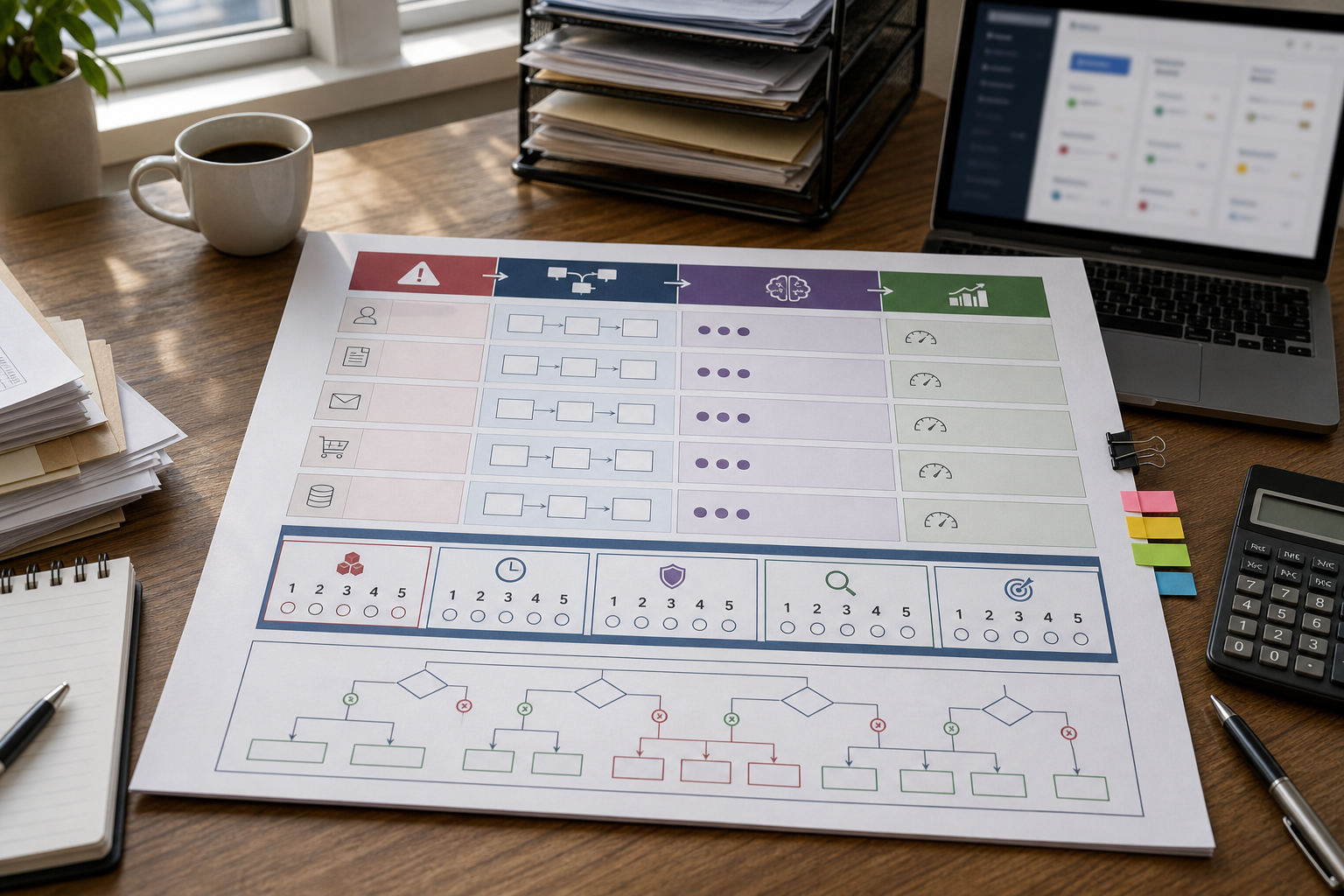
The Business-First AI Framework™ for selecting use cases
Use this sequence to keep decisions grounded in business value:
- Business problem: What is slowing you down or causing avoidable cost?
- Workflow improvement: What steps are repetitive, delayed, or error-prone?
- Choose the right solution: Automation, document AI, chatbot, predictive model, or an LLM assistant?
- Implement with human oversight: Define review and escalation rules.
- Measure business outcomes: KPIs that prove value (time saved, response time, conversion, error rate).
- Standardize and scale: Turn the win into a repeatable process before expanding.
A practical selection scorecard (fast ROI bias)
Before committing to an “industry AI” project, score the candidate workflow from 1–5:
- Volume: How often does it happen weekly?
- Time drain: How much human time per week?
- Risk: What happens if AI makes a mistake?
- Clarity: Are inputs/outputs consistent and easy to define?
- Measurability: Can you track a KPI within 2–8 weeks?
In small businesses, the best first use cases tend to score high on volume/time/measurability, and low on risk.
Business-First AI Insight: The “best” AI use case is usually the one your team will actually adopt. If a workflow crosses too many tools, has unclear ownership, or requires perfect data, it won’t stick—even if the AI is impressive. Adoption is a business constraint, not a technical one.
The core matrix: Problem → Workflow → AI category → KPI
This is the simplest way to turn AI ideas into implementable projects. Pick one row, run a small pilot, measure, then expand.
| Business Problem | Workflow (high level) | AI Category | Good First KPI |
|---|---|---|---|
| Too many repetitive customer questions | FAQ → response draft → escalate complex | Support AI / chatbot + LLM assist | First-response time; % escalations |
| Manual invoice entry and approval delays | Extract fields → validate → approve → sync | Document AI (OCR) + workflow automation | Minutes per invoice; error rate |
| Sales team wastes time on weak leads | Collect lead data → score → prioritize → follow-up | Predictive analytics / CRM AI | Lead-to-meeting rate; close rate |
| Slow proposal and report writing | Brief → draft → review → approve → send | LLM assistant | Cycle time; revision count |
| Stockouts and overstock | Sales history → forecast → reorder → monitor | Forecasting ML + automation | Stockout rate; inventory turns |
| Errors hidden in finance operations | Transactions → anomaly flags → review → correct | Anomaly detection | # anomalies found; time-to-review |
Best AI use cases by business function (quick wins that work in most industries)
Even though this article focuses on AI use cases by industry, small businesses usually get the fastest results by starting with cross-functional workflows. These apply almost anywhere and typically require less custom data than industry-specific projects.
1) Customer support and front desk
Best use cases:
- Ticket triage: classify and route requests; suggest replies for staff to approve
- FAQ automation: answer common questions 24/7 with escalation rules
- Appointment and reservation handling: capture intent, propose time slots, confirm, and notify
Why it matters: customer-facing delays cost trust and revenue, and support load grows faster than headcount in small teams.
When not to use it: if you don’t have stable policies (returns, cancellations, service boundaries), your bot will confuse customers. Fix policy clarity first.
2) Sales and marketing execution
- Lead qualification: score and prioritize leads based on fit and intent signals
- Personalized outreach drafts: generate first-draft emails with human review
- Content production support: briefs, outlines, ad variations, product descriptions
- Reporting summaries: turn weekly metrics into plain-English updates
Trade-off to understand: generative outputs can be wrong or off-brand. The workflow must include review and brand guardrails.
3) Operations and internal admin (often the highest ROI)
- Document processing: extract data from invoices, POs, delivery notes, onboarding forms
- Task routing: automatically assign tasks based on type/priority/customer tier
- Inventory and demand forecasting: predict demand to reduce stockouts/overstock
- Standard operating procedures (SOPs): generate/checklistify steps and keep docs consistent
Consultant insight: These “boring” workflows are where small businesses usually win first, because they’re measurable and repeatable. You can’t scale growth if your back office can’t scale volume.
4) Finance and accounting support
- Invoice capture and coding: OCR extraction and suggested categories
- Reconciliation assistance: matching records and flagging mismatches
- Anomaly detection: identify unusual transactions or patterns for review
When not to use it: fully autonomous decisions in finance without approvals. Keep a review step for anything that can create compliance or cash-flow risk.
5) HR and people operations
- Resume pre-screening support: structured summaries against role criteria (with fairness checks)
- Onboarding automation: collect documents, schedule training, and track completion
- Internal knowledge assistant: answer policy and process questions consistently
Best AI use cases by industry: 20 practical starting points
The table below gives you a practical “first use case” per industry, plus a second use case that often becomes valuable once the basics work. Use it as an idea generator and prioritization tool—then map your chosen idea to the Problem → Workflow → AI category → KPI matrix.
| Industry | Best First AI Use Case (small-business friendly) | Next Best Use Case | Typical AI Category | Good KPI |
|---|---|---|---|---|
| 1) Retail (brick-and-mortar) | Customer support + product Q&A + returns policy assistant | Demand forecasting for replenishment | Support AI; forecasting | Response time; stockout rate |
| 2) eCommerce | Product descriptions + support triage (shipping/returns) | Recommendation & upsell prompts | LLM assistant; support AI | Time per listing; conversion rate |
| 3) Restaurants | Reservations + FAQ bot (hours, menu, allergens, parking) | Review sentiment analysis for ops fixes | Support AI | No-show rate; response time |
| 4) Hospitality (hotels, tours) | Booking questions + itinerary FAQs with human handoff | Staff scheduling support (forecast-driven) | Support AI; forecasting | Booking conversion; call volume |
| 5) Logistics & delivery | Customer updates + exception handling triage | Route optimization / demand forecasting | Automation; predictive analytics | On-time rate; cost per delivery |
| 6) Manufacturing | Quality checks on paperwork (nonconformance reports, logs) | Vision-based inspection or predictive maintenance | Document AI; vision AI | Defect rate; downtime hours |
| 7) Construction | Quote/proposal drafting + change order summaries | Document capture for invoices and compliance docs | LLM assistant; document AI | Bid cycle time; rework rate |
| 8) Real estate | Lead qualification + follow-up drafts | Listing description generation + FAQ assistant | LLM assistant; predictive scoring | Lead-to-showing rate |
| 9) Professional services (consulting, agencies) | Proposal and report drafting with templates | Internal knowledge assistant (past work, SOPs) | LLM assistant | Turnaround time; utilization |
| 10) Marketing agencies | Content variations + client reporting summaries | Lead scoring and outreach personalization | LLM assistant; analytics | Hours per deliverable |
| 11) Accounting & bookkeeping | Invoice extraction and coding suggestions | Anomaly detection for review prioritization | Document AI; anomaly detection | Time per client/month |
| 12) Financial services (small firms) | Client onboarding document processing | Risk/anomaly monitoring with review workflows | Document AI; anomaly detection | Onboarding cycle time |
| 13) Healthcare clinics | Scheduling + admin intake assistance (with strict oversight) | Triage support (non-diagnostic) + documentation summaries | Automation; LLM assist | No-show rate; admin hours |
| 14) Dental clinics | Appointment reminders + FAQ assistant | Treatment plan explanation drafts (review required) | Automation; LLM assist | Fill rate; call volume |
| 15) Legal services (small firms) | Contract clause extraction and document search | First-draft letters and summaries (review required) | Document AI; LLM assistant | Time per matter |
| 16) HR & recruiting agencies | Resume summarization + shortlist support | Onboarding workflow automation | LLM assist; automation | Time-to-shortlist |
| 17) Education & training providers | Content outline generation + admin automation | Tutor/support assistant for FAQs | LLM assistant; support AI | Content production time |
| 18) Automotive services (repair shops) | Customer updates + estimate explanations drafts | Inventory forecasting for common parts | LLM assist; forecasting | Approval turnaround time |
| 19) Home services (HVAC, plumbing) | Booking intake triage + dispatch-ready summaries | Quote drafting and follow-up automation | Support AI; automation | Time-to-schedule; lead-to-job rate |
| 20) Nonprofits & community orgs | Grant drafting support + donor comms templates | Volunteer onboarding and FAQ automation | LLM assistant; automation | Hours saved per campaign |
How to prioritize “AI use cases by industry” when you have limited time
Once you have a shortlist, prioritize with two practical filters small businesses care about:
- Time to value: Can you see measurable results in 2–8 weeks?
- Implementation complexity: Does it require clean historical data, integrations, or custom models?
AI use cases with the fastest ROI (typical for small businesses)
Based on common patterns across the research, these are frequently the earliest wins:
- Support triage + assisted replies (fast setup; measurable response-time improvements)
- Document AI for invoices/forms (measurable minutes saved per document)
- LLM-assisted drafting for proposals, emails, and summaries (fast adoption when templates exist)
- Workflow routing between your existing apps (reduces “copy/paste operations” that quietly consume hours)
Use cases that usually take longer (but can be high impact later)
- Forecasting and predictive analytics (needs sufficient, reliable historical data)
- Vision AI (more engineering effort, hardware/camera considerations, and monitoring)
- High-risk regulated workflows (legal/health/finance decisions need oversight and governance)
Expert Verdict: where most small businesses should start
Expert Verdict: For most small businesses, the best first AI use case is a workflow that removes repetitive handling—support triage, document processing, or internal drafting—because it’s measurable, low-to-moderate risk, and doesn’t require perfect data. Predictive and vision projects can be excellent, but they’re typically second-wave initiatives after you’ve proven adoption and measurement.
Practical examples (what “good” looks like in real workflows)
Below are realistic scenarios to show how AI business applications become operational systems—not isolated “AI outputs.”
Example 1: Retail store — customer support triage that doesn’t annoy customers
Business problem: staff constantly answer the same questions (hours, availability, returns), pulling them away from the floor.
Workflow design (simple and effective):
- Customer asks a question via web chat, social DMs, or email.
- System classifies it: FAQ vs. order issue vs. complaint.
- FAQ gets an instant answer from a maintained knowledge base.
- Order issues collect order number and route to a human with a summary.
- Complaints route to a manager queue with priority tags.
AI category: customer support AI + workflow automation.
What to measure: first-response time, % of conversations escalated, and customer satisfaction (or a simple post-chat rating).
Common mistake: launching a bot without a clear escalation rule. Customers don’t hate bots—they hate being trapped.
Example 2: Accounting firm — invoice processing that reduces rework
Business problem: manual invoice data entry causes errors and slows monthly close.
Workflow design:
- Invoices arrive (email upload, client portal, or scanned PDFs).
- Document AI extracts vendor, date, totals, line items (where possible).
- Validation rules check for missing fields and duplicates.
- Exceptions go to a human review queue.
- Approved invoices sync to the accounting system.
AI category: document AI/OCR + automation.
What to measure: minutes per invoice, % needing manual correction, and cycle time from receipt to approval.
Trade-off: document AI accuracy varies with document quality. Expect an exception workflow; don’t design for 100% straight-through processing on day one.
Example 3: Logistics — exception handling before route optimization
Business problem: drivers and dispatch spend too much time on “where is my delivery?” and delivery exceptions.
Good first step: build an exception triage workflow before investing in advanced optimization.
- Capture exception type (delay, address issue, failed delivery).
- Auto-generate customer updates and next steps.
- Route complex exceptions to a dispatcher with a summary.
Why this sequencing matters: exception reduction and communication improvements often deliver quicker results than complex routing projects—especially if data quality is still maturing.
Example 4: Legal — clause extraction with human review
Business problem: staff spend hours searching contracts for specific clauses and obligations.
Workflow design:
- Upload documents → extract key clauses/fields → highlight sections → produce a review checklist.
- Human confirms findings, flags risk, and finalizes advice.
AI category: document AI + LLM-assisted summarization.
Governance note: in legal workflows, AI should reduce search and drafting time—not replace professional judgment. Keep a clear review and sign-off step.
Decision tree: which AI use case should you start with?
Use this quick decision tree to narrow your first project.
- Do you handle lots of repetitive documents (invoices, forms, contracts)?
- Yes → Start with Document AI + approval routing.
- No → go to #2.
- Do customers ask the same questions repeatedly?
- Yes → Start with Support triage + knowledge base answers + escalation.
- No → go to #3.
- Is your team producing lots of written output (proposals, reports, emails, listings)?
- Yes → Start with LLM-assisted drafting with templates and review.
- No → go to #4.
- Do you have historical data and a planning problem (inventory, demand, staffing)?
- Yes → Consider forecasting / predictive analytics (after defining KPIs and data readiness).
- No → Start with workflow automation to improve data capture and consistency first.
Common mistakes small businesses make with industry AI (and how to avoid them)
Mistake 1: Starting with a tool instead of a workflow
Why it happens: tools are easy to buy; workflows are harder to map.
Consequence: you get “AI outputs” that don’t connect to real operations.
Better approach: define the handoffs: what comes in, what decisions happen, what goes out, and who owns exceptions.
Mistake 2: Choosing high-risk use cases first
Why it happens: leaders pick “strategic” projects that feel important (legal conclusions, clinical decisions, automated approvals).
Consequence: governance slows everything down; trust drops after the first visible error.
Better approach: start with low-risk support: drafting, triage, extraction, routing—then scale toward higher-risk work with stronger controls.
Mistake 3: Not defining KPIs upfront
Why it happens: teams assume “AI will help” without specifying what “help” means.
Consequence: you can’t prove ROI, so adoption fades.
Better approach: pick 1–2 KPIs per pilot: hours saved, response time, error rate, conversion rate, cost per case.
Mistake 4: Treating the knowledge base as “set and forget”
Why it happens: support content is seen as documentation, not operations.
Consequence: support AI drifts, answers become outdated, and escalations increase.
Better approach: assign ownership and a monthly review cadence (top questions, failed answers, policy changes).
Mistake 5: Underestimating exception handling
Why it happens: teams design for the happy path.
Consequence: staff lose time fighting edge cases, and customers get stuck.
Better approach: design a clear exception queue and escalation rules from day one.
How to implement a pilot in 30 days (small-business realistic)
You don’t need a massive transformation to get value. A focused pilot is the safest way to prove results and build internal confidence.
Week 1: Pick one workflow and define success
- Choose one use case with high volume and low risk.
- Write a one-page workflow: inputs, steps, outputs, owner, exception path.
- Set baseline metrics (current time per task, response time, error rate).
Week 2: Build the minimum viable workflow
- Implement the simplest version that can run end-to-end.
- Keep humans in the loop for approvals and escalations.
- Document “what counts as done” so the team works consistently.
Week 3: Run in production with monitoring
- Start with a subset: one inbox, one location, one service line, or one team.
- Track exceptions daily and adjust rules/knowledge content.
- Collect feedback from staff: where does it save time, where does it add friction?
Week 4: Measure ROI and decide to scale
- Compare KPIs vs. baseline.
- Standardize: templates, QA checklist, knowledge base ownership.
- Decide: scale, iterate, or stop.
Pilot readiness checklist
- We have a clear workflow owner.
- We can measure at least one KPI within 2–8 weeks.
- We’ve defined human review/escalation rules.
- We know where the data comes from (inbox, forms, CRM, POS, accounting).
- We have a plan to maintain knowledge/rules monthly.
Implementation priorities
Start Today (low effort):
- List your top 10 repetitive tasks and estimate weekly hours spent.
- Pick one workflow and define a baseline KPI.
- Draft an escalation rule: when must a human take over?
Improve Next (next 30 days):
- Run one pilot end-to-end (support triage, invoice extraction, or drafting workflow).
- Build a small knowledge base or template library that the workflow relies on.
- Set up exception tracking (why did the workflow fail, what fix prevents repeats?).
Scale Later (after proven results):
- Expand to a second workflow in the same function (e.g., support → refunds processing).
- Add forecasting/predictive analytics once data capture is reliable.
- Standardize governance for higher-risk domains (finance/legal/health).
FAQs about AI use cases for small businesses
What are the best AI use cases for small businesses?
The most practical AI use cases are usually customer support triage, document and invoice processing, lead qualification, and LLM-assisted drafting for proposals, emails, and reports. These workflows are repetitive, measurable, and typically deliver value faster than complex predictive or vision projects.
Which industries get the fastest ROI from AI?
Industries with high-volume, repeatable workflows—like retail, eCommerce, professional services, logistics, and finance operations—often see the clearest near-term gains because they can measure improvements in response time, hours saved, and error reduction quickly.
What AI use cases should I start with first?
Start with low-risk, high-volume tasks where a mistake is recoverable and a human can review: ticket triage, document extraction with approvals, and drafting workflows with templates. Avoid starting with fully automated decisions in regulated or high-risk areas.
Do small businesses need custom AI models?
Usually not. Many small-business AI business applications can start with off-the-shelf assistants, document extraction tools, and workflow automation. Custom models become more relevant when you have strong data maturity, stable processes, and a clear reason a generic approach can’t meet your needs.
Is AI only useful for big companies?
No. Small businesses often benefit earlier because even modest time savings matter more when teams are small. The key is choosing workflows that are repetitive and measurable, not trying to replicate enterprise-scale AI programs.
What’s the biggest mistake when adopting AI?
Starting with tools before defining the business problem and workflow. Without a mapped process, clear ownership, and KPIs, AI becomes an isolated experiment instead of an operational improvement.
Which AI use cases need human supervision?
Workflows in legal, healthcare, finance, and other regulated contexts typically need tighter human oversight—especially where errors create compliance risk, financial loss, or patient/client harm. In these cases, AI is best used for search, summarization, extraction, and drafting support rather than final decisions.
How do I measure AI success in a small business?
Use a small set of operational KPIs tied to the workflow: hours saved per week, time per task, first-response time, ticket resolution time, error rate, cost per case, lead-to-close rate, and adoption rate (how often the team actually uses the workflow).
Conclusion: the best AI use case is the one you can operationalize
The most useful way to think about AI use cases isn’t “Which industry is best for AI?” It’s “Which workflow in my business is repetitive, measurable, and ready to improve?” When you start with the problem, map the workflow, choose the right AI category, and measure outcomes, AI stops being a trend and becomes operational leverage.
Your next step is simple: pick one workflow from the industry table, define one KPI, and run a 30-day pilot with human oversight. Once you can prove value in one place, scaling becomes a business decision—not a leap of faith.
Next step (helpful CTA): If you want a clearer starting point, run a quick internal “use-case audit” this week: list your top repetitive workflows, estimate weekly hours, and choose the one with the best mix of volume, low risk, and measurability. That single choice usually determines whether your AI adoption feels easy—or chaotic.