Lead Qualification Automation Case Study Using ChatGPT + HubSpot
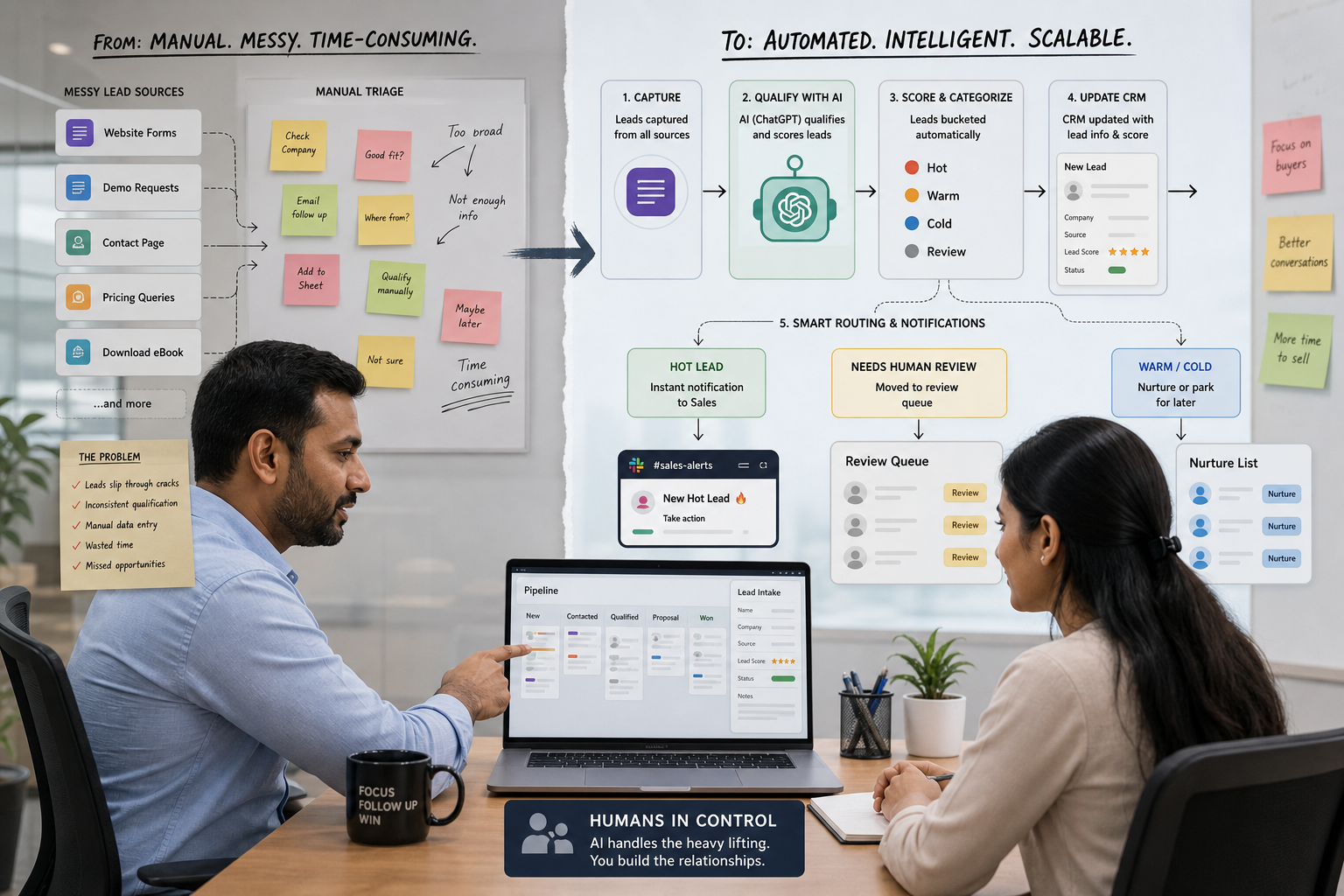
A small B2B services company receives hundreds of inbound leads every month, but sales reps spend valuable time manually reading, scoring, and routing them. This case study shows how ChatGPT and HubSpot can automate the repetitive part of that process while keeping salespeople in control of high-value and ambiguous leads.
Case study classification: Illustrative SMB Implementation Case Study (India, B2B Services)
Evidence type: Proposed workflow + illustrative ROI model + externally reported benchmarks (no verified results for a single named business)
Primary workflow: Website lead capture → AI qualification → lead scoring → HubSpot update → sales notification → follow-up / nurture
Automation risk: Moderate (misrouting, inconsistent scoring, privacy exposure if external AI is used)
Implementation difficulty: Moderate (higher if you add custom integrations and enrichment)
Scope & Assumptions
This is an illustrative scenario based on a common inbound-sales workflow in small B2B service businesses. The tools, field mappings, costs, and potential outcomes are examples for planning purposes and do not represent verified results from a specific business.
Case Study Scope & Classification
This case study shows how a small B2B services team in India could redesign inbound lead handling so that:
- Every new website lead is triaged consistently (fit + intent)
- Sales only gets “high-signal” notifications
- HubSpot becomes the system of record for qualification outcomes
- Humans keep control over edge cases, high-value accounts, and exceptions
The focus is not “using AI because it’s available.” The focus is removing operational friction: slow response, inconsistent qualification, and wasted time on low-fit leads.
Business Context & Workflow
Business type: A small B2B services company (or agency/consultancy) generating inbound leads via website forms (contact, demo request, pricing, or consultation booking).
Typical team setup: A founder-led sales motion or a small sales team (often a mix of SDR/BDR + one closer). In many SMBs, the same people who sell also manage operations, proposals, and client delivery—so time spent on manual triage competes directly with revenue work.
Where leads come from:
- Website forms
- Landing pages for specific services
- Paid ads (often higher lead volume but mixed quality)
- Organic inbound and referrals
Systems commonly involved:
- Website form tool (native website form, HubSpot form, or a form builder)
- HubSpot CRM as the system of record (Contacts, Companies, Deals, Tasks)
- Email and/or Slack for sales notifications
- Calendar for booking links (optional)
Why this workflow matters: In inbound sales, “speed-to-lead” and consistent prioritization are often the difference between a booked meeting and a lost opportunity—especially when the team is lean and lead quality is uneven.
The Problem & Business Impact
Manual lead qualification usually breaks down in predictable ways in small B2B service businesses:
- Efficiency: Sales spends time reading every inbound submission (including students, job seekers, vendors, and low-budget buyers) instead of focusing on real opportunities.
- Quality and consistency: Different reps apply different standards. One rep may treat “Need SEO help” as high intent; another may ignore it. This inconsistency makes pipeline reporting unreliable.
- Customer experience: High-intent leads can wait hours (or longer) for a response, while lower-intent leads might get immediate attention simply because they were seen first.
- Capacity and cost: As lead volume grows, the business either accepts slower response times or adds headcount before it’s economically justified.
Why this is a good automation candidate (when done carefully):
- The early triage step is repetitive and high volume.
- Many qualification signals are present at capture time (form fields + free-text “requirements”).
- The output can be structured (labels, scores, routing decisions), making it measurable.
When it may not be a good automation candidate: If your lead volume is low (for example, a few leads per week) or your qualification logic is highly bespoke and requires deep context, a simple process/SLA improvement may outperform an AI build.
Before: Manual Workflow
Website form submission → Sales inbox notification → Rep reads the message → Rep guesses fit/intent → Rep updates HubSpot (sometimes) → Rep replies (sometimes) → Follow-up depends on memory and time
Common failure points in the manual “before” workflow:
- No shared qualification rubric: The team relies on intuition rather than a consistent scorecard.
- CRM fields are incomplete: HubSpot becomes a partial record; later, nobody trusts reports.
- Notification noise: Everyone gets notified about everything, so real opportunities get buried.
- Weak follow-up discipline: The lead might get an initial reply, but task creation, reminders, and next steps are inconsistent.
Baseline measurement note (important): Many SMBs do not have reliable baseline metrics for (a) time-to-first-response, (b) time spent per lead on triage, and (c) meeting-booked rate by lead segment. If those metrics are not currently tracked, the first step is to instrument the workflow before claiming any improvement.
AI Automation Design
The proposed design uses ChatGPT as a controlled “reasoning layer” to interpret lead context (especially free text), while HubSpot remains the system of record and the place where routing rules and workflow actions are enforced.
What the automation is trying to do (in business terms)
- Turn messy, inconsistent inbound form data into structured qualification outputs (fit, intent, urgency, recommended next action).
- Write those outputs into HubSpot properties so the team can route, report, and improve.
- Notify sales only when action is required (and avoid spamming the team for low-fit leads).
AI role in this workflow
- Classification: Hot / Warm / Cold / Review
- Extraction: Pull out budget signals, timeline, service requested, and constraints from free text
- Recommendation: Suggest next action (call now, email within SLA, nurture, request more info)
- Drafting (optional): Create a first-response email draft for rep review
Trigger, tasks, rules, data access, actions
| Design element | Proposed approach |
|---|---|
| Trigger | New form submission (HubSpot form or website form syncing into HubSpot) |
| AI task | Score fit and intent using a defined rubric; extract key details from free-text fields; return structured JSON-like outputs (label, score, rationale, missing fields) |
| Business rules | Hard rules override AI (e.g., excluded industries, minimum company size, service not offered, spam patterns). AI cannot “approve” a lead that violates hard rules. |
| Data access | Minimum necessary lead fields only (e.g., name, email, company, role, website, service interest, message). Avoid sending unnecessary PII or sensitive fields. |
| System actions | Update HubSpot properties (score, label, routing); create task for owner; notify sales channel for Hot leads; enroll Cold leads into nurture (if appropriate) |
| Human approval | Required for “Review” leads, strategic accounts, and any lead where AI confidence is low or critical fields are missing |
| Fallback | If AI fails, times out, or returns low confidence: route to manual queue with a clear SLA |
| Monitoring & auditability | Log AI inputs/outputs (redacted where needed), confidence, final routing decision, and whether humans overrode the recommendation |
Example: How ChatGPT + HubSpot Work Together
A practical implementation can keep HubSpot as the system of record while using an AI model to interpret the unstructured parts of a new lead submission.
Example workflow:
Website form submission → HubSpot Contact created/updated → Automation layer/webhook → ChatGPT qualification → Structured output → HubSpot properties updated → HubSpot workflow applies routing rules → Sales notification/task created
When a prospect submits a form describing their requirements in free text, the automation layer can send the minimum necessary lead information to ChatGPT for qualification. ChatGPT returns structured recommendations such as fit score, intent score, lead label, rationale, and whether human review is required.
The automation layer then writes those outputs back into predefined HubSpot properties. HubSpot workflows can use those properties to determine the next action.
For example:
- Hot lead: Assign to the appropriate sales owner, create a follow-up task, and send a sales notification.
- Warm lead: Assign a follow-up task with a longer response SLA.
- Cold lead: Route to an appropriate nurture workflow if consent and messaging rules allow.
- Review lead: Send to a human review queue instead of automatically routing or contacting the lead.
This design keeps the responsibilities separated: ChatGPT interprets the lead information; the automation layer handles the integration; and HubSpot remains the system of record and enforces the business workflow.
Example HubSpot Qualification Properties
A practical implementation could create dedicated HubSpot properties for the AI-generated qualification output.
| HubSpot Property | Example Value | Purpose |
|---|---|---|
| AI Fit Score | 82 | Indicates how closely the lead matches the defined ideal customer profile |
| AI Intent Score | 91 | Indicates the strength of buying intent based only on the available lead information |
| AI Lead Label | Hot | Provides a simple routing category |
| Needs Human Review | No | Identifies leads that require manual assessment |
| Routing Reason | High intent + target industry | Provides a concise explanation for the recommended routing |
| AI Qualification Rationale | “Matches target industry and requested service; implementation timeline indicates near-term intent.” | Gives the sales team context behind the recommendation |
These properties should be treated as AI recommendations rather than unquestionable facts. The business should define allowed values, validation rules, and human override procedures in HubSpot.
For example, a sales manager could review a sample of Hot leads each week and compare the AI recommendation with the actual sales outcome. If the team frequently overrides a particular classification, the qualification rubric and thresholds should be reviewed before expanding the automation.
Why AI (and what simpler automation can do)
What rules-based automation can do well: If your form fields are already structured (industry dropdown, budget range, company size range), HubSpot workflows and scoring rules can handle a lot without any external AI.
Why AI may be justified: Many SMBs rely on a free-text “Tell us about your requirements” field. AI can interpret that text more consistently than simple keyword rules (for example, recognizing urgency, scope, or a mismatch with offered services).
Proportionate approach: Use AI only where it adds unique value (free-text interpretation and structured extraction). Keep the routing and irreversible actions controlled by HubSpot rules and human review thresholds.
After: Automated Workflow
Website form submission → Data validation → AI qualification (fit + intent) → HubSpot property update (score/label) → Rules-based routing → Sales notification for Hot leads → Human review queue for exceptions → Follow-up tasks and SLAs enforced in HubSpot
Before vs After (what changes)
| Workflow element | Before (manual) | After (proposed automated) |
|---|---|---|
| Lead triage | Rep reads every lead and makes an ad-hoc decision | AI produces a consistent label + score; hard rules validate the output |
| CRM updates | Often incomplete; depends on rep discipline | Structured properties updated automatically for every lead |
| Sales notifications | Noisy (everything notifies) or inconsistent | Reserved for Hot (and sometimes Warm) leads; Review leads go to a separate queue |
| Follow-up | Driven by memory and time pressure | Tasks and SLAs created consistently; escalation if SLA breached |
| Manager visibility | Hard to report; inconsistent segmentation | Reporting by label/score becomes reliable enough to improve thresholds |
What the AI does not do (boundaries)
- It does not make final routing decisions without rules and thresholds. AI can recommend; HubSpot workflow logic should enforce guardrails.
- It does not contact leads autonomously in the starting version. For many SMBs, the safest first step is AI triage + task creation, not fully automated outreach.
- It does not override “do-not-contact” or consent rules. Compliance and consent controls must remain deterministic.
- It does not enrich or scrape data by default. If enrichment is added later, it should be explicit, permissioned, and measured for ROI.
- It does not handle ambiguous or incomplete leads silently. Those should be routed to a human review queue or a “request more info” step.
Human Control, Risks & Safeguards
Automation adds speed, but it also introduces new failure modes. The goal is not “remove humans,” but “move humans to where judgment matters.”
Where humans remain responsible
- Qualification rubric ownership: A sales manager (or founder) owns what “Hot/Warm/Cold” means and reviews it periodically.
- Exception handling: Humans review “Review” leads and any lead flagged as high-value or ambiguous.
- Final outreach decisions: Humans approve messaging tone, pricing claims, and commitments—especially for high-value accounts.
- Override authority: Humans can override the AI score/label with a reason code (this becomes training data for improvement).
Risks and practical safeguards
| Risk | What can go wrong | Safeguard (specific and testable) |
|---|---|---|
| Incorrect interpretation | AI misreads intent or over/under-scores a lead | Use confidence thresholds + “Review” label; require humans to review borderline scores; track override rate |
| Wrong system action (misrouting) | Hot leads routed to nurture or wrong owner | Hard-rule validation in HubSpot (e.g., region/service lines); alerts for routing failures; daily audit of Hot leads |
| Notification noise | Sales ignores alerts due to volume | Notify only for Hot leads; batch Warm leads; route Cold to nurture without sales alerts |
| Privacy exposure (external AI) | Lead PII is sent unnecessarily to an external service | Data minimization; redact free text when possible; ensure consent language; define retention policy; restrict which fields are transmitted |
| Hallucinated rationale | AI invents facts about the lead | Prompt for extraction strictly from provided fields; require “unknown” when missing; store the source fields alongside the extracted output |
| Integration failure | Webhook/API fails; lead is not scored | Retry logic + failure queue; alert operations; fallback to manual triage SLA |
| CRM hygiene decay | Fields become inconsistent over time; reports lose trust | Lock required properties; enforce allowed values; quarterly rubric review; sampling-based QA |
Technology, Implementation & Cost
This section keeps technology subordinate to the workflow. The stack below is one reasonable pattern for “ChatGPT + HubSpot,” but the implementation should be chosen based on your data, risk tolerance, and team capability.
Reference architecture (components and roles)
| Component | Role in the workflow |
|---|---|
| Website form / HubSpot form | Captures inbound lead data; triggers automation |
| HubSpot CRM | System of record for lead properties, lifecycle stage, owner assignment, tasks, and reporting |
| Automation/orchestration layer (optional) | Routes the form event to AI, handles retries, writes back to HubSpot (often done with an automation platform or custom webhook service) |
| ChatGPT / LLM API | Interprets free text, extracts fields, outputs structured label/score recommendations |
| Email/Slack | Notifies sales for Hot leads and escalations |
| Human reviewer | Reviews exceptions, high-value accounts, and low-confidence outputs; updates rubric over time |
Implementation difficulty: Moderate (why)
- You need a clear rubric and HubSpot property model (this is process design, not just tooling).
- You need reliable write-back into HubSpot (data integrity matters).
- You need safeguards (confidence thresholds, exception queues, and audit logs).
Cost (planning ranges, not exact prices)
Exact pricing varies by HubSpot tier, AI usage volume, and whether you use an automation platform or custom code. If you are planning, break costs into categories rather than forcing a single number.
| Cost category | What it includes | Notes for SMB planning |
|---|---|---|
| Software (recurring) | HubSpot tier/features; AI model/API usage; automation platform subscription (if used) | Variable AI cost depends on lead volume and prompt size; consider caps and monitoring |
| Implementation (one-time) | Rubric design, property setup, workflows, integration, testing, rollout | Often 1–3 weeks for a practical SMB rollout, depending on complexity and approvals |
| Ongoing operations | Exception review time, QA sampling, prompt/rubric tuning, monitoring failures | Budget for ongoing human oversight; “set and forget” usually fails |
| Change management | Sales enablement, new SLA, training, adoption | Low effort if the workflow reduces noise; higher if it changes ownership rules |
| Governance & privacy | Consent language, data minimization, retention policy, vendor/security review | Important when sending lead content to external AI systems |
Results, Evidence & ROI
This illustrative case study does not include verified results from one named business using the exact “ChatGPT + HubSpot” stack. Instead, this section separates (1) externally reported benchmarks, (2) feasibility constraints reported by practitioners, and (3) an ROI planning model you can adapt to your own numbers.
Verified Result
No verified performance results are available for a single identified business implementing “ChatGPT + HubSpot” end-to-end in this case study.
Externally reported benchmarks (use as context, not promises)
External Report
- xQuantum has reported a lead-qualification workflow becoming roughly 5x faster (framed as moving from manual minutes to seconds) and first-response time dropping from hours to near-instant in its example.
- Arahi has reported a real-estate workflow reducing time from form submission to rep notification to under 90 seconds.
- aTeam Soft Solutions has reported response time dropping to under 2 minutes, alongside pipeline conversion and deal-size changes in its published example.
- A LinkedIn case post has claimed 47 hours per week saved with a short implementation and fast payback; this is a weaker evidence source than formal vendor documentation and should be treated cautiously.
Feasibility constraint to consider (HubSpot AI scoring)
External Report
Digital Applied has stated that certain AI scoring approaches require meaningful historical outcomes data (for example, a minimum number of closed-won and closed-lost deals) to train effectively, and that initial training can take time. For many SMBs, this means you may start with rules + simple scoring before relying on “AI scoring” features that need a training dataset.
Illustrative ROI planning model (replace with your numbers)
The most defensible ROI model for SMB lead qualification is usually time-to-triage reduction plus speed-to-lead improvement. The second part is real but often harder to monetize without baseline conversion data, so start with labor and capacity, then add revenue only when you can measure it.
Illustrative Assumption
- Monthly inbound leads: 300
- Manual triage time per lead (reading, deciding, updating CRM): 6 minutes
- Fully-loaded labor cost (blended): ₹900 per hour
- Automation reduces manual triage time by: 50% (through auto-labeling + property updates)
- Ongoing exception review required: 15% of leads, 4 minutes each
Calculated estimate (from the illustrative assumptions):
- Current manual triage hours/month = 300 leads × 6 minutes ÷ 60 = 30 hours
- Current triage cost/month = 30 hours × ₹900 = ₹27,000
- Post-automation manual triage hours/month (50% reduction) = 15 hours
- Exception review hours/month = 300 × 15% × 4 minutes ÷ 60 = 3 hours
- Total human time after automation = 15 + 3 = 18 hours
- Post-automation human cost/month = 18 × ₹900 = ₹16,200
- Estimated labor/capacity value/month = ₹27,000 − ₹16,200 = ₹10,800
How to use this: Treat ₹10,800/month as a capacity gain. It becomes cash ROI only if you can avoid hiring, reduce overtime, or convert the saved time into more meetings and revenue.
ROI structure (formula-first, then fill in your costs)
Estimated current process cost = Monthly leads × Manual minutes/lead ÷ 60 × Labor cost/hour
Estimated post-automation oversight cost = (Manual minutes/lead after automation + Exception minutes/lead) × volume × labor cost/hour
Net value (labor/capacity) = Current cost − Post-automation oversight cost
Illustrative ROI = (Net value − Total monthly automation operating cost) ÷ Total monthly automation operating cost × 100
Payback (months) = One-time implementation cost ÷ (Net value − Monthly operating cost)
If you cannot estimate implementation effort, AI usage cost, or HubSpot tier costs accurately yet, do not publish a payback number internally. Start by measuring time saved and response time first, then add cost layers as you gain clarity.
What to measure to prove value (recommended evidence plan)
| Metric | Baseline you need | After-state measurement | Why it matters |
|---|---|---|---|
| Speed-to-lead (time to first human touch) | Median and 90th percentile, by lead source | Same measure post-automation; segment by Hot/Warm/Cold | Connects automation to buyer experience and meeting conversion |
| Manual triage minutes/lead | Time sampling for a week | Time sampling post-automation + exception queue time | Most reliable early ROI signal for SMBs |
| Qualified lead rate | Definition of “qualified” + historical rate | Compare by label and source | Ensures scoring is not just “faster,” but meaningful |
| Meeting booked rate | Meetings/leads by channel | Meetings/leads by label and SLA compliance | Shows whether faster routing improves outcomes |
| Human override rate | Not applicable pre-automation | % of leads where humans change label/score | Primary quality control signal |
Lessons, Starting Version & KPIs
Because this is an illustrative implementation, the “lessons” below are drawn from common SMB rollout patterns and from how these systems typically behave in production when measured carefully.
What we learned from comparable implementations and the planning model
- Rubric clarity beats model sophistication: Most failures come from vague definitions of “good lead,” not from the AI being “not smart enough.”
- Noise kills adoption: If the team still receives alerts for low-fit leads, they will stop trusting the automation.
- Start with measurement: Without a baseline for speed-to-lead and triage time, you cannot prove value.
- Exception handling is the real workflow: The goal is not 100% automation; it’s fast handling of the 70–85% of leads that are straightforward, while making the remaining 15–30% visible and reviewable.
What should not be automated initially
- Final deal qualification and pricing commitments (requires human judgment, negotiation context, and risk control)
- Auto-sending “personalized” proposals (high brand and accuracy risk)
- Irreversible lifecycle changes (for example, auto-disqualifying or deleting records)
- Any outreach that could violate consent preferences
Recommended starting version (minimum sensible implementation)
A practical “v1” that many SMBs can implement without overreach:
- Define a 1-page qualification scorecard (fit + intent). Keep it simple: 6–10 criteria max.
- Create HubSpot properties such as:
- AI Fit Score (0–100)
- AI Intent Score (0–100)
- AI Lead Label (Hot/Warm/Cold/Review)
- AI Rationale (short text, optional)
- Needs Human Review (yes/no)
- Routing Reason Code (dropdown)
- Automate triage and CRM write-back for every new lead.
- Notify sales only for Hot leads and create a task with a clear SLA.
- Route Review leads to a shared queue with daily review ownership.
- Enroll Cold leads into nurture only after verifying consent and messaging strategy.
What should remain human-controlled (explicit boundaries)
- Final label/score approval for high-value accounts (for example, strategic logos or high contract values)
- Changes to the qualification rubric and thresholds
- Outbound messaging beyond a basic “thanks + next step” template
- Exception handling for missing/contradictory information
Suggested KPIs (3–5) and how to run the review
| KPI | Owner | How to measure | Review cadence |
|---|---|---|---|
| Speed-to-lead for Hot leads | Sales manager / founder | HubSpot timestamps: form submission → first logged call/email/task completion | Weekly |
| Manual triage time per lead | Ops or sales ops (if present) | Time sampling + exception queue time | Monthly |
| Human override rate | Sales manager | % of records where label/score changed by humans + reason code | Weekly (early), then monthly |
| Meeting booked rate by label | Sales manager | Meetings created ÷ leads, segmented by Hot/Warm/Cold | Monthly |
| Escalation/failure rate | Ops / admin | # of AI failures, webhook errors, and leads without a score | Weekly |
30/60/90-day review plan (how to decide if it created value)
- Day 30: Validate data quality (are properties being written correctly?), measure speed-to-lead for Hot leads, and confirm notifications are not noisy.
- Day 60: Review override reasons and update thresholds/rubric. Confirm the exception queue is manageable and staffed.
- Day 90: Compare meeting booked rates by label, assess whether saved time is being converted into more selling activity, and decide whether to expand (for example, add enrichment or AI-assisted drafting).
When to expand (standardize and scale)
- Override rate stabilizes at an acceptable level (and is trending down with rubric improvements)
- Hot-lead speed-to-lead consistently meets SLA
- Integrations are reliable (low failure rate, clear fallback)
- Sales trusts the labels enough to act on them
- You can attribute measurable value (time saved, improved meeting rate, or improved pipeline efficiency)
Practical CTA (non-aggressive)
If you want to implement lead qualification automation without losing control of your CRM data and routing logic, start with a simple audit: map your current triage steps, define your rubric, and identify the minimum safe automation version.
Call to action: Book an AI lead qualification audit (or request a 30-minute workflow mapping session for inbound lead triage).
Optional lead magnet: Ask for a lead qualification scorecard template and a HubSpot lead scoring checklist you can adapt to your services.