Restaurant AI Case Study: Automating Reservations & Customer Support
Case study metadata
- Case study classification: Illustrative SMB Implementation Case Study (India)
- Industry: Restaurant / Hospitality
- Primary workflow: Reservation requests, customer FAQs, booking confirmations, reminders, escalation and support
- Primary channel focus: WhatsApp-first guest communication (common in India)
- Automation risk level: Moderate (customer-facing messaging + booking integrity risks)
- Implementation difficulty: Intermediate (multi-channel intake + availability rules + integrations)
Scope & Assumptions
This is an illustrative scenario based on a common restaurant workflow in India (WhatsApp + website + phone). The workflow design, tools, costs, and potential outcomes are examples for planning purposes and do not represent verified results from a specific restaurant.
Many small restaurants and cafes in India run a familiar front-desk reality: reservation requests and repetitive questions arrive all day across WhatsApp, phone calls, and website forms. The guest expects an immediate answer. The staff member is also greeting walk-ins, coordinating tables, and handling peak-hour pressure.
This case study focuses on one practical question: what changes operationally if a restaurant automates routine reservation handling and common customer FAQs, while keeping table-control decisions and edge cases under human ownership?
The goal is not “AI for AI’s sake.” The goal is to reduce repetitive work, respond faster, protect booking accuracy (no double-booking), and create a measurable way to prove whether automation created value.
Case study classification & what this covers
This Restaurant AI Case Study is written as an illustrative SMB implementation. It reflects a workflow pattern that many restaurants can adopt, but it does not claim a single restaurant’s verified results, verified tech stack, or measured before/after metrics.
What you will get:
- A clear “before vs after” process map for reservations + FAQs
- A practical automation design that prioritizes booking integrity and human escalation
- A risk-and-safeguards plan (what can go wrong, and how to contain it)
- A planning ROI model you can populate with your own numbers
- A starting version (MVP) and KPI measurement plan for a 30/60/90-day review
Business context & workflow
Business context (illustrative): A small-to-midsize restaurant in India with a front-of-house team handling guest inquiries and bookings. Guests commonly message on WhatsApp for “table for 2,” “today at 8 pm,” “is parking available,” “veg options,” and “how to reach.” Reservations also come from phone calls and a website/Google presence.
Why this workflow matters: Reservation handling sits directly on the revenue path. If a request is missed, confirmed late, or double-booked, the restaurant pays for it in wasted capacity, guest frustration, and staff stress.
Systems typically involved:
- Channel inboxes: WhatsApp, phone call log, website form, social DMs
- Availability source: table plan/reservation book (paper), spreadsheet, or a reservation tool
- Operating policies: seating duration, peak-hour rules, large-group rules, deposit policy (if any)
- Guest messaging: confirmations, reminders, reschedule/cancel handling
Workflow owner: In most SMB restaurants, this is effectively owned by the front-desk/host function (sometimes the manager on duty). The key operational requirement is simple: availability must be accurate, and the restaurant must stay in control of table allocation.
The problem & business impact
The operational friction typically shows up in four places:
- Efficiency: Staff repeatedly answer the same questions (timings, location, menu highlights, parking, policies). During peaks, every minute spent typing is a minute not spent serving guests.
- Quality: Manual copy-paste responses and rushed confirmations create inconsistent information (different staff say different things) and increase the risk of booking mistakes.
- Customer experience: Guests expect fast replies on WhatsApp. Slow responses increase drop-off, especially when guests are comparing nearby options.
- Financial impact (potential, not guaranteed): Missed reservations, no-shows, and double-bookings can reduce realized covers per service. The restaurant may also “overspend” on labor hours that are mostly administrative rather than guest-facing.
Why this is a reasonable automation candidate:
- High repeatability: Many requests follow predictable patterns (date, time, party size).
- Rule stability: Seating duration, table capacity, peak-hour policies are often stable and can be encoded as business rules.
- Measurability: Response time, booking capture, escalation rate, and no-show rate can be tracked.
- Channel fit: WhatsApp is already a primary guest channel in India, making “reservation automation” more adoptable than a brand-new app.
When it may not be a good candidate: If availability is not maintained in any reliable system (e.g., no consistent reservation book), or if the restaurant’s table allocation is highly dynamic and subjective (constant manual reshuffling), automation can create more conflicts than it solves. In that case, the first step is to standardize availability tracking before adding AI.
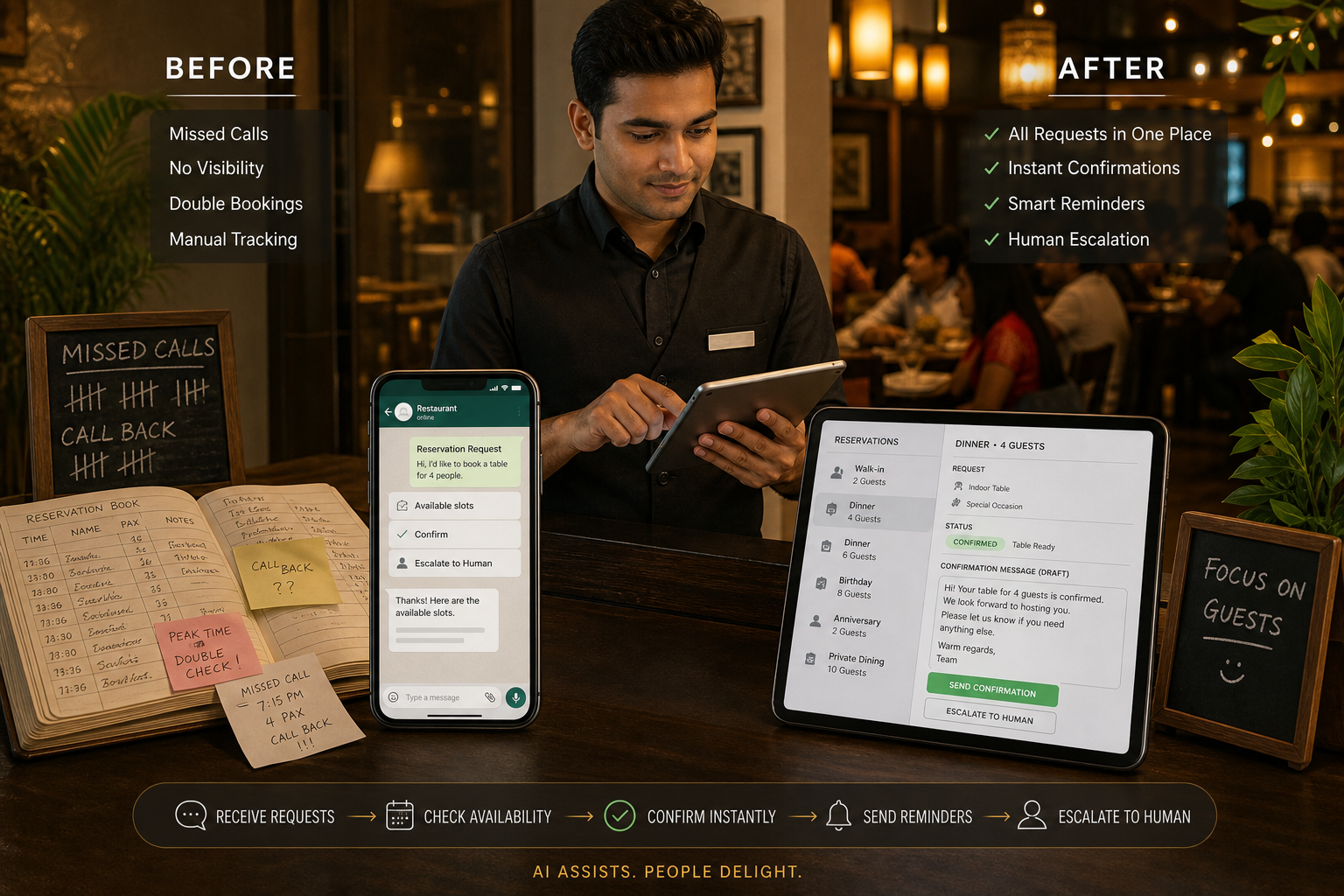
Before: manual workflow
Typical manual flow
Guest message/call → Staff reads/answers → Staff asks follow-up questions → Staff checks availability → Staff confirms/declines → Staff logs booking → Staff sends reminder (often skipped) → Staff handles changes/cancellations
Where time goes (common patterns):
- Back-and-forth to collect missing details (date, time, party size, name, phone)
- Manual availability checking (paper diary, spreadsheet, or a reservation tool)
- Repeating FAQs dozens of times per day (location, parking, menu, pricing, dietary options)
- Manual reminder sending (often inconsistent, especially during peaks)
- Rework when guests change plans (reschedule, late arrival, combine tables)
Baseline discipline (what to measure before changing anything): Many restaurants do not have clean baseline metrics. Before implementing automation, the business should measure at least:
- Inquiry volume by channel: WhatsApp / phone / website
- Median first response time: how long guests wait for a first reply
- Booking capture rate: inquiries that become confirmed bookings
- No-show rate: confirmed bookings that do not arrive (and are not cancelled)
- Staff handling time per request: a simple time-sample (e.g., 30 requests logged)
If these are not measured, any “improvement” later becomes guesswork. The rest of this case study therefore treats outcomes as potential and uses a planning model rather than claiming realized results.
AI automation design (business-first)
The proposed design uses AI where it is proportionate: understanding guest intent from natural language (WhatsApp messages) and answering FAQs from an approved knowledge base. Everything that can break revenue or guest trust (table allocation, exceptions, complaints) stays controlled by rules and humans.
What starts the workflow (triggers)
- Incoming WhatsApp message to the restaurant’s WhatsApp Business number
- Website reservation form submission
- Missed call / call summary logged (optional for a later phase)
What the AI does (specific roles)
- Classification: Identify whether the guest wants a reservation, a change/cancellation, a waitlist request, or is asking an FAQ.
- Extraction: Pull key fields from the message (date, time, party size, guest name, special requests).
- Drafting (bounded): Generate a reply using an approved response style, but only within policy and knowledge-base limits.
- Decision support (limited): Suggest the next step (confirm, ask a follow-up question, offer alternate slots, escalate).
Business rules (non-negotiable controls)
- Availability rules: The system must check an availability source of record before confirming.
- Capacity rules: Table size constraints, maximum party size for online/WhatsApp bookings, and large-group policy.
- Seating duration rules: Standard slot duration by day/time (especially peak hours).
- Peak-hour policy: Whether deposits/confirmation steps are required for certain times or group sizes (if the restaurant chooses).
- Fallback rules: If key details are missing or confidence is low, ask clarifying questions or escalate.
Data access (minimum necessary)
- Opening hours, location, parking notes, menu highlights, policies (knowledge base)
- Availability and existing reservations (calendar/reservation system/spreadsheet)
- Guest contact identifier (WhatsApp number) and minimal booking details
System actions (what happens after AI processing)
- Create/Update a reservation record (or add to waitlist)
- Send confirmation message on WhatsApp
- Schedule reminders (e.g., day-before and a few hours before)
- Notify staff for exceptions (ambiguous requests, VIP notes, complaints, policy exceptions)
Human approval (where humans must stay in control)
- Any booking that violates a rule (party size too large, peak-hour constraints)
- Special requests (birthday setup, wheelchair access, custom seating)
- Complaints, negative sentiment, refund/deposit disputes (if deposits exist)
- Anything the system cannot confidently interpret
Fallback, monitoring, and auditability
- Fallback: Ask clarifying questions; if still unclear, route to a human with conversation context and extracted fields.
- Monitoring: Track automation completion rate, escalation rate, and failure reasons (missing details, availability conflicts, integration errors).
- Audit log: Store timestamps, extracted fields, the rule checks applied, and the final action taken (confirm/escalate/decline).
Why AI is used here (and where it should not be): A deterministic form can’t easily parse “Table for six tomorrow around 8, window seat if possible” across WhatsApp. AI helps interpret intent and extract fields. But AI should not be the authority that “decides” table allocation; that must remain rule-validated and human-governed to avoid double-bookings and guest trust failures.
After: automated workflow (proposed)
Proposed automated flow (WhatsApp-first)
Guest WhatsApp message → AI classifies request & extracts details → Rules validate details & availability → System confirms (or offers alternatives) → Confirmation sent → Reminders scheduled → Human escalation for exceptions
Before vs after (what changes operationally)
| Workflow element | Before (manual) | After (proposed automation) |
|---|---|---|
| First response | Depends on staff availability; slower during peaks | Instant acknowledgment + guided questions to complete missing details |
| FAQ handling | Staff repeats answers (timings, location, parking, menu basics) | Automated answers from an approved knowledge base; staff only handles unusual questions |
| Availability check | Manual check; risk of overlooking conflicts under pressure | Rules-based validation against an availability source before any confirmation |
| Booking confirmation | Manual messages; inconsistent tone and details | Standardized confirmation template; includes key details and policy notes |
| Reminders | Often inconsistent or skipped | Automatic reminders scheduled per policy |
| Edge cases | Handled in real time by staff, sometimes without context | Escalated to staff with extracted details and conversation history |
What the AI does not do (boundaries)
- It does not override availability rules to “make the guest happy.” If the slot is unavailable, it must offer alternatives or escalate.
- It does not confirm high-risk bookings autonomously (large groups, peak-hour exceptions, special seating guarantees) unless the restaurant explicitly allows it via rules.
- It does not invent policies or menu details. Responses must come from an approved knowledge base; unknown questions are escalated or answered with “Let me confirm with the team.”
- It does not handle complaints or sensitive situations end-to-end (service recovery requires human judgment).
- It does not take irreversible actions without guardrails (e.g., cancelling a booking) unless identity and intent are confidently confirmed and the restaurant permits it.
These boundaries exist because the business risk is not “AI being wrong in a chat.” The business risk is a wrong system action (double-booking, incorrect confirmation, or misleading policy statements) that damages operations and guest trust.
Human control, risks & safeguards
Automation only works in hospitality when it protects the human service layer. In this scenario, humans remain responsible for table allocation decisions that require judgment, policy exceptions, and guest relationship management.
Where humans stay responsible (explicit control points)
- Final decision on exceptions: large parties, special seating promises, VIP handling
- Complaint handling and service recovery: refunds, disputes, negative reviews, rude messages
- Policy changes: holiday hours, special menus, deposit policy updates
- Daily operational overrides: closed sections, staff shortages, private events
Risk & safeguard map (practical controls)
| Risk | What could go wrong | Safeguard (prevention / detection / containment) |
|---|---|---|
| Incorrect intent interpretation | FAQ mistaken as booking (or vice versa); wrong next step | Confidence thresholds; clarifying questions; escalation when uncertain |
| Double-booking or availability mismatch | Confirmed slot not truly available | Single source of availability; atomic “check-and-hold” logic; rule validation before confirmation |
| Hallucinated or outdated answers | Wrong timings/menu/policy info shared | Approved knowledge base only; “unknown” fallback; periodic content review by manager |
| Privacy exposure | Collecting unnecessary personal data; sharing booking details improperly | Minimum necessary data; limit what is stored; staff access controls; avoid sensitive data collection in chat |
| Integration failure | Messages sent but booking not created (or vice versa) | Retries; failure alerts to staff; reconciliation report (bookings created vs confirmations sent) |
| Over-automation reduces hospitality feel | Guests feel “talking to a bot” during sensitive moments | Human handoff as a feature; friendly but concise tone; quick escalation for complaints or complex requests |
Operational accountability: Even with AI assistance, the restaurant must name a process owner (often the manager on duty or FOH lead) responsible for policies, knowledge-base accuracy, and exception resolution. Without this, automation drifts and becomes a new source of errors.
Technology, implementation & cost (planning view)
This workflow can be implemented with different tool choices. The important thing is not the brand—it is the architecture: channel intake, availability validation, controlled messaging, and logging.
Reference architecture (tool-category view)
| Component | Role in the workflow | Notes for SMB practicality |
|---|---|---|
| WhatsApp business messaging | Primary guest conversation channel | Use an official business messaging setup suitable for automation; keep templates minimal and clear |
| Automation/orchestration layer | Routes messages, calls AI, applies rules, triggers reminders | Should support retries, logs, and human escalation |
| AI layer (intent + extraction + bounded drafting) | Understands natural-language requests and drafts responses | Must be constrained by policies and knowledge base |
| Availability system of record | Prevents double-booking; stores reservations | Can be a reservation tool or a structured sheet as a starting point (but must be reliable) |
| Staff handoff channel | Receives escalations with context | Could be WhatsApp group, helpdesk, or internal chat; choose what staff will actually use |
| Reporting | KPI tracking: response time, escalations, booking conversion, no-shows | Start with a simple weekly dashboard or spreadsheet export |
Implementation difficulty: Intermediate (why)
- Multi-channel intake is messy (WhatsApp + website + calls), and guests may duplicate requests.
- Availability rules must be correct; otherwise automation creates operational chaos.
- Customer-facing messages require careful tone, policy clarity, and escalation paths.
Implementation steps (practical sequence)
- Workflow cleanup (before AI): Standardize booking fields, confirmation template, and availability source of truth.
- Knowledge base: Write approved answers for the top FAQs (timings, location, parking, menu highlights, policies).
- Build the WhatsApp flow: Identify intents, required fields, and clarifying questions.
- Rules + availability validation: Implement “confirm only after validation.”
- Human escalation: Define what triggers escalation and who receives it.
- Pilot: Start with WhatsApp-only reservations + FAQs; limit scope; log every exception.
- Expand: Add reminders, waitlist automation, and then other channels after stability.
Cost (illustrative planning ranges, not verified pricing)
Illustrative Scenario
Some SMB-oriented guidance in the market describes WhatsApp + chatbot automation costs in the range of ₹3,000–₹15,000 per month, but these figures vary widely by provider, message volume, and included services. Treat this as a starting point for budgeting, not a guaranteed cost.
To avoid underestimating, separate costs into categories:
| Cost category | What it includes | What drives variability |
|---|---|---|
| Software subscriptions / messaging | WhatsApp messaging fees, automation platform, reservation system, AI API usage | Message volume, automation runs, AI usage, number of locations |
| One-time implementation | Flow design, rule setup, integrations, testing, staff training | Quality of existing availability data; complexity of table rules; number of channels |
| Ongoing operations | Exception handling, knowledge base updates, monitoring, periodic tuning | Escalation rate; menu/policy changes; seasonal spikes |
| Maintenance & governance | Audit logs, access control, backups, security reviews | Compliance requirements; vendor selection; internal accountability |
Results, evidence & ROI (how to prove value)
This illustrative case study does not include verified before/after results from a single restaurant. Instead, this section provides a measurement framework and an ROI planning model that a restaurant can populate with its own baseline data.
Evidence separation (reader-friendly)
Verified Result
No verified performance results are presented for a specific restaurant in this case study.
Research Finding
Across reservation and hospitality tooling, automated confirmations and reminders are widely positioned as methods to reduce missed bookings and mitigate no-shows. However, the size of impact varies by restaurant, guest segment, and policy design, and marketing claims should not be treated as guaranteed outcomes.
What you should measure (minimum viable evidence)
- Response time: median time to first reply on WhatsApp
- Booking capture rate: confirmed bookings ÷ booking-intent inquiries
- No-show rate: no-shows ÷ confirmed bookings
- Escalation rate: conversations escalated to humans ÷ total conversations
- Staff time per booking: time-sampled before vs after
Planning ROI model (fill in your numbers)
Use this model to determine whether your automation created value. Keep the first model simple and conservative.
| Item | Formula | Your inputs |
|---|---|---|
| Monthly reservation-related inquiries | WhatsApp + website + phone booking-intent inquiries | (Enter) |
| Manual handling time per inquiry (minutes) | Time-sample average | (Enter) |
| Fully loaded labor cost per hour (₹) | Hourly wage + overhead estimate | (Enter) |
| Current monthly handling cost (₹) | (Monthly inquiries × minutes per inquiry ÷ 60) × labor cost per hour | (Calculated) |
| Automation monthly operating cost (₹) | Software + messaging + AI usage + ongoing support | (Enter) |
| Monthly labor time freed (hours) | (Baseline handling hours − after-state handling hours) | (Measured post-launch) |
| Monthly labor value freed (₹) | Monthly labor time freed × labor cost per hour | (Calculated) |
| Net monthly value (₹) | (Monthly labor value freed + other quantified benefits) − automation operating cost | (Calculated) |
Important: “Time freed” is not automatically “money saved.” The business captures value if the freed time reduces overtime, avoids adding headcount, increases covers served, or improves service quality enough to increase repeat visits. Decide upfront how you intend to convert time into value.
Optional revenue-side model (only if you can measure it)
Some market guidance suggests automation can recover missed bookings (e.g., by responding 24/7). Treat any such numbers as hypotheses until you measure them in your own logs.
Illustrative Assumption
If you want to test revenue impact, you can start with a conservative hypothesis (for example, “automation helps capture a small number of bookings that would otherwise be missed”). Validate with tracking: count booking-intent conversations that occur when staff previously could not respond quickly, and measure how many convert after automation.
Revenue-side formula (example):
- Estimated incremental monthly bookings = (after-state bookings captured) − (baseline bookings captured), measured over the same hours/channel mix
- Estimated incremental contribution = incremental bookings × average contribution per booking (not revenue)
If you cannot measure incremental bookings cleanly, do not force a revenue ROI. Start with labor/time ROI and customer experience KPIs.
Lessons, starting version & KPIs
What we learned (from comparable implementations and the planning model)
- Availability integrity matters more than “smart chat.” A polite bot that confirms the wrong slot is worse than slow humans.
- Rule-based automation does most of the heavy lifting. AI is most useful for understanding messy WhatsApp messages and drafting within tight boundaries.
- Human handoff is a service feature, not a failure. Guests are reassured when complex requests reach a real person quickly with context.
- Start narrow, measure, then expand. A phased rollout reduces the risk of guest-facing errors.
What should not be automated initially
- Complaint resolution and refunds (requires judgment)
- Guaranteeing special seating or decorations without staff confirmation
- Large-party negotiation (multiple tables, timing flexibility)
- Policy exceptions during high-stress service periods
Recommended starting version (MVP)
A practical MVP for a small restaurant in India:
- Channel: WhatsApp only (first)
- Use cases:
- Reservation requests for standard party sizes
- FAQ answers from an approved knowledge base
- Standard confirmation message with booking summary
- Escalation to staff when uncertain or out-of-policy
- Availability: One source of truth (reservation tool or structured sheet) with clear slot rules
- Reminders: Add after the first 2 weeks of stable confirmations (to avoid reminding the wrong bookings)
KPIs (3–5 to start) and how to review them
| KPI | How to measure | Direction of improvement | Review cadence |
|---|---|---|---|
| Median first response time (WhatsApp) | Timestamp of guest message to first reply | Down | Weekly |
| Booking capture rate | Confirmed bookings ÷ booking-intent inquiries | Up | Weekly |
| Human escalation rate | Escalated conversations ÷ total conversations | Down (but not to zero) | Weekly |
| Booking error/rework rate | Bookings requiring staff correction ÷ total bookings | Down | Weekly |
| No-show rate (if tracked) | No-shows ÷ confirmed bookings | Down | Monthly |
30/60/90-day review (when to expand)
- 30 days: Confirm stability (low booking error rate, integrations reliable, staff escalation workflow working).
- 60 days: Add reminders and waitlist automation if booking accuracy is stable and exception categories are understood.
- 90 days: Expand channels (website forms, then calls) and add analytics for missed-booking recovery if measurement is clean.
Expansion criteria: stable availability validation, acceptable error/rework rate, predictable escalation categories, staff adoption, and clear evidence of time saved or bookings captured.
Practical next step (CTA): If you want to implement this safely, start with a workflow audit: map your current reservation channels, define table/slot rules, and identify the smallest WhatsApp automation pilot you can measure in 30 days.