AI for Manufacturing: Practical AI Automation Ideas for Small Manufacturers
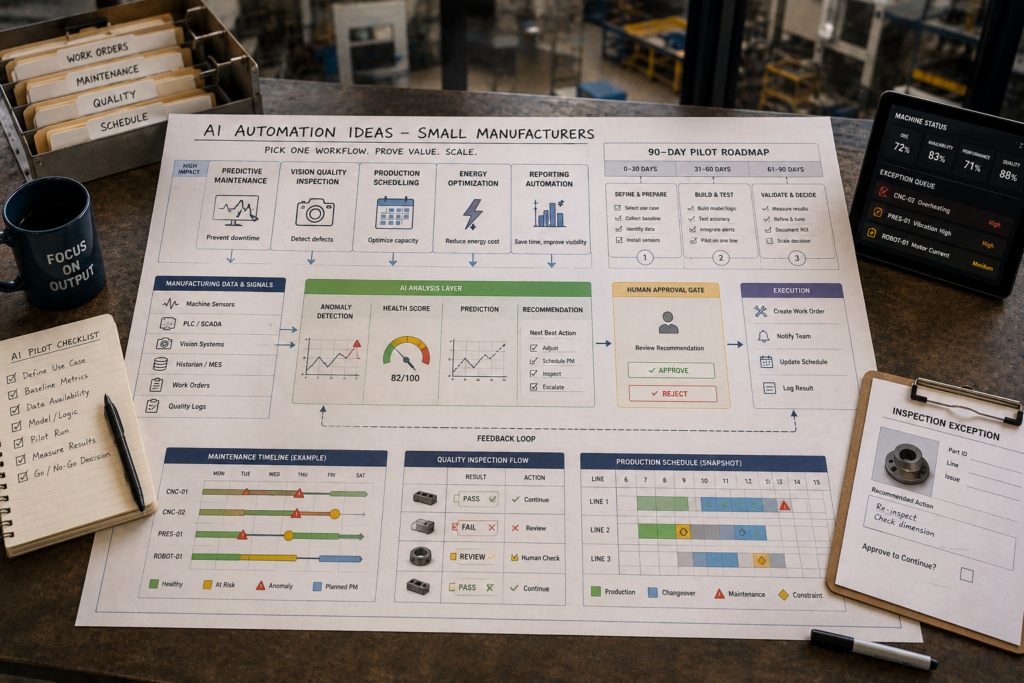
If you run a small factory, “AI for Manufacturing” can sound like an expensive smart-factory overhaul. In practice, the most successful manufacturing AI initiatives usually start much smaller: one operational problem (downtime, scrap, scheduling delays, or energy waste), one workflow, one pilot, and clear before/after metrics. That’s how you get real ROI without betting the plant on a transformation program.
Quick Answer (40–60 words): AI for manufacturing is most effective when it automates or improves a specific workflow—like predictive maintenance, visual quality inspection, scheduling, energy optimization, or production reporting. Small manufacturers should start with a 90-day pilot on one high-value process, measure outcomes (downtime, scrap, OEE), and scale only after the pilot proves value.
What AI Can Actually Do in a Small Manufacturing Business
Most small manufacturers don’t need “AI everywhere.” They need tighter operations: fewer stoppages, less rework, more predictable schedules, and less supervisor time spent chasing information. Modern manufacturing AI is usually one of these categories:
- Predictive / condition-based maintenance: detect abnormal equipment behavior and prompt maintenance before a breakdown.
- Computer vision inspection: use cameras and AI models to detect defects or missing components.
- Planning and scheduling optimization: generate better schedules using constraints like capacity, due dates, and setup time.
- Demand forecasting and inventory optimization: improve forecasts to reduce stockouts and excess inventory.
- Energy optimization: identify consumption patterns and reduce waste.
- Documentation and reporting automation: draft SOPs, shift summaries, and production notes for human review.
Notice what’s missing: you don’t need to invent a custom model on day one. Many wins come from AI features embedded in tools you may already be using (or are ready to adopt), especially ERP/MRP and CMMS platforms.
The Biggest Pain Points AI Can Solve (and Why They Matter)
Manufacturing AI is most valuable when it reduces operational variability—because variability is what creates overtime, firefighting, missed due dates, and customer frustration. Here are the pain points that most often justify an AI pilot in a small plant:
1) Unplanned downtime
Why it matters: downtime doesn’t just stop a machine. It breaks the schedule, triggers expediting, increases scrap risk during restarts, and consumes maintenance time in the least efficient way (emergency work).
When AI helps: when a small set of assets are clearly “critical” and you already have usable machine signals (or can reasonably add them).
When not to start here: if breakdowns are mostly caused by obvious issues (poor PM discipline, lack of spares, operator training gaps). Fixing the maintenance workflow may beat building predictions.
2) Quality defects, scrap, and rework
Why it matters: quality losses quietly tax everything—material cost, capacity, morale, and customer trust (returns and warranty risk).
When AI helps: when defects are visible (surface, assembly presence/absence, label/print issues) and inspection is repetitive.
Trade-off: vision systems can be highly effective, but they need calibration, lighting consistency, and a defined “human review boundary” for edge cases.
3) Scheduling and planning delays
Why it matters: spreadsheet scheduling often works—until it doesn’t. Once you have more SKUs, changeovers, constraints, and rush orders, planning becomes a daily bottleneck.
When AI helps: when work orders are repeatable enough to model and constraints are documented (capacity, setups, labor skills, due dates).
When not to start here: if routings/BOMs are unreliable or the plant frequently deviates from standard processes without recording why.
4) Inventory imbalance and forecasting errors
Why it matters: inventory mistakes are costly in both directions: stockouts create late shipments; excess inventory ties up cash and space.
When AI helps: when demand is volatile, lead times fluctuate, or service levels are consistently poor.
5) Energy waste
Why it matters: energy is a controllable cost that often improves without redesigning the product or adding headcount.
Why it’s a good pilot candidate: energy optimization can be low disruption compared to production optimization, especially as a first AI initiative.
6) Documentation and reporting overload
Why it matters: supervisors and ops leaders get buried in shift reports, production notes, and recurring summaries—exactly the work that should support decisions, not consume the day.
Why it’s often the fastest time-to-value: document automation can reduce manual effort quickly, as long as outputs are reviewed and sensitive data handling is managed.
Business-First AI Insight: In small factories, the best AI project is rarely the “most advanced.” It’s the one where the cost of the problem is already obvious, the workflow is stable enough to improve, and the success metric can’t be argued about later. If you can’t baseline the pain, you can’t prove the win.
Best AI Use Cases by Workflow (Practical Automation Ideas)
Below are the most practical manufacturing AI workflows for small manufacturers, with a focus on how they actually run day-to-day—not just what the technology can do.
Use Case 1: Predictive Maintenance (Downtime Reduction)
Workflow goal: catch issues early and create a predictable maintenance response, instead of reacting to failures.
Typical workflow steps:
- Collect machine data (existing PLC/SCADA signals, sensors, runtime, vibration/temperature where available).
- Detect anomalies (rules-based thresholds or ML-driven pattern detection).
- Create an alert with context (asset, time, signal, suspected issue).
- Route alert into maintenance workflow (CMMS work order, triage queue).
- Maintenance tech confirms cause and logs outcome (this feedback improves future accuracy).
Human oversight boundary: AI should recommend and prioritize; maintenance decides and executes. In small plants, making AI the “trigger” for action without a review step often creates false alarms and distrust.
Implementation considerations:
- Start with critical assets: one machine that routinely disrupts the schedule.
- Data readiness matters more than model sophistication: unreliable signals will produce unreliable recommendations.
- Plan for operational ownership: who checks alerts daily, and what’s the expected response time?
Evidence note: Some sources report predictive maintenance model accuracy ranges (for example, 90–95%), but performance varies by machine, sensors, failure mode, and data quality. Treat any accuracy claim as directional, not guaranteed.
Use Case 2: Computer Vision Quality Inspection (Scrap and Rework Reduction)
Workflow goal: reduce manual inspection burden and catch defects earlier, when they’re cheaper to fix.
Practical workflow steps:
- Capture images at a consistent inspection point (lighting and camera placement matter).
- AI classifies: pass / fail / needs review (triage is usually more practical than “AI decides everything”).
- Operator verifies exceptions (human-in-the-loop for ambiguous cases).
- Log results to quality records and trigger corrective action when trends appear.
Where small manufacturers win fastest: highly repetitive inspections with visible defect patterns and high inspection labor time.
Trade-offs: vision projects can drift over time if materials, suppliers, lighting, or camera positioning change. Plan for recalibration and periodic re-validation.
Evidence note: Some publications cite high reported inspection accuracy (for example, 98–99.5%). Use that as a reason to explore the approach, not as a promise for your line.
Use Case 3: Production Scheduling and Constraint-Aware Planning
Workflow goal: improve schedule adherence and reduce daily firefighting caused by bottlenecks and manual rescheduling.
Practical workflow steps:
- Pull orders, due dates, and priorities from ERP/MRP.
- Apply constraints (capacity, setups, labor skills, material availability).
- Generate a proposed schedule.
- Supervisor reviews and approves changes (especially for rush orders).
- Track schedule adherence and reasons for deviation (this is where improvement comes from).
Implementation considerations:
- If routings/BOMs aren’t maintained, scheduling tools can create false confidence.
- Start with one work center or one product family before expanding plant-wide.
Evidence note: Some sources report large improvements in meeting production targets with AI-supported scheduling, but outcomes depend heavily on data quality, constraint definition, and how consistently the floor executes the schedule.
Use Case 4: Demand Forecasting and Inventory Optimization
Workflow goal: make purchasing and production planning more predictable, reducing stockouts and excess inventory.
Practical workflow steps:
- Pull historical demand (orders/shipments), promotions, and known customer patterns.
- Generate a forecast and show confidence ranges (ranges matter more than single numbers).
- Compare forecast to current inventory and lead times.
- Recommend reorder/production timing for planner review.
When it pays off: expensive inventory, long/volatile lead times, and frequent expediting are strong signals forecasting improvements will matter.
Use Case 5: Energy Optimization (Low-Disruption Cost Reduction)
Workflow goal: reduce energy per unit without compromising throughput or quality.
Practical workflow steps:
- Monitor usage (facility meters and, if available, machine-level consumption).
- Identify patterns: peak demand charges, idle running, compressed air leakage behavior, HVAC inefficiencies.
- Recommend changes: runtime shifts, load balancing, shutoff policies, maintenance triggers.
- Review savings and unintended consequences (e.g., quality impact).
Why it’s underrated: it’s often easier to measure (utility bills + production volume) and less invasive than changing core production processes.
Use Case 6: Production Summaries, SOP Drafting, and Reporting Automation
Workflow goal: reduce the time managers spend compiling updates and increase consistency of reporting.
Practical workflow steps:
- Gather shift notes, downtime reasons, and key production counts.
- AI drafts a structured summary (what happened, why it matters, actions needed).
- Human reviews and edits.
- Publish to the team (and optionally archive for audits).
Why it’s a strong first pilot: faster time-to-value, fewer OT/IT integration dependencies, and clearer “hours saved” measurement.
A Use Case Selection Matrix (Impact vs Complexity vs Data Readiness)
If you’re deciding what to automate first, use a simple scoring approach. The goal isn’t to be “perfect”—it’s to avoid picking a use case that sounds impressive but is hard to deliver in your current environment.
| Workflow | Typical Business Impact | Implementation Complexity | Data Readiness Requirement | Best First-Pilot Fit When… |
|---|---|---|---|---|
| Reporting & document automation | Medium (hours saved, visibility) | Low | Low to Medium | Supervisors spend lots of time writing updates; you can standardize formats |
| Energy optimization | Medium (cost reduction) | Low to Medium | Medium | Energy costs are meaningful; you can measure kWh per unit or per shift |
| Maintenance workflow modernization (CMMS + automation) | Medium to High (less chaos, better PM) | Low to Medium | Medium | Breakdowns are frequent and work orders are poorly managed today |
| Predictive maintenance | High (downtime avoided) | Medium | Medium to High | You have critical assets and usable machine data (or can add it affordably) |
| Computer vision inspection | High (scrap/rework reduction) | Medium to High | Medium | Defects are visual and inspection is repetitive; lighting/capture can be controlled |
| Scheduling optimization | Medium to High (due dates, utilization) | Medium | High | Routings, BOMs, and constraints are maintained and execution is reasonably stable |
| Demand forecasting | Medium to High (inventory + service) | Medium | Medium to High | Demand is volatile and inventory decisions are expensive |
Recommended Tools and Software (By Workflow, Not Hype)
For small manufacturers, the “best” tool is usually the one that fits your operational maturity and integrates with your existing systems. Below is a business-focused comparison of tools mentioned in the research. Always confirm current capabilities, integrations, and pricing on official vendor pages—details can change.
| Tool | Best For | Ease of Use | Time to Value | Business Size Fit | Notes |
|---|---|---|---|---|---|
| MRPeasy | ERP/MRP basics + planning for small plants | High | Fast | Small manufacturers | Good entry point for ERP-first improvement; not a vision or predictive platform |
| Katana | Visual production management, order-driven environments | High | Fast to Medium | Small to SMB | Strong usability; verify fit for your complexity and integrations |
| Odoo | Configurable modular ERP with manufacturing apps | Medium | Medium | Growing manufacturers | Flexible but customization can increase complexity; governance matters |
| Fiix | CMMS modernization + maintenance automation | High | Fast | Small to SMB | Maintenance-first wins; pairs well with disciplined work order processes |
| MachineMetrics | Real-time equipment monitoring, OEE visibility, anomaly detection | Medium | Medium | SMB to mid-market | Requires reliable equipment connectivity and data; strong operations relevance |
| Augury | Condition monitoring for critical rotating equipment | Medium | Medium | SMB to mid-market | May require sensor deployment; good when downtime risk is high |
| Instrumental | AI quality inspection and defect analytics | Medium | Medium | SMB to mid-market | Vision projects need setup and calibration; strongest when inspection is repetitive |
| Logility | Demand forecasting, inventory optimization, scenario planning | Medium | Medium to Slow | Mid-market+ | Often heavier implementation; best for planning-heavy complexity |
Expert Verdict: What most small manufacturers should buy first
If you don’t yet have solid system-of-record processes, start with workflow foundations (ERP/MRP and/or CMMS) that reduce chaos and make data consistent. In many plants, a CMMS modernization or ERP/MRP improvement creates the clean data and stable workflows that predictive maintenance, scheduling optimization, and vision inspection depend on.
When downtime is the most expensive pain and you can connect machines reliably, equipment monitoring platforms become compelling. When scrap is the biggest leak and inspection is repetitive, vision-based quality is a strong next step.
A Simple Decision Tree: Which AI Project Should You Start With?
Use this to narrow to one pilot. The right answer is the one you can measure and operationalize, not the one that sounds most “Industry 4.0.”
- Is supervisor/manager time being eaten by reporting, SOPs, and updates?
- Yes → Start with production summary & document automation (fast time-to-value).
- No → Continue.
- Is your biggest cost leak downtime or breakdown chaos?
- Yes → If you lack disciplined work orders, start with CMMS + maintenance workflow automation. If you already have good maintenance discipline and machine data, pilot predictive maintenance / anomaly detection.
- No → Continue.
- Is scrap/rework/warranty risk your biggest issue?
- Yes → Pilot computer vision inspection on one inspection point.
- No → Continue.
- Are missed due dates driven by planning/scheduling complexity?
- Yes → If routings/BOMs/constraints are clean, pilot scheduling optimization. If not, fix master data first.
- No → Continue.
- Are stockouts or excess inventory common and expensive?
- Yes → Pilot demand forecasting + inventory optimization.
- No → Consider energy optimization if energy cost is significant.
How to Start with a Pilot Project (90 Days, One Workflow)
A pilot is where manufacturing AI succeeds or fails. The goal is not “prove AI works.” The goal is “prove this workflow improvement is operationally adoptable and financially worth scaling.” A 90-day structure is commonly recommended in the research: baseline (days 1–30), deploy (days 31–60), measure and expand (days 61–90).
Phase 1 (Days 1–30): Baseline and define the workflow boundary
- Pick one workflow: one machine, one line, one inspection point, or one report type.
- Define the decision rule: what exactly will AI recommend, and who approves action?
- Capture baseline metrics: downtime minutes, scrap rate, inspection time, schedule adherence, energy per unit, or hours spent reporting.
- Document data sources: PLC/SCADA/MES/ERP/CMMS logs, quality records, energy meters, shift notes.
Phase 2 (Days 31–60): Implement a narrow deployment
- Integrate lightly: don’t connect every system on day one. Build a minimal data flow that supports the pilot.
- Train the users: operators and maintenance teams need to know how to interpret outputs and what to do next.
- Set review routines: daily triage for maintenance alerts, per-shift review for inspection exceptions, weekly planning review for schedules.
Phase 3 (Days 61–90): Measure, stabilize, and decide to scale
- Compare to baseline: focus on measurable operational outcomes, not just “the system is running.”
- Audit false positives/false negatives: trust is built when you transparently handle misses and explain improvements.
- Decide scale criteria: what threshold makes it worth extending to the next machine/line?
Consultant Insight: Most AI pilots don’t fail because the model is weak. They fail because the workflow isn’t owned. If nobody has time to review alerts, validate inspection exceptions, or maintain master data, the project becomes shelfware—no matter how “accurate” the tool claims to be.
ROI, KPIs, and Measurement (How to Prove Value Without Guessing)
Manufacturing leaders usually don’t need complex ROI spreadsheets. They need a defensible baseline, a short list of KPIs, and agreement on what success means.
Core KPIs to track by use case
- Downtime and maintenance: downtime minutes, mean time between failures (if tracked), maintenance response time, emergency work orders, planned vs unplanned maintenance ratio.
- Quality: scrap rate, first-pass yield, rework hours, warranty/return incidents (if available).
- Scheduling: schedule adherence, on-time completion, changeover time impact, queue time at bottlenecks.
- Inventory/forecasting: forecast accuracy (choose one method and stick to it), stockouts, expediting events, excess/obsolete inventory.
- Energy: energy per unit, peak demand costs (if applicable), runtime vs idle consumption.
- Admin/reporting: hours spent compiling reports, time to publish shift summaries, consistency/format compliance.
A practical KPI tracker table (copy into your pilot plan)
| KPI | Baseline (Last 4 Weeks) | Pilot Target | Data Source | Review Cadence | Owner |
|---|---|---|---|---|---|
| Downtime minutes (critical asset) | _____ | _____ | Machine logs / OEE tool | Weekly | Maintenance lead |
| Scrap rate / first-pass yield | _____ | _____ | Quality records | Weekly | Quality manager |
| Schedule adherence | _____ | _____ | ERP/MRP | Weekly | Planner |
| Energy per unit | _____ | _____ | Utility + production counts | Monthly | Ops leader |
| Supervisor reporting time (hours/week) | _____ | _____ | Self-reported time study | Weekly | Production manager |
Budget expectations (what the research suggests)
Costs vary widely by scope and integration. One cited source estimates targeted SME applications may start around $15,000–$50,000, with many initial projects ranging $15,000–$100,000 depending on scope. Treat this as a planning range, not a universal quote.
The same source suggests measurable ROI often appears within 6–18 months for targeted implementations. Again, outcomes depend on problem selection, workflow adoption, and baseline strength.
Common Mistakes to Avoid (What Derails Small-Factory AI)
- Starting with tools instead of a problem: you end up with dashboards nobody uses. Start with downtime, scrap, scheduling delays, or energy waste.
- Skipping baseline metrics: without a “before,” every outcome becomes a debate.
- Over-scoping the pilot: trying to cover the whole factory kills momentum. One machine, one line, or one workflow is the point.
- Ignoring data quality and process discipline: AI can’t compensate for missing work orders, inconsistent defect codes, or unmaintained routings.
- No human-in-the-loop rule: if operators don’t know when to trust the system (and when to override), they won’t adopt it.
- Underestimating change management: the floor needs training, routines, and feedback loops—not just a new tool.
- Security and data handling as an afterthought: connecting operational systems to external services requires a deliberate risk review.
Implementation Checklists (Data, People, and Governance)
Pilot readiness checklist
- We can name one workflow owner responsible for daily/weekly review.
- We can measure the pain today (baseline for downtime, scrap, adherence, energy, or hours).
- We can define what AI recommends vs what humans approve.
- We can run the pilot on one machine/line/workflow without disrupting everything else.
- We have an agreed success threshold that triggers scale (or stops the project).
Data readiness checklist
- We know where the data lives (PLC/SCADA/MES/ERP/CMMS/quality logs/energy meters).
- Key fields are consistent enough to analyze (asset IDs, defect codes, work order categories).
- We can access the data safely (permissions, network segmentation, vendor security review).
- We have a process to correct bad data and keep it clean.
Vendor/tool evaluation checklist (business-first)
- Time to value: can we implement a pilot in weeks, not quarters?
- Workflow fit: does it match how work actually happens on the floor?
- Integration effort: what data connections are required, and who builds/maintains them?
- Human oversight: can we route recommendations into an approval workflow?
- Total cost of ownership: beyond subscription, what’s the cost of calibration, sensors, training, and ongoing maintenance?
- Security: how is data handled, stored, and accessed?
Industry-Specific Use Cases (How the Same Workflows Show Up Differently)
Even though the core workflows are similar, what “good” looks like varies by manufacturing context.
Discrete assembly (light assembly, electronics, kitting)
- Best first bets: vision inspection (presence/absence, labeling), scheduling optimization, production summaries.
- Watch-outs: frequent engineering changes can confuse inspection models unless change control is tight.
Machining and fabrication
- Best first bets: equipment monitoring and anomaly detection, maintenance workflow automation, energy optimization.
- Watch-outs: tool wear and job variation can look like “anomalies” unless you model normal operating ranges by job type.
Process manufacturing (mixing, batching, food/chemical-like operations)
- Best first bets: energy optimization, quality monitoring, demand forecasting (if shelf-life and variability matter).
- Watch-outs: compliance and traceability requirements often raise the bar for data governance.
Regulated manufacturing (medical device-like environments)
- Best first bets: document automation with strong review controls, inspection assistance, traceability improvements.
- Watch-outs: validation, audit trails, and controlled change processes may shape tool selection more than “AI capability.”
Implementation Priority: Start Today, Improve Next, Scale Later
Start Today (low effort, immediate clarity)
- Pick one problem to solve: downtime, scrap, scheduling, energy, or reporting.
- Run a 2-week baseline: capture the KPI in a simple tracker and agree it’s the “source of truth.”
- Map the current workflow in plain language (who does what, when, with what data).
Improve Next (next 30 days)
- Choose one pilot workflow and define the human review boundary.
- Clean the minimum data needed (asset list, defect codes, routing fields, downtime reason codes).
- Shortlist tools based on workflow fit and integration effort, not feature volume.
Scale Later (after pilot success)
- Expand to the next machine/line only after the first workflow is stable and adopted.
- Standardize routines: alert review meetings, quality exception handling, schedule review cadence.
- Build governance: security review process, data ownership, and change control for models and workflows.
FAQ: AI for Manufacturing (Small Manufacturer Edition)
What is AI for manufacturing?
AI for manufacturing applies methods like machine learning, computer vision, and automation to improve factory workflows—maintenance, quality inspection, planning, forecasting, energy management, and reporting. In small plants, the best results usually come from targeted workflow improvements with measurable KPIs.
What is the best first AI use case for small manufacturers?
The best first use case is the one with the highest measurable pain and the simplest pilot boundary—often downtime on a critical asset, a repetitive quality inspection point, or documentation/reporting automation. A focused pilot beats a broad rollout almost every time.
Is predictive maintenance worth it for small factories?
It can be, especially when downtime is expensive and you have (or can add) reliable machine data. If your maintenance process is still reactive and poorly documented, modernizing the CMMS workflow first may produce faster and more reliable gains.
Can AI improve quality control in a small factory?
Yes. Computer vision inspection can reduce manual inspection effort and catch defects more consistently—especially for visible defects and repetitive checks. Successful deployments typically include controlled lighting/camera setup and a human review step for ambiguous cases.
How much does manufacturing AI cost?
Costs vary by scope, integration, and whether sensors/hardware are needed. One cited source suggests targeted SME applications may start around $15,000–$50,000, with many initial projects in the $15,000–$100,000 range depending on scope. Always verify current vendor pricing and implementation requirements.
Do small manufacturers need custom AI models?
Not always. Many small manufacturers get meaningful value from standard software with embedded AI features in ERP/MRP, CMMS, and equipment monitoring platforms. Custom AI becomes more relevant when your workflow is unique and you have strong data discipline.
What data is needed for AI in manufacturing?
Common inputs include machine sensor data (from PLCs/SCADA), maintenance logs (CMMS), production counts (MES/ERP), quality records, inventory and order data (ERP/MRP), and sometimes energy meter data. The most important factor is consistency and accessibility, not volume.
How do we measure success for an AI pilot?
Use baseline and post-implementation metrics tied to the problem: downtime minutes avoided, scrap rate reduced, first-pass yield improved, schedule adherence improved, energy per unit reduced, and hours saved in reporting. Decide the success threshold before the pilot starts.
Conclusion: The Practical Way to Use AI in Manufacturing
AI for Manufacturing is most valuable when it turns recurring operational chaos into a controlled, measurable workflow—maintenance that’s planned, quality checks that are consistent, schedules that are realistic, and reporting that doesn’t consume leadership bandwidth. Small manufacturers don’t win by doing “more AI.” They win by choosing one problem where the math is obvious, piloting it with disciplined measurement, and scaling only after adoption is real.
If you want a clear next step, pick one workflow (one machine, one line, or one reporting process) and run a 90-day pilot with a baseline, a defined human review boundary, and a short KPI list. That approach creates confidence—because you’re not buying technology. You’re buying a better operational outcome.
Next step: If you’d like help narrowing to the highest-value pilot (downtime, quality, scheduling, energy, or reporting), request a manufacturing workflow review and we’ll map one process end-to-end, define KPIs, and outline a realistic pilot plan aligned to the Business-First AI Framework™.